

 Free Consultation
 PCI-DSS Compliant
 GDPR Ready
 ISO 27001
 NDA Protected
 AI Services
 AI App Development
 Generative AI Development
 AI Chatbot Development
 AI Integration Services
 AI Consulting Services
 AI For Fintech
 AI Financial Assistant Solution
 AI Insurance Agent Development
 Tech Stack
 OpenAI / GPT-4
 Claude / Anthropic
 Gemini / Google AI
 Llama / Open Source
 LangChain / LlamaIndex
 Pinecone / Pgvector
 AWS / Azure AI


 Fintech Solution
 Core Fintech
 App Development
 Neobank Solutions
 eWallet Solutions
 Lending Software
 Banking Solutions
 BNPL Solutions
 BNPL Solutions
 Insurance App
 Wealth Management
 Crypto & DeFi
 Blockchain Development
  Payroll Software
 DeFi Solutions
 Crypto Wallet
 Crypto On/Off Ramp
 Crypto Exchange
 Trading Platform
 Payments
 Compliance
 Regulations & Compliance
 Fraud Detection
 Lending Ecosystem
 P2P Lending Platform
 Mortgage Software
 Engagement
 Fintech Outsourcing

 Mobile Development
 Mobile App Dev
 iOS App Development
 Android App Development
 React Native
 Flutter Development
 Web Solution
 Node.js Development
 React.js Development
 Angular Development
 App Services
 UI/UX Design
 App Maintenance
 By Stage
 MVP Development
 Industry Solutions
 Healthcare App Dev
 Education App Dev
 Travel App Dev
 Real Estate App Dev
 Logistics Software
 Social Media App

 Hire Mobile Developers
 Hire iPhone Developers
 Hire Android Developers
 Hire React Native Devs
 Hire Flutter Developers
 Hire Web Developers
 Hire Node.js Developers
 Hire Angular Developers
 Hire PHP Developers
 Hire Laravel Developers
 How It Works
 Pre-Vetted Developers
 Ready In 48 Hours
 NDA From Day One
 Replace Guarantee
 Company
 About Us
 Our Work Process
 Portfolio
 Case Studies
 Blog / Insights
 Careers
 Contact Us
 Awards
 Recognition


 Offices


TL;DR
- NFC mobile payment lets a smartphone exchange encrypted payment data with a terminal from a few centimeters away, so a user taps to pay instead of swiping or inserting a physical card.
- Since 2024, EU regulators have forced Apple to open iPhone NFC access to third-party wallets via Host Card Emulation (HCE) – a major shift for anyone building a wallet outside Apple Pay.
- NFC payments are generally safer than card swipes because they rely on tokenization – the terminal and merchant never see your actual card number.
- Building a custom NFC payment app typically costs $25,000 to $250,000, depending on feature scope and platforms.
- Nimble AppGenie designs and develops PCI-DSS-compliant NFC and e-wallet apps for fintechs worldwide – the full build process is below.
Paying at a checkout counter with only a tap of your phone feels exceptional now, but it is a genuine shift from the days of looking for a card or change in a long cafe queue.
Behind this tap is Near Field Communication (NFC), a piece of a broader mobile payment technology stack, and our eWallet app statistics report unveils how fast NFC-enabled payments are growing globally.
This guide covers what NFC mobile payment is, how an end-to-end transaction flows, what it costs to build an NFC payment app, and a major 2026 regulatory change every wallet developer should know.
What Is NFC Mobile Payment?
NFC mobile payment is a contactless payment method that leverages the existing NFC chip in a smartphone to exchange encrypted payment data with a compatible terminal, eliminating the need for a physical card.
NFC is not new; it’s the exact short-range wireless standard used in tap-to-pay credit cards and access cards. As its range is just a few centimeters (unlike Bluetooth and Wi-Fi), it’s inherently challenging to intercept. Thus, it became the default for contactless payments.
Three NFC Modes
Most articles treat NFC as a single feature. Practically, an NFC chip operates in one of three modes:
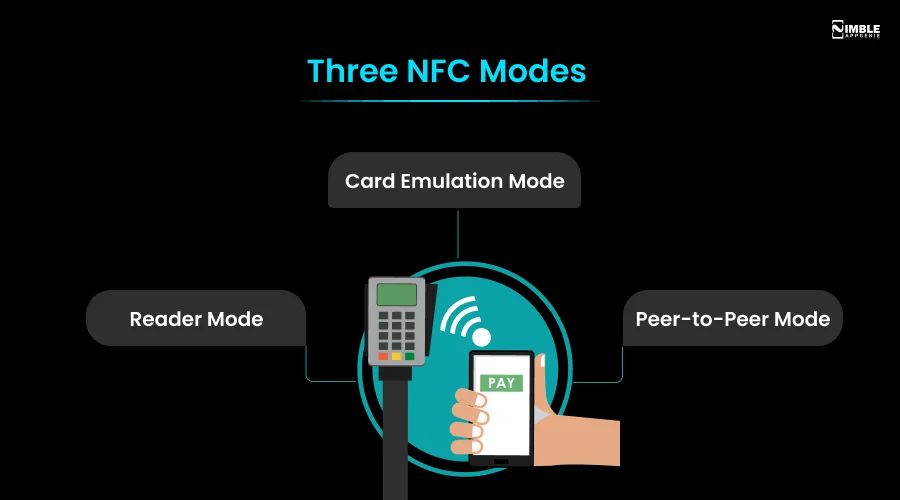
- Reader Mode: The phone reads data from an NFC tag, like a product label or smart poster.
- Card Emulation Mode: The phone acts like a physical contactless card. This powers Google Pay, Apple Pay, and Samsung Pay.
- Peer-to-Peer Mode: Two NFC devices exchange data directly; rarely used for payments today.
Card emulation mode is the one related to building a payment app, and it is also where the 2026 Apple/EU change below comes in.
NFC vs. RFID: What’s the Difference?
They are relevant but not the same.
RFID (Radio Frequency Identification) can be read from various meters away and is usually one-directional, used for access badges and inventory tags.
NFC operates only within a few centimeters and allows two-way communication, which makes it secure enough for financial transactions.
Apple’s EU NFC Access Change: What It Means for Wallet Developers
In the last two years, this has been the most crucial development for developers, and most “what is NFC payments” guides still skip it.
Following a multi-year EU antitrust investigation into Apple Pay, Apple committed to opening iPhone NFC access to third-party wallet developers across the European Economic Area. Basically, this means:
- Third-party wallets can store payment credentials and complete NFC transactions using Host Card Emulation (HCE) without depending on Apple Pay and Apple’s secure element.
- Third-party developers access Touch ID, Face ID, and passcode authentication for their wallet apps under a licensing agreement with Apple.
- Users in the EEA can set a non-Apple wallet as their default on Apple’s secure element or Apple Pay.
- The commitment lasts 10 years, and an independent trustee monitors it, with fines of up to 10% of Apple’s annual EU revenue for non-compliance.
This significantly changes the build for any business building an NFC payment or wallet app with EU ambitions; if you are not building on Apple Pay, you are no longer locked out of the iPhone’s NFC hardware. If you raise new architecture questions, as HCE doesn’t use Apple’s secure element, your app’s tokenization and encryption strategy carries more of the security burden.
NFC Mobile Payments Workflow: Step by Step
Let’s check what actually happens while an NFC transaction takes place, from setup to confirmation:
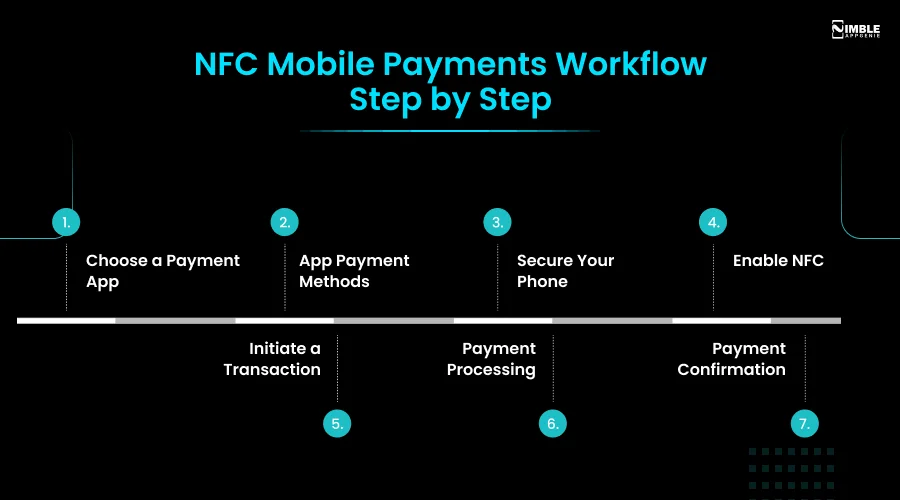
1. Choose a Payment App
Download a wallet app – Google Pay, Apple Pay, Samsung Pay, or your bank’s app – which securely stores your payment information.
2. App Payment Methods
Add a card by scanning it or entering the details manually. The app converts this into a token rather than storing the raw card number.
3. Secure Your Phone
You need a PIN, biometric lock, and password – the first authentication layer before you authorize any NFC transaction.
4. Enable NFC
Most modern smartphones ship with NFC hardware; you just need to switch it on in device settings.
5. Initiate a Transaction
Hold the phone within 1-2 inches of the terminal’s NFC symbol. The two devices automatically exchange encrypted data.
6. Payment Processing
The tokenized payment data is passed to the transaction processing system and authorized in almost real time.
7. Payment Confirmation
The user gets an on-device confirmation and usually a digital receipt – the complete flow rarely takes more than a few seconds.
NFC vs. Traditional Mobile Payment Methods
| Aspect | Traditional Mobile Payment | NFC Mobile Payment |
| Technology | SMS, USSD, or a mobile banking app | Near Field Communication (NFC) |
| Hardware Needed | Basic phone with SMS, or a smartphone with internet | NFC-enabled smartphone + NFC-compatible terminal |
| Authentication | PIN, password, or biometric login to the banking app | Device unlock (PIN/biometric) plus proximity to the terminal |
| Security | Relies on PIN/password and transmission encryption; vulnerable to phishing and SIM cloning | Uses tokenization and encryption; card data is never transmitted |
| Transaction Speed | Slower – manual entry and SMS confirmation | Under a second of physical contact needed |
| Merchant Acceptance | Limited, especially outside major markets | Widespread across retail, hospitality, and transit |
| Costs and Fees | SMS/data charges may apply | Minimal, provider-dependent fees |
Security & Compliance: Why NFC Is Considered Safer
NFC’s security benefits influence three mechanisms working together:
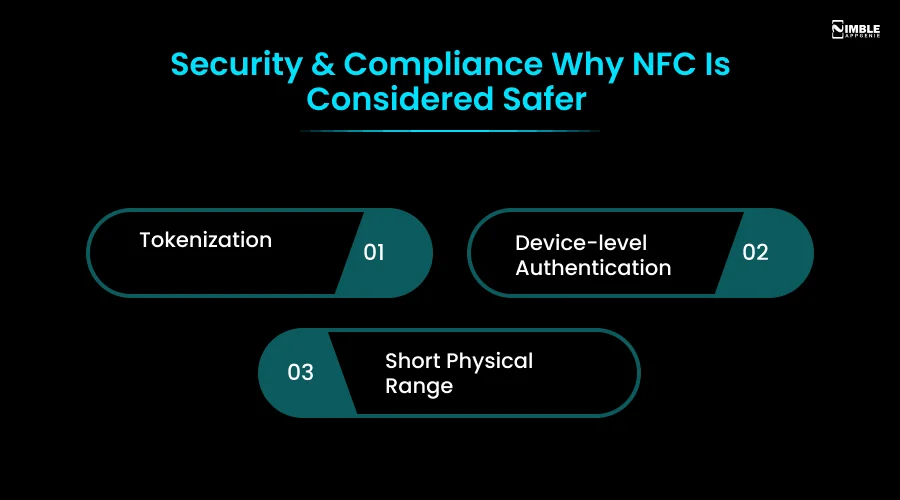
- Tokenization: During setup, the real card number (PAN) is replaced with a device-specific token; learn more in our eWallet payment tokenization guide. Even if a transaction is intercepted, the token is useless outside that merchant and device context.
- Device-level Authentication: PIN unlock and biometrics are essential before the NFC chip transmits payment data completely.
- Short Physical Range: An attacker would need to be within a few centimeters of the device while a transaction takes place, which is far more challenging to exploit at scale than remote card skimming.
Businesses acknowledge this; like any NFC payment app, which should meet PCI-DSS compliance requirements for how encryption keys, tokens, and transaction logs are handled, NFC reduces specific risks but doesn’t remove the requirement for ongoing regulatory compliance and secure architecture.
| Note: Nimble AppGenie’s development process is ISO 27001 certified, PCI-DSS compliant, and GDPR-ready by default across every NFC and wallet app we build. |
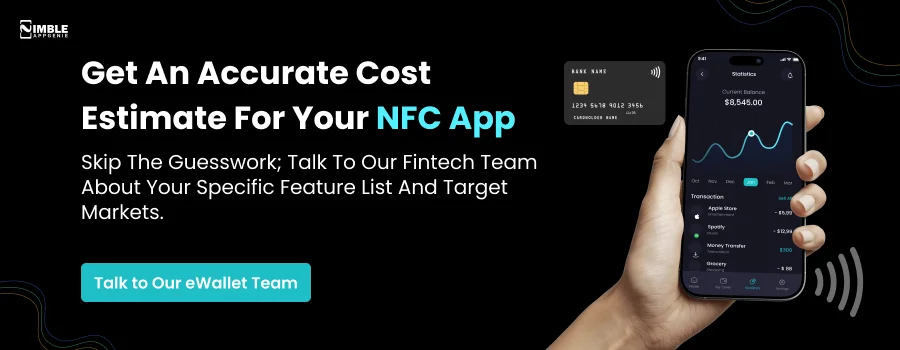
Developing a Custom NFC Mobile Payment App: Step-by-Step Process
Businesses entering the fintech space reap the benefits of growing acceptance of NFC.
Step 1: Ideation & Market Research
Ground your idea in real numbers – consider our fintech market statistics report as a good starting point. If you are unsure which existing wallet to compete with, our Google Pay vs. Apple Pay vs. Samsung Pay comparison breaks down NFC implementation differences across all three.
Step 2: Wireframing & Design
Wireframe the core flows before development starts – it’s far cheaper to iterate on a wireframe than on a shipped one.
Step 3: Identify Features & Functionalities
Common features across NFC payment apps include:
| Core Features | Supporting Features |
| User Registration & Authentication | Transaction History |
| Wallet Integration | Push Notifications |
| Tokenization | Remote Device Deactivation |
| Balance Management | Fingerprint/Face ID Enrollment |
| Offline Mode | Analytics & Reporting |
| Multi-Currency Support | Cross-Platform Compatibility |
| Peer-to-Peer (P2P) Transfers | Card Management |
| Rewards & Loyalty Programs | Privacy Controls |
Before you build, reviewing which eWallet app features are essential vs. optional will be worth it – NFC is one capability among what your product will need.
Step 4: Develop Functionalities
Build module by module rather than all at once, so every feature – wallet sync, tokenization, offline mode – is tested vigorously on its own before integration.
Step 5: Testing & Quality Assurance
The app should be tested across real-world edge cases: low battery, poor signal, multiple card profiles, and terminal misreads – not just the happy path.
Cost to Develop an NFC Mobile Payment App
The cost to build an NFC mobile payment app usually ranges from $25,000 to $250,000. The range is wide because platform count, feature scope, and compliance requirements vary significantly between projects.
For a complete cost breakdown beyond NFC-specific features, see our cost to build an eWallet app guide that covers how platform choice, feature scope, and geography affect your budget.
Conclusion
NFC is a part of the larger mobile payment technology stack, and in 2026, understanding it means learning everything, including how the tap works, how regulatory shifts like Apple’s EU NFC opening are reshaping who can build competitive wallets.
Whether you are building for the EU market under the new HCE rules or aiming at a global launch, getting the tokenization, compliance architecture, and security right from day one separates a wallet users trust from one they leave after the first failed transaction.
FAQs
NFC (Near Field Communication) mobile payment is a contactless transaction method that permits a smartphone to exchange encrypted payment data with a terminal from a few centimeters away, without needing a physical card.
The phone and terminal exchange tokenized payment data wirelessly over a very short range. The user holds their phone near the terminal, and the transaction is authorized in near real time.
RFID can be read from several meters away and is typically one-directional, used for tags and access badges. NFC only works within a few centimeters and supports two-way communication, making it secure enough for payments.
The NFC exchange itself doesn’t need internet, but the terminal or app typically needs connectivity to send the transaction to the bank for authorization. Some wallets support limited offline transaction queuing.
NFC payments are harder to exploit than card swipes because tokenization means the real card number is never transmitted, and the short range limits how close an attacker must be. No system is completely risk-free, which is why device-level authentication (PIN/biometric) is required.
Yes, most NFC payment apps support multiple credit or debit cards, letting the user choose their preferred card before tapping to pay.
Limits vary by payment provider, card issuer, and country. Higher-value transactions may require additional authentication, such as a PIN or biometric confirmation.
Since 2024, EU regulators have required Apple to let third-party wallet apps access iPhone NFC hardware via Host Card Emulation, without requiring Apple Pay or Apple Wallet, letting EEA users set a non-Apple wallet as their default payment app.

Niketan Sharma, CTO, Nimble AppGenie, is a tech enthusiast with more than a decade of experience in delivering high-value solutions that allow a brand to penetrate the market easily. With a strong hold on mobile app development, he is actively working to help businesses identify the potential of digital transformation by sharing insightful statistics, guides & blogs.
Table of Contents




No Comments
Comments are closed.