

 Free Consultation
 PCI-DSS Compliant
 GDPR Ready
 ISO 27001
 NDA Protected
 AI Services
 AI App Development
 Generative AI Development
 AI Chatbot Development
 AI Integration Services
 AI Consulting Services
 AI For Fintech
 AI Financial Assistant Solution
 AI Insurance Agent Development
 Tech Stack
 OpenAI / GPT-4
 Claude / Anthropic
 Gemini / Google AI
 Llama / Open Source
 LangChain / LlamaIndex
 Pinecone / Pgvector
 AWS / Azure AI


 Fintech Solution
 Core Fintech
 App Development
 Neobank Solutions
 eWallet Solutions
 Lending Software
 Banking Solutions
 BNPL Solutions
 BNPL Solutions
 Insurance App
 Wealth Management
 Crypto & DeFi
 Blockchain Development
  Payroll Software
 DeFi Solutions
 Crypto Wallet
 Crypto On/Off Ramp
 Crypto Exchange
 Trading Platform
 Payments
 Compliance
 Regulations & Compliance
 Fraud Detection
 Lending Ecosystem
 P2P Lending Platform
 Mortgage Software
 Engagement
 Fintech Outsourcing

 Mobile Development
 Mobile App Dev
 iOS App Development
 Android App Development
 React Native
 Flutter Development
 Web Solution
 Node.js Development
 React.js Development
 Angular Development
 App Services
 UI/UX Design
 App Maintenance
 By Stage
 MVP Development
 Industry Solutions
 Healthcare App Dev
 Education App Dev
 Travel App Dev
 Real Estate App Dev
 Logistics Software
 Social Media App

 Hire Mobile Developers
 Hire iPhone Developers
 Hire Android Developers
 Hire React Native Devs
 Hire Flutter Developers
 Hire Web Developers
 Hire Node.js Developers
 Hire Angular Developers
 Hire PHP Developers
 Hire Laravel Developers
 How It Works
 Pre-Vetted Developers
 Ready In 48 Hours
 NDA From Day One
 Replace Guarantee
 Company
 About Us
 Our Work Process
 Portfolio
 Case Studies
 Blog / Insights
 Careers
 Contact Us
 Awards
 Recognition


 Offices


Key Takeaways:
- Core iOS frameworks are Apple’s built-in frameworks that power everything in an iPhone app, and knowing the right ones is what separates a good iOS developer from a great one.
- SwiftUI is the best starting point for modern iOS app development in 2026, which allows developers to build beautiful, responsive interfaces with less code.
- UIKit is still very much alive and widely used, and many of the top apps on the App Store use both SwiftUI and UIKit together.
- Core Data, CloudKit, and Foundation handle the behind-the-scenes work that keeps every iOS app running smoothly, from storing data offline to syncing it on all of a user’s Apple devices.
- Frameworks like Core ML and ARKit have made it possible for any iOS app development team to add AI-powered features and AR experiences without needing a full data science team or expensive infrastructure.
- Most real-world iOS apps use multiple core iOS app frameworks together — for example, a fitness app might combine SwiftUI, Core Location, Core ML, and CloudKit all in one project.
- Choosing the right iOS app development framework from the start saves time, reduces bugs, and makes your app easier to scale.
If you have ever used an iPhone app that felt smooth, looked beautiful, or had a cool AR feature, there is a good chance Apple’s core iOS frameworks were doing the heavy lifting behind the scenes.
But if you are new to iOS development or even if you have been at it for a while, the list of frameworks can feel overwhelming. SwiftUI, UIKit, ARKit, Core ML, and Combine. What do they all do? Which ones do you actually need?
Don’t worry! We have got you covered. In this blog, we break down the top 10 core iOS app development frameworks. It also covers the comparison that can help you decide the right framework to build better iOS apps in 2026.
So, let’s begin!
What Are Core iOS Frameworks?
The core iOS frameworks are developed by Apple and baked into every iPhone. They are different from third-party libraries because they are native. It means they are always updated with the latest iOS release and deeply integrated with Apple hardware.
Let’s understand this with an example. Think of a framework like a toolbox. Instead of creating every tool from scratch, Apple provides you with a pre-built toolbox full of code, API, and libraries that manage common tasks.
If you want to add a button to your app, there is a best framework for iOS app development for that. If you want to store data locally on a user’s phone? Framework. Want to build augmented reality features? Again, the framework is there.
| Nimble AppGenie’s Tip: You should always begin with Apple’s native frameworks before reaching for a third-party library. Native frameworks are quite faster, more secure, and Apple actively updates them with every iOS release. |
How We Selected the Best 10 Apple iOS Frameworks?
There are plenty of Apple iOS frameworks out there. We thoroughly researched and narrowed it down to 10 frameworks based on:
- Developer adoption: Frameworks that most iOS developers actually use every day.
- Apple’s official backing: Frameworks Apple actively updates and recommends.
- Real-world impact: Frameworks that directly affect app performance and user experience.
- Relevance in 2026: Current Frameworks, not outdated or deprecated.
No matter if you are a solo developer planning to develop an iOS app or part of a team at a startup or enterprise, these are the frameworks you need to know.
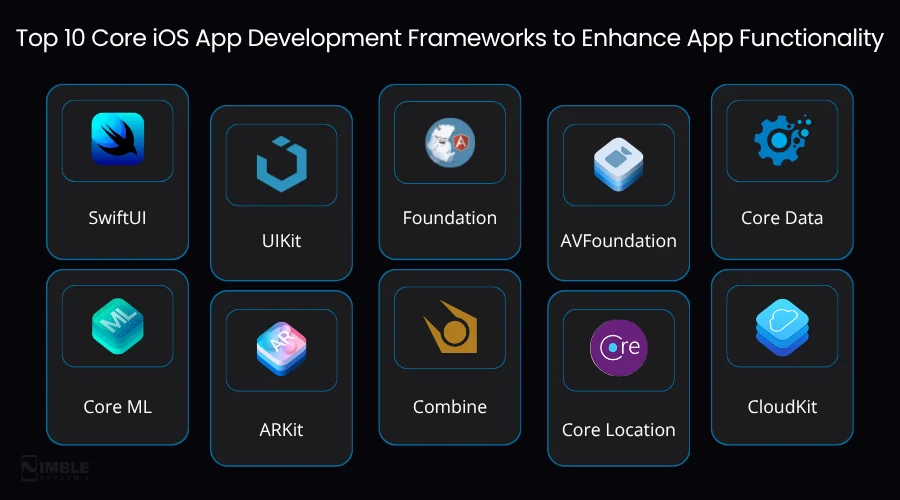
Top 10 Core iOS App Development Frameworks to Enhance App Functionality
Choosing the right Apple iOS frameworks is vital because they help your app work seamlessly and add useful features. Each framework does a different job. For example, developing an app design, managing data, or handling network tasks. Below are the top 10 core iOS frameworks that can help you improve your app’s performance.
1. SwiftUI
SwiftUI is the modern way to create visually appealing iOS interfaces with less code. If you are developing an iOS app today, SwiftUI is where you should start. It is Apple’s modern UI framework that was introduced in 2019.
It is the best framework for iOS app development that has completely changed the way developers used to build UI. The major idea behind SwiftUI is something called declarative syntax.
In simple terms, it means you describe what you want the UI to look like, and SwiftUI figures out how to build it. With less code and fewer bugs, you can even see a live preview of your design while you type.
Why developers love it:
- It writes less code to build the same UI compared to UIKit.
- It shows a live preview in Xcode so you can see changes in real time.
- It works on iPhone, iPad, Mac, Apple Watch, and Apple TV from one codebase.
- It provides deep integration with Apple’s latest features.
Best for:
New iOS mobile applications, modern iOS app design, and developers who want to build fast. If you are starting fresh in 2026, SwiftUI is the default choice.
| Real Example: Instagram, Airbnb, and countless startup iOS apps use SwiftUI for their newest features. It is not just for beginners; top apps are adopting it fast. |
2. UIKit
The UILit is the battle-tested backbone of iOS app development. It has been around since the very first iPhone SDK, and it is still one of the most important frameworks you can understand.
However, SwiftUI is the future, and UIKit is very much the present for large, complex applications and anything that needs to support older iOS versions.
Additionally, UIKit offers you direct, low-level control over every single UI element on screen. Also, buttons, tables, navigation controllers, animations, all of it is in UIKit. It is more code-heavy than SwiftUI, but that also means more customization and control.
Why developers still use it:
- It powers the majority of iOS apps already on the App Store.
- It is the best option for apps with highly custom UI components.
- Supports iOS versions going all the way back.
- Many SwiftUI apps still depend on UIKit under the hood for certain things.
Best for:
Complex apps with custom interfaces, legacy app maintenance, enterprise-scale projects, and any situation where you need total UI control.
3. Foundation
The Foundation framework is the invisible backbone every iOS application depends on. This iOS app development framework is not flashy, but it is absolutely essential.
Think of it as the invisible plumbing that runs through every iOS app. It handles all the fundamental things, data types, dates, file management, networking basics, strings, and more.
Every single iOS application uses Foundation. If you have ever formatted a date, made a network request, or stored a value locally. You have already used Foundation, and you just might not have realised it.
What it covers:
- Strings, numbers, dates, and data types.
- File system access and management.
- URL handling and basic networking.
- Users default to storing small pieces of app data.
Best for:
Every iOS app, no exceptions. This is the foundation (literally) that everything else is built on.
4. AVFoundation
The AVFoundation is the complete framework for audio and video in iOS. If your app needs to record video, play audio, or process any kind of media, AVFoundation is the framework you need.
It gives you deep access to the iPhone’s camera, microphone, speakers, and media processing pipeline. It is so powerful. Apps like TikTok, Snapchat, and Instagram depend on it for their camera and video features.
What it handles:
- Camera capture for photos and videos
- Audio recording and playback
- Video editing and processing
- Streaming media from the internet
Best for:
The AVFoundation is the best framework for social media apps, video editing tools, music apps, and any app that involves capturing or playing back media.
5. Core Data
The Core Data is a go-to framework for storing and managing data on-device. If your iOS app needs to save data locally on the user’s device, like a to-do list, a shopping cart, saved articles, or user profiles, Core Data is the framework for the task.
It is Apple’s built-in framework for managing your app’s data model. It is not a database itself, but it sits on top of SQLite and gives you a bespoke, object-oriented way to store, fetch, update, and delete data.
Why it matters:
- It saves data locally so users can access it offline.
- It manages complex data relationships.
- Syncs with iCloud through CloudKit integration
- Works smoothly with SwiftUI via the @FetchRequest property wrapper
Best for:
It is perfect for applications that need offline-first data storage, notes apps, fitness trackers, e-commerce, task managers, and more.
| 2026 Update: Apple introduced SwiftData as a modern successor to Core Data. If you are creating a brand-new iOS app, SwiftData provides an easier Swift-native API. But Core Data is still popularly used and fully supported. |
6. Core ML
The Core ML iOS frameworks bring AI and machine learning directly into your iPhone app. AI is not just for the big tech companies anymore.
With this framework, any iOS dedicated development team can integrate machine learning features directly into their app. Also, everything runs on the user’s devices and not in the cloud.
What you can build with it:
- Photo apps that recognize objects, faces, or scenes.
- Apps that understand and respond to natural language text.
- Fitness apps that analyze movement and posture using the camera.
- Predictive features that personalize the user experience.
Best for:
Any app that wants to add intelligent, AI-powered features without needing a data science team or cloud infrastructure.
| Quick Stat: According to Apple, Core ML 3 runs models up to 10x faster on-device compared to cloud-based alternatives for many tasks. |
7. ARKit
The ARKit is Apple’s powerful augmented reality framework. The best framework for iOS app development allows you to blend digital objects with the real world using the iPhone’s camera, motion sensors, and depth data.
It is the most impressive framework Apple has ever shipped, and it keeps getting better every year. You can easily place virtual furniture in someone’s living room and create interactive 3D games that play out in the real world.
What ARKit can do:
- World tracking: It understands the physical environment around the user.
- Object detection: It recognizes real-world objects and surfaces.
- Face tracking: It maps facial movements in real time.
- LiDAR support on Pro iPhones has more accurate depth sensing.
Best for:
ARKit is best for retail apps with virtual try-ons, education apps with interactive 3D content, gaming, and interior design. Also, it is good for any experience where the real and digital worlds overlap.
| Real Example: IKEA Place uses the ARKit framework to allow customers to visualize furniture in their home before buying. It is one of the most famous examples of ARKit in action, and it works beautifully. |
8. Combine
One of the most used core iOS app development frameworks, Combine, manages real-time data and asynchronous events cleanly. Many modern iOS applications deal with a lot of moving parts at once, network requests, timers, and data updates from servers.
It is Apple’s framework for managing all of this asynchronous data in a clean and organized way, and it also helps fix iOS compatibility issues when handling updates on different versions.
You can think of it as a pipeline. The data flows through the pipeline and gets transformed along the way. It ends up exactly where it needs to go, all without the messy callback code that used to make async programming a headache.
Why it’s useful:
- Cleaner code for handling network responses and live data.
- Works naturally with SwiftUI for reactive UI updates.
- Replaces messy completion handlers and delegate patterns.
- Makes it easy to respond to user input in real time.
Best for:
The Combine is ideal for apps with live data feeds, complex form validation, and search-as-you-type features. Also, any situation where your UI needs to react instantly to data changes.
9. Core Location
The Core Location gives your iOS application the power to know exactly where the user is. With this framework, iOS apps can access the device’s GPS, Wi-Fi positioning, and compass data.
It is one of the core iOS frameworks behind every maps app, delivery tracker, weather app, and location-based service you have used on your iPhone. Also, it is very privacy-conscious.
Apple needs mobile applications to ask the user’s permission before accessing location data. Core Location gives you fine-grained control over when and how location is accessed.
What you can do with it:
- Get the user’s current GPS coordinates
- Set up geofences, trigger actions when a user enters or leaves an area
- Calculate the distance and direction between two points
- Integrate with MapKit for full map experiences
Best for:
Core Location is best for delivery applications, navigation tools, local search, weather apps, and fitness trackers. Also, for any app where knowing the user’s location makes the experience better.
10. CloudKit
It stores and syncs data in the cloud without developing a backend. CloudKit is Apple’s cloud database service, and it is a game-changer for indie developers and small mobile app development teams.
It allows you to store data in iCloud and sync it on all of a user’s Apple devices. Also, it is without having to develop or pay for your own backend server.
Your users get smooth data sync on iPhone, iPad, and Mac. You get a bespoke, scalable cloud storage system backed by Apple’s infrastructure. It is free and up to generous limits.
Why developers love it:
- It does not need a backend; Apple manages all the infrastructure.
- It is free storage quotas that scale with your user base.
- It is automatically synced on all of a user’s Apple devices.
- It comes with built-in privacy, and users control their own iCloud data.
Best for:
CloudKit is ideal for notes apps, productivity tools, and journaling apps. Also, it is good for any app where users expect their data to follow them across devices.
Quick Comparison: All Core iOS Frameworks at a Glance
So far, we have seen in-depth about the essential core iOS app frameworks. We will now see the quick table so you can compare all 10 frameworks side by side.
| Framework | Primary Use | iOS Support | Difficulty | Best for |
| SwiftUI | UI development | iOS 13+ | Beginner | Modern apps |
| UIKit | UI development | iOS 2+ | Intermediate | Complex/ legacy apps |
| Foundation | Core Utilities | All | Beginner | Every iOS app |
| Core Data | Local storage | iOS 3+ | Intermediate | Data-heavy apps |
| Core ML | AI & Machine Learning | iOS 11+ | Advanced | AI-powered apps |
| ARKit | Augmented Reality | iOS 11+ | Advanced | AR experience |
| Combine | Async programming | iOS 13+ | Intermediate | Reactive apps |
| Core Location | Location services | iOS 2+ | Beginner | Maps/navigation |
| AVFoundation | Audio & Video | iOS 2+ | Intermediate | Media apps |
| CloudKit | Cloud Storage | iOS 8+ | Intermediate | iCloud-synced apps |
How to Choose the Right Apple iOS Development Framework for Your App?
Now that you know what each framework does, how do you decide which ones to use for your project? Well, you can check out the decision guide below. If you follow that, you can surely choose the right framework for iOS mobile app development.
- Building a UI-heavy app? You can start with SwiftUI. For complex legacy UI, add UIKit.
- Need to store data locally? You can use Core Data or SwiftData for new projects.
- Want AI or smart features? You can use Core ML in your framework.
- Building AR experiences? ARKit is the only choice on iOS.
- Dealing with lots of live data or async events? You can add Combine.
- Do apps need location features? Core Location manages it all.
- Camera, video, or audio? AVFoundation is crucial.
- Want cloud sync without a backend? CloudKit makes it very simple.
Most real-world apps use multiple frameworks together. For example, a fitness tracker might use SwiftUI for the interface and Core Location for GPS tracking. However, Core ML for movement analysis, Core Data to store workout history, and CloudKit to sync across the user’s devices.
| Note: Do not try to use all 10 frameworks at once. You can start with SwiftUI + Foundation + Core Data for more apps. Besides, you can add other frameworks as your feature list grows. Good iOS development is about picking the right framework for the right work. |
Why Choose Nimble AppGenie to Build an iOS App with the Right Framework?
Developing an iOS app is not just about getting it live. The frameworks you choose shape how your app actually works day to day, how smooth it feels, and how easy it is to update later.
The right iOS mobile app development frameworks can help you avoid a lot of common issues down the line. At Nimble AppGenie, our iOS developers use these frameworks to build high-performance, visually appealing apps for startups and enterprises worldwide.
We focus on building apps that actually work well in real use, not just on paper. The goal is to keep things smooth, reliable, and easy to handle as your app grows.
Need expert help building your iOS app? Share your ideas, and let’s build something amazing together. Book a free consultation now!

Conclusion
Developing a cutting-edge iOS app is not just about writing good code. It is about using the right framework for the right thing. Apple’s core iOS frameworks are the best frameworks available for any iOS developer.
Thus, if you are developing your first iOS app or fiftieth, a good understanding of these frameworks will make you a faster, better iOS developer.
And if you feel stuck or need a team of experts to help bring your iOS app idea to life, that is exactly what Nimble AppGenie is here for.
FAQs

Rahul leads the iOS development team at Nimble AppGenie, with a sharp focus on high-performance mobile applications and cutting-edge user interfaces. He specializes in creating intuitive, friction-free experiences for millions of end-users and is committed to pushing the boundaries of what is possible within the Apple ecosystem. When he’s not coding, he enjoys playing badminton, exploring new places, and finding his peace playing cricket on the weekends.
Table of Contents




No Comments
Comments are closed.