

 Free Consultation
 PCI-DSS Compliant
 GDPR Ready
 ISO 27001
 NDA Protected
 AI Services
 AI App Development
 Generative AI Development
 AI Chatbot Development
 AI Integration Services
 AI Consulting Services
 AI For Fintech
 AI Financial Assistant Solution
 AI Insurance Agent Development
 Tech Stack
 OpenAI / GPT-4
 Claude / Anthropic
 Gemini / Google AI
 Llama / Open Source
 LangChain / LlamaIndex
 Pinecone / Pgvector
 AWS / Azure AI


 Fintech Solution
 Core Fintech
 App Development
 Neobank Solutions
 eWallet Solutions
 Lending Software
 Banking Solutions
 BNPL Solutions
 BNPL Solutions
 Insurance App
 Wealth Management
 Crypto & DeFi
 Blockchain Development
  Payroll Software
 DeFi Solutions
 Crypto Wallet
 Crypto On/Off Ramp
 Crypto Exchange
 Trading Platform
 Payments
 Compliance
 Regulations & Compliance
 Fraud Detection
 Lending Ecosystem
 P2P Lending Platform
 Mortgage Software
 Engagement
 Fintech Outsourcing

 Mobile Development
 Mobile App Dev
 iOS App Development
 Android App Development
 React Native
 Flutter Development
 Web Solution
 Node.js Development
 React.js Development
 Angular Development
 App Services
 UI/UX Design
 App Maintenance
 By Stage
 MVP Development
 Industry Solutions
 Healthcare App Dev
 Education App Dev
 Travel App Dev
 Real Estate App Dev
 Logistics Software
 Social Media App

 Hire Mobile Developers
 Hire iPhone Developers
 Hire Android Developers
 Hire React Native Devs
 Hire Flutter Developers
 Hire Web Developers
 Hire Node.js Developers
 Hire Angular Developers
 Hire PHP Developers
 Hire Laravel Developers
 How It Works
 Pre-Vetted Developers
 Ready In 48 Hours
 NDA From Day One
 Replace Guarantee
 Company
 About Us
 Our Work Process
 Portfolio
 Case Studies
 Blog / Insights
 Careers
 Contact Us
 Awards
 Recognition


 Offices



Key Takeaways
- iOS apps are prime targets – 85% of organizations report that mobile cyberattacks are increasing. (Verizon DBIR).
- Apple’s built-in protections are a starting point, not a finish line – developers carry the real security burden.
- The OWASP Mobile Top 10 is your baseline security framework for every iOS project.
- Common vulnerabilities include weak authentication, insecure data storage, and unprotected API communications.
- SSL pinning, biometric auth, Keychain usage, and code obfuscation are non-negotiables in 2026.
- Regular third-party security audits and penetration testing are no longer optional for serious apps.
- Nimble AppGenie builds security into every layer of iOS development, from architecture to App Store launch.
Years back, a fitness app with widespread exposure revealed 61+ million user health records due to an unsecured cloud storage bucket.
No access controls. No encryption. Just raw data was kept open, prone to attack, and the company was spending months rebuilding user trust.
The truth is: Apple is not capable of securing your app for you all alone. The App Store review process only catches policy violations and often misses architectural flaws.
Your iOS app development team is responsible for your data storage, authentication logic, and API communication.
They need to follow iOS app security best practices to protect data at rest and in transit, secure authentication, and prevent tampering.
Global Mobile Threat Report by Zimperium reported that around 60% of iOS apps and 43% of Android apps are vulnerable to sensitive data leakage. Today, attacks are faster, smarter, and more targeted than ever.
This guide is for iOS developers, founders, CTOs, and product managers who want to build iOS apps that users can really trust.
By the end, you will know which iOS app vulnerabilities to watch for, which security practices to implement, and how Nimble AppGenie, as a leading iOS app development company, embraces security into each project from day one.
What You Will Learn
- Why iOS app security is the responsibility of a developer, not an Apple guarantee.
- Proven iOS app security best practices you can implement right now.
- The most common iOS app vulnerabilities in 2026 and how attackers exploit them.
- A ready-to-use iOS app security checklist.
- How Nimble AppGenie builds secure iOS apps for startups and enterprises.
| Nimble AppGenie’s Approach As a leading app development company with 350+ apps delivered, we treat security not as a checkbox but as an architecture decision. Every app we develop follows OWASP Mobile Top 10 compliance, undergoes internal security reviews, and is stress-tested before launch. |
Why iOS App Security Matters in 2026?
In 2026, iOS app security has evolved from a technical need into a critical business priority.
A study by Juniper Research estimates that merchant losses from online payment fraud will exceed $362 billion globally between 2023 and 2028, including $91 billion in 2028 alone.
The assumption that iOS is inherently secure is no longer valid.
What is At Stake For Your Business?
- Brand reputation and user trust: A single breach can ruin years of loyalty.
- App Store delisting – If Apple identifies policy violations or reports malicious behavior.
- Regulatory fines under GDPR, HIPAA, CCPA, and PCI-DSS are often reaching millions of dollars.
- Revenue loss – Users abandon apps after a security incident.
Security is not a feature that you can add afterwards; it’s the base you build from the beginning.
What are iOS App Security Vulnerabilities?
Before learning how to fix issues, you need to understand what can break.
The OWASP Mobile Top 10, the industry-standard framework, maps the most critical mobile app security risks.
Below is what they look like in an iOS context:
| Vulnerability | Risk | Fix |
| Insecure Data Storage | Stolen credentials, PII leaks | Use iOS Keychain; encrypt local databases |
| Weak Authentication | Account takeover, fraud | Biometrics + MFA; token-based sessions |
| Improper Session Handling | Session hijacking | Auto-expire tokens; secure logout flow |
| Insecure Network Comms | Man-in-middle attacks | SSL pinning; enforce HTTPS everywhere |
| Hardcoded Secrets | API key theft, backend breach | Use environment vars; secret management tools |
| Reverse Engineering | IP theft, logic manipulation | Code obfuscation; jailbreak detection |
| Client-Side Injection | XSS in WebViews, data manipulation | Sanitize inputs; use WKWebView with restrictions |
| Third-Party Libraries | Supply chain attacks | Audit dependencies; use Swift Package Manager |
These are not hypothetical risks. You can find them appearing every day in production apps, specifically apps downloaded millions of times.
iOS App Security Best Practices
iOS app security best practices involve secure data storage, authentication and session management, network security, SSL pinning, and more.
You should have a complete security strategy, including regular security assessments, a plan to respond to security incidents, and employee training on iOS security best practices.
By following a proactive approach to security, developers can help ensure iOS apps and devices are secure and safe from potential threats.
Below is an in-depth explanation of best practices you should consider for your iOS app security.
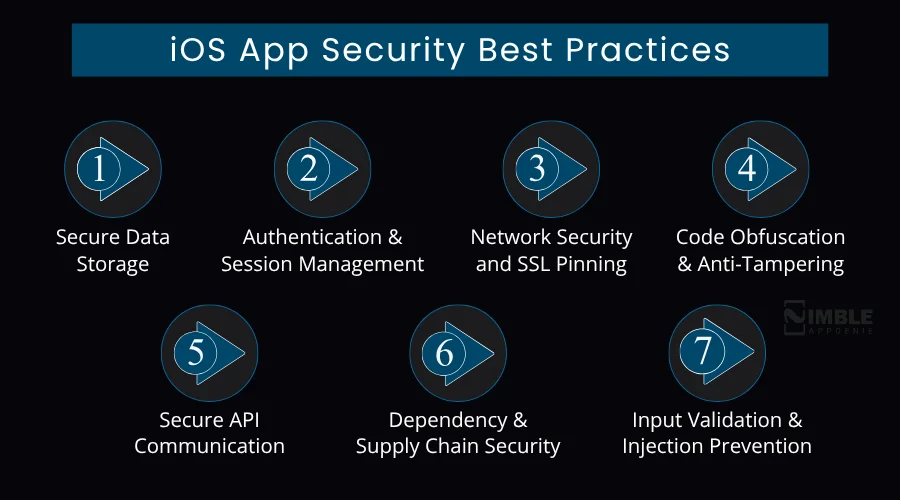
1. Secure Data Storage
Never store sensitive data in plain text files, UserDefaults, or unencrypted SQLite databases. These are the foremost spots attackers look at a compromised or jailbroken device.
Opt for iOS Keychain security for authentication tokens, passwords, and cryptographic keys. Keychain is a hardware-backed, secure database on modern iPhones that’s encrypted even when the device is locked.
For big data sets, leverage Core Data with NSFileProtectionComplete or encrypt SQLite utilizing SQLCipher. Apply the most restrictive data protection class always, if your use case permits.
- Use Keychain Services API for each credential and token.
- Set NSFileProtectionComplete on sensitive files
- Avoid logging sensitive data even in debug builds
- Encrypt database files using SQLCipher or CryptoKit
2. Authentication and Session Management
Weak authentication is a front door through which most attackers walk in. Password-only login is not acceptable now for any app handling sensitive data – medical, financial, or personal.
Use iOS biometric authentication via the LocalAuthentication framework (Face ID and Touch ID authentication). Pair this with token-based sessions (JWT or OAuth 2.0) and impose short expiry windows. With a never-expiring token, you give an open invitation to the attackers.
Implement multi-factor authentication for risky actions, like password changes, transfers, or account deletion. Revoke tokens on suspicious activity detection and on logout.
- Use short-lived JWT tokens with refresh token rotation
- Enable Face ID / Touch ID with the LocalAuthentication framework
- Implement MFA for sensitive operations
- Never store passwords; use hashed credentials with bcrypt or Argon2
- Force re-authentication after session timeouts or app backgrounding
3. Network Security and SSL Pinning
Every network call your iOS app makes is a possible interception point. Man-in-the-middle (MITM) attacks on apps are one of the most common real-world attack vectors, specifically on public Wi-Fi.
SSL pinning ties your app to a particular public key or server certificate. Even if an attacker installs a rogue root certificate on the device, they can’t intercept your traffic as your app rejects any certificate that doesn’t match the pinned value.
Implement pinning by using Alamofire’s ServerTrustManager, URL session, and TrustKit with custom TLS handling. Always enforce App Transport Security (ATS), and reject HTTP connections completely.
- Implement an SSL certificate or public key pinning
- Use TLS 1.3 for all communications where possible
- Enable App Transport Security (ATS) with no exceptions
- Validate responses; do not trust data just because it came over HTTPS
4. Code Obfuscation and Anti-Tampering
Reverse engineering iOS apps is even simpler than most developers realize. Tools like Frida, Hopper, and Ghidra can decompile your Swift or Objective-C code in minutes. Once an attacker learns your business logic, they can fake API calls, clone your app, or bypass licensing checks.
Leverage obfuscation tools to rename methods, classes, and variables into meaningless identifiers. Implement root detection libraries and jailbreak detection iOS. If your device is compromised, block or limit app functionality.
Add runtime integrity checks to identify tampering, hooking frameworks like debugger attachments, and Frida.
Tools like iXGuard and Guardsquare’s DexGuard for iOS provide enterprise-grade protection.
- Obfuscate class names, method names, and string literals
- Detect and respond to debugger attachments at runtime
- Implement jailbreak detection (check for Cydia, unusual file paths, sandbox violations)
- Strip debug symbols from production builds
- Use anti-hooking measures to block Frida and Cycript
5. Secure API Communication
Your app is secure only as long as your backend is secure. Even a well-written iOS app can be compromised through poorly secured APIs. Treat your API endpoints as public-facing attack surfaces.
Authenticate each API request using short-lived tokens. Never expose internal logic or admin endpoints through the mobile API. Implement rate limiting, anomaly detection, and request signing on the server side.
Avoid sending sensitive data in URL parameters or query strings, as they get logged by proxies, servers, and analytics tools. Use POST request bodies with encrypted payloads for anything confidential.
- Use OAuth 2.0 or API key rotation for all endpoint authentication
- Implement server-side rate limiting and request validation
- Avoid sensitive data in URL parameters
- Use mutual TLS (mTLS) for high-security applications
6. Dependency and Supply Chain Security
In mobile development, one of the fastest-growing attack vectors is third-party libraries. A single compromised Swift Package or CocoaPod can expose backdoors into thousands of apps simultaneously.
Regularly audit your dependencies. Use tools, like OSS Review Toolkit or Dependabot, to detect vulnerable packages. Before updating, verify checksums and pin dependency versions.
Choose Apple’s native frameworks over third-party alternatives wherever performance permits. Each external dependency is a trust decision; make it deliberately.
- Audit all third-party dependencies quarterly.
- Check dependencies against CVE databases before adoption
- Pin package versions in Package.swift or Podfile.lock
- Prefer Swift Package Manager over CocoaPods for better security auditing
7. Input Validation and Injection Prevention
Any input field in your iOS app, like chat inputs, login forms, URL handlers, and search bars, is a potential injection point. Specifically in apps using WKWebView, client-side injection attacks can lead to local data theft and cross-site scripting (XSS).
Validate all input on the client and server side. Never trust user-supplied data. Utilize parameterized queries for any database operations and sanitize all inputs before rendering in a web view.
For URL scheme handlers and deep links, validate incoming URLs rigorously. An attacker can create a malicious URL to exfiltrate data or trigger unintended behavior through your own URL handler.
- Sanitize and validate all user inputs before processing
- Parameterize all database queries
- Use WKWebView with disabled JavaScript where possible
- Validate and restrict deep link URL schemes

Secure Enclave – What It Is & How to Use It
The Secure Enclave is a dedicated secure subsystem in Apple devices, including iPhone, iPad, Mac, Apple TV, Apple Watch, HomePod, and Apple Vision Pro.
It is integrated into Apple’s system-on-a-chip (SoC) but operates separately from the main processor to provide an additional layer of security. Its purpose is to protect sensitive user data even if the application processor kernel is compromised.
The Secure Enclave follows an exact architectural design as the SoC. It includes a Boot ROM that establishes a hardware root of trust, an AES (Advanced Encryption Standard) engine for efficient cryptographic operations, and secure memory for processing sensitive data.
However, it does not contain its own storage. Instead, it uses a secure mechanism to store data on attached storage in an encrypted and isolated form, separate from the NAND flash storage used by the application processor and operating system.
Privacy Manifests in 2026 – Apple’s App Transparency Requirement
Apple requires apps distributed on the App Store to include a Privacy Manifest (PrivacyInfo.xcprivacy) when they use certain APIs or third-party SDKs. This file documents what data is collected, how it is used, and the reasons for accessing it.
Developers create the privacy manifest directly in Xcode, and Apple uses this information to support App Privacy Details displayed on the App Store product page. This helps users understand how an app handles their data before downloading it.
By 2026, Privacy Manifests have become a critical compliance requirement for modern iOS development, especially as Apple continues to enforce strict rules around data tracking, third-party SDK usage, and transparency standards.
Failure to include accurate privacy disclosures can lead to App Store rejection or removal during review, making compliance an essential part of the release process.
For developers, privacy manifests are no longer optional documentation; they are now a core part of App Store readiness and compliance strategy.
Memory Management Security in iOS Apps
Memory management in iOS is a critical security layer, besides being a performance concern. Sensitive data, like personal information, API responses, and authentication tokens, often exists temporarily in memory while an app is running.
If you do not handle it correctly, this data can be exposed through debugging tools, memory dumps, runtime inspection attacks, and jailbreaks.
So, developers should ensure not to store sensitive information longer than required in memory to reduce risk and clear it securely after use.
iOS App Security Checklist
Consider this table as your pre-launch security gate.
Every item marked ‘critical’ should be resolved before you launch your app.
High-priority items should be accomplished within your first sprint after your app goes live.
| Category | Checklist Item | Priority |
| Data Storage | Use Keychain for sensitive data (tokens, passwords) | Critical |
| Avoid storing PII in UserDefaults or plain files | Critical | |
| Encrypt Core Data / SQLite databases | High | |
| Network Security | Implement SSL/TLS pinning | Critical |
| Enforce HTTPS for all API calls | Critical | |
| Validate server certificates | High | |
| Authentication | Enable biometric authentication (Face ID/Touch ID) | High |
| Implement multi-factor authentication (MFA) | High | |
| Set token expiry and refresh logic | High | |
| Code Security | Enable code obfuscation and anti-tampering | Medium |
| Disable debug logs in production builds | High | |
| Remove hardcoded API keys and secrets | Critical | |
| Input Handling | Sanitize all user inputs to prevent injection | High |
| Implement rate limiting on API endpoints | Medium | |
| Session Mgmt | Expire sessions on app background/logout | High |
| Use secure, HttpOnly cookies for web views | Medium | |
| Compliance | Follow the OWASP Mobile Top 10 checklist | High |
| Conduct third-party iOS app penetration testing annually | High | |
| Review App Store privacy nutrition label accuracy | Medium |
Tip: Print it out. Pin it to your sprint board. Check it before each major release.
How Nimble AppGenie Builds Secure iOS Apps?
At Nimble AppGenie, we consider security not a last-minute checklist, but an architectural discipline that starts at the discovery phase and runs through each sprint, deployment, and code review.
Our Security-First Development Process
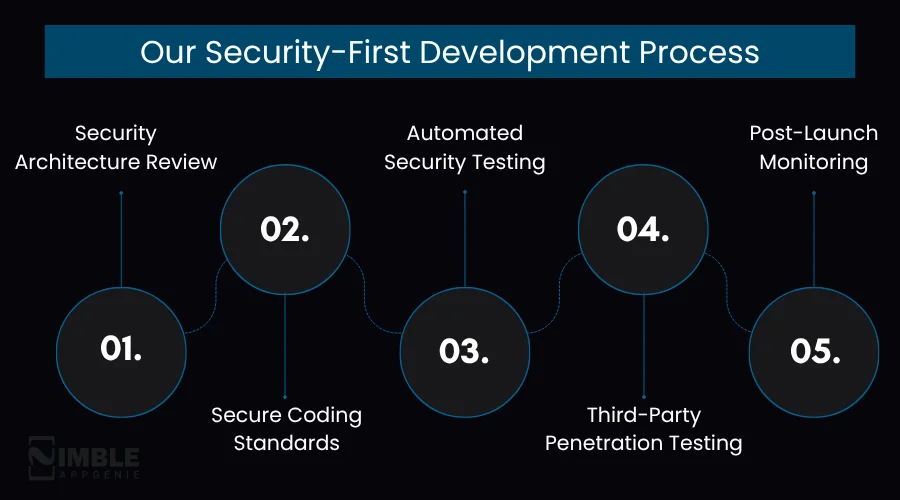
1. Security Architecture Review
Before writing code, our app developers define the app’s threat model. We check what data the app handles, how it flows, and where it can be misused or intercepted. This shapes each decision ahead.
2. Secure Coding Standards
Every developer of our iOS team follows OWASP MASVS iOS guidelines, our internal secure coding playbook, and Apple’s Swift security coding guidelines. Our iOS secure coding practices include code reviews where we mandate security checks before merging PR.
3. Automated Security Testing
Our CI/CD pipeline includes static application security testing (SAST), leveraging tools like Semgrep and SonarQube. Dynamic testing with Burp Suite and OWASP ZAP validates the app’s runtime behavior.
4. Third-Party Penetration Testing
We coordinate with certified third-party penetration testers for fintech, enterprise, and healthcare clients who attempt real-world attacks against the mobile app before launch. Findings are fixed before the app goes live.
5. Post-Launch Monitoring
Security plays a crucial role even at launch. We implement anomaly detection, crash reporting, and security patching cycles for each app our experts maintain. When new iOS app vulnerabilities are unveiled, our clients are patched proactively.
Industries We Secure
- Healthcare Apps – HIPAA-compliant data handling, secure EHR integrations, patient data encryption
- Fintech and Mobile Banking Apps – PCI-DSS compliance, fraud detection, and encrypted transaction flows.
- Enterprise Mobility – MDM integration, corporate VPN support, and certificate-based authentication.
- E-commerce – PCI-compliant payment flows, secure checkout, anti-fraud tooling.
Conclusion
iOS security in 2026 is a fundamental expectation, not a feature. Your users trust you with their most sensitive data.
On the contrary, attackers are smarter than ever. The gap between a secure app and a vulnerable one is created decision by decision, line by line.
The iOS security best practices in this guide are not theory; they are precise standards that production-grade iOS teams consider today. You must implement them, audit them routinely, and treat security as an ongoing practice rather than a one-time job.
If you are developing an iOS app or only modernizing it and need a development team that treats security as a first principle, Nimble AppGenie is set to help.
We have secured apps for startups uncovering Series A and enterprises processing billions in transactions. Your app also deserves the same standard.
FAQs

Niketan Sharma, CTO, Nimble AppGenie, is a tech enthusiast with more than a decade of experience in delivering high-value solutions that allow a brand to penetrate the market easily. With a strong hold on mobile app development, he is actively working to help businesses identify the potential of digital transformation by sharing insightful statistics, guides & blogs.
Table of Contents




No Comments
Comments are closed.