

 Free Consultation
 PCI-DSS Compliant
 GDPR Ready
 ISO 27001
 NDA Protected
 AI Services
 AI App Development
 Generative AI Development
 AI Chatbot Development
 AI Integration Services
 AI Consulting Services
 AI For Fintech
 AI Financial Assistant Solution
 AI Insurance Agent Development
 Tech Stack
 OpenAI / GPT-4
 Claude / Anthropic
 Gemini / Google AI
 Llama / Open Source
 LangChain / LlamaIndex
 Pinecone / Pgvector
 AWS / Azure AI


 Fintech Solution
 Core Fintech
 App Development
 Neobank Solutions
 eWallet Solutions
 Lending Software
 Banking Solutions
 BNPL Solutions
 BNPL Solutions
 Insurance App
 Wealth Management
 Crypto & DeFi
 Blockchain Development
  Payroll Software
 DeFi Solutions
 Crypto Wallet
 Crypto On/Off Ramp
 Crypto Exchange
 Trading Platform
 Payments
 Compliance
 Regulations & Compliance
 Fraud Detection
 Lending Ecosystem
 P2P Lending Platform
 Mortgage Software
 Engagement
 Fintech Outsourcing

 Mobile Development
 Mobile App Dev
 iOS App Development
 Android App Development
 React Native
 Flutter Development
 Web Solution
 Node.js Development
 React.js Development
 Angular Development
 App Services
 UI/UX Design
 App Maintenance
 By Stage
 MVP Development
 Industry Solutions
 Healthcare App Dev
 Education App Dev
 Travel App Dev
 Real Estate App Dev
 Logistics Software
 Social Media App

 Hire Mobile Developers
 Hire iPhone Developers
 Hire Android Developers
 Hire React Native Devs
 Hire Flutter Developers
 Hire Web Developers
 Hire Node.js Developers
 Hire Angular Developers
 Hire PHP Developers
 Hire Laravel Developers
 How It Works
 Pre-Vetted Developers
 Ready In 48 Hours
 NDA From Day One
 Replace Guarantee
 Company
 About Us
 Our Work Process
 Portfolio
 Case Studies
 Blog / Insights
 Careers
 Contact Us
 Awards
 Recognition


 Offices



In a Nutshell
- A community app is developed to help people connect with others who have shared interests and similar mindsets.
- You can build a community app through performing a market study, including effective features, designing it, developing it, testing it, and then deploying it.
- The overall cost to create a community app can vary from $20,000 to $110,000+, depending on the complexity of features, complex design, tech stack, and selection of developers.
- The key features to include in the app are content sharing, notifications, real-time messaging, and activity feeds to foster engagement.
- Key monetization strategies to include here are in-app purchases, subscription plans, freemium plans, affiliate marketing, and event ticket sales.
- Partnering with Nimble AppGenie can be effective for you to create your next community app.
Build a Community app with features such as unlimited channels, push notifications, and member profiles, using technologies like React Native and Swift.
In this growing app ecosystem, build an app you can be proud of.
It’s not about a business; it’s about connecting people with similar mindsets. You should know that “when you take care of your people, they will take care of you.”
You can create and monetize a community app by following the right steps: market research, feature design, selection of a tech stack, testing, and deployment.
This is not just a process; it’s a way to convert your community app idea into success.
To know more, let’s walk you through the complete guide to community app development.
What is a Community App?
A “Community App” refers to a mobile application that is built to host an interactive virtual community.
It is a platform that is designed to connect people who have shared interests, enables engagement, promotes content sharing, and discussion outside of social media.
Additionally, an online community app is a powerful tool that is used for connecting and engaging people from all around the world.
Now, the term “community” here may refer to any group of people, ranging from employees of an organization, developers who work on the same language, people who go to the same church or follow the same sect, and so on.

Coming back to the app itself, it allows users to engage in discussion with other members in a range of ways. This includes:
- Sharing media
- Commenting on posts
- Like
- Sharing
and so on.
Whether it’s about building a social media app or “how to develop a community app?”
One of the important questions to understand is how these apps work. It will help you to frame a complete user flow and provide a complete structure to proceed with its development.
So, let’s switch to the following section.
How Does the Community App Work?
The working process of a community app begins with user authentication and registration. People sign in and make their profiles in the community app.
Then, these platforms are the community engines that enable real-time chat, threaded conversations, and direct messaging for facilitating discussions.
Now, the users can join the communities and groups that they seems of their interest. They can chat, create their own community, start conversations, and share any documents or files. Here, you can hire dedicated app developers to discuss the right process for your app.
Let’s have a closer look at the working steps of the app, here:
Step 1: User Authentication and Registration
Here, the users install the app and create their own profile by stating information important to begin with the app, such as name, user ID, etc.
Step 2: Role of Community Engines
Then the work of community engines begins, which produces real-time chat and enables users to have direct messaging for facilitating discussions.
Step 3: Administrative Management & Moderation
In this step, the users can connect to the administrators, who manage the complete group and are responsible for every discussion. Here, the administrators can manage the content, create polls, and send notifications.
Step 4: Service and Event Management
Service and event management is the complete procedure that begins with planning, organizing, and executing events. Here, the users can book any events, and the organizers can share any event-related information.
Step 5: Data-Driven Insights
Organizers can analyze the interaction patterns for understanding the community’s needs and then analyze the users’ buying behavior.
Now, let’s move ahead with the features to include in a community app.
What are the Features of a Community App?
The key features of a community app comprise user registration, push notifications, chat and messaging, event hosting, and creating custom groups as well as spaces.
For every social media platform, the key social media app features can change as per the requirements of the app.
Let’s learn all the features in the given table:
| Feature | Description |
|---|---|
| User Profiles | Allows members to create and manage personal profiles. |
| Discussion Forums | Enables users to start conversations and share ideas. |
| Real-Time Messaging | Supports private and group chats between members. |
| Content Sharing | Users can post images, videos, and other media. |
| Notifications | Alerts users about updates, messages, and activity. |
| Event Management | Helps organize and promote community events. |
| Moderation Tools | Allows admins to manage content and maintain guidelines. |
| Monetization Options | Supports subscriptions, ads, or paid content. |
Now, let’s evaluate the popular community apps in the following section:
List of the Popular Community Apps
Speaking of community app development, let’s go through some of the best community apps in the market and get inspired.
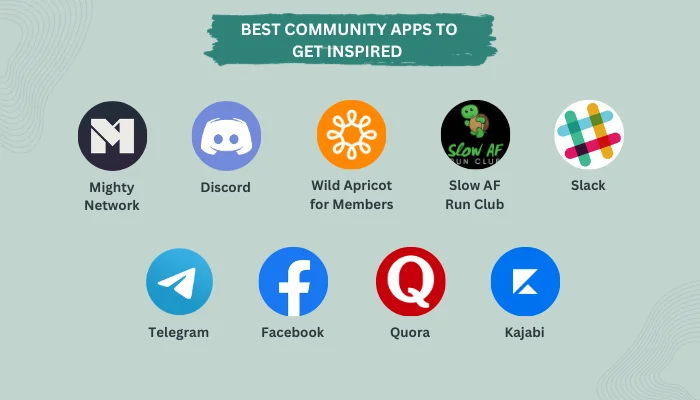
Let’s look at some of the best apps for community groups. These are, as mentioned below:
- Mighty Networks
- Discord
- Wild Apricot for Members
- Slow AF Run Club
- Slack
- Telegram
- Quora
- Kajabi
Looking at the list, you can recognize some of them as popular social media applications. While others are unrecognizable.
This is the perfect example of open-community apps like social media (Facebook, Telegram, etc) and closed-community apps like Wild Apricot for members.
The difference between types of community apps is important to understand before you get into community app development. With this cleared, it’s time to look at the reason to build a community app.
Why Build A Community App?
Truth be told: Mobile App Development can be EXPENSIVE! But that’s a small price to pay if you get results.
So, do you get results with community apps?
Well, you do – in fact – you get more than you bargained for. Confused, right? It will be quite clear by the end of this section.
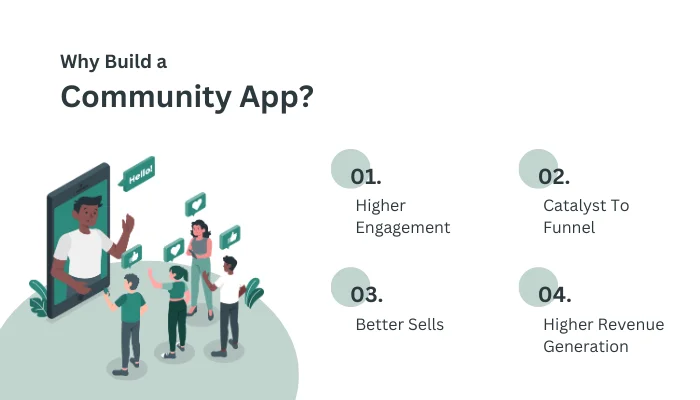
Let’s get right into it, starting with:
-
Growing Market Size
The global community platforms market size in 2021 was recorded as $454.114 millions, whereas by the end of 2033, this size can become $2667.87, growing at a CAGR of 15.9% during 2025 to 2033.
Additionally, the global sales community engagement platform is estimated to be worth USD 4313.0 million in 2025, which is anticipated to reach a value of USD 23,193.4 million by 2035.
This growth depicts a great opportunity for you to contribute to this market.
-
Higher Engagement
Whatever the nature of your business may be, you can always use higher engagement. And this is especially beneficial if you are selling a product or service.
Even if you are running a corporate business and want to create a community app for employees, higher engagement would keep your employees happier and more involved with the company.
How amazing is that?
If that’s not the reason enough to hire an app developer and go for community app development, the next one will seal the deal.
-
Catalyst To Funnel
A sales funnel is difficult to create and even more difficult to maintain and optimize.
Confused about all the ToFu, MoFu, and BoFu? You should develop a community app. It’s a proven method that acts as a catalyst to funnel, helping businesses get more leads.
And this brings us to our next point.
-
Better Sells
Are you running a product-based or service-based company?
Well, if you want to increase sales, community app development is just the thing you need.
Let us explain, with a community for your platform, you get a more accurate user base. And more importantly, a loyal one.
So, if you want to sell:
- Memberships
- Courses
- New products and services
OR
Offer a:
- Premium experience
- Value a website can’t
- Group coaching or a mastermind
- Live events
The community app allows you to do all of this. And when the sales go up, you have chances for…
· Higher Revenue Generation
There is not a single business in existence that doesn’t love money, which is the reason why improving sales via a community app is such a lucrative idea.
Think about it this way – better sales, higher engagement, & improved funnel give you higher revenue generation.
And who doesn’t love that?
So, these are some of the top reasons to go for community app development.
At this point, you are either convinced to develop a community app or not, but still want to read the blog.
Regardless, we shall guide you through the community app development process in the section below.
How to Build a Community App?
Gear up; it’s time to create a community app.
Community app development follows a path similar to mobile app development. Still, we shall be taking you through each step, discussing them in detail.
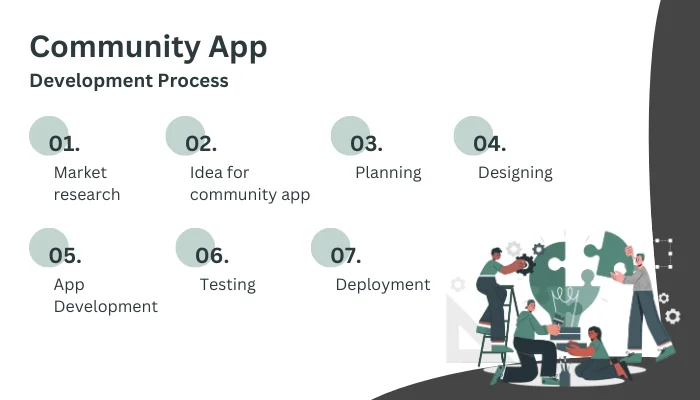
Therefore, with this being said, let’s get started:
Step 1: Market Research
It all starts with mobile app market research.
Before you go on to make a community app, you must first understand. Now, this can be a short process if you are making a closed-community app or a longer one if you are going to make an app like Quora or Facebook.
The main goal of this step is to understand the target audience (and competitors). And information gathered here acts as fuel for the entire development process.
So, once you are done with this, we will deal with…
Step 2: Idea For Community App
With all the information at your hand, it’s time to come up with an idea for your community app. This is the spearhead to direct the community app development process.
Whether you want to develop a community app for your company staff, for church goers, i.e., “church app development,” or you want to create a social media-like platform for a specific audience.
All in all, you need to draw a clear concept for the platform.
Step 3: Planning (Platform, Tech Stack, Features, & More)
It’s time to draw a roadmap for the community app development process.
There are a few things you need to choose, with the first one being the platform. Do you want to develop an iOS application or an Android app?
Or do you want to go with hybrid app development?
After you have selected the platform, the next thing you need to do is choose a mobile app development tech stack. You can go with the pre-set ones, or you can come up with custom ones.
In any case, it’s also time to explore the feature set. This is something that will be highly affected by the platform and tech stack.
We already discussed a few examples of community app features in starting of the blog.
Step 4: Community App Designing
With all said and done, we will start the process of “community app design and development”, first dealing with the UI/UX design part.
Now, this is no rocket science; rather, it’s closer to music theory (which is actually more difficult), since it has to do with creativity.
Take your time; create a design based on the user base, their persona, and requirements. Make sure to keep it simple and direct, but don’t be afraid to woo your users.
Once you have a user-friendly interface, it’s time to go for back-end development.
Step 5: Community App Development
Time to create a community app.
For this, mobile app developers will start writing the source. And you should expect this to take a lot of time.
Rather, this is the most time and resource-intensive process of community app development. For that reason, we highly recommend you keep a good community channel with the development team.
Step 6: Testing
With development done, we go into testing!
Testing is the norm before deploying the app. Something that we absolutely have to do.
For laymen out there, it is the process of finding out issues, fixing them, and improving the solution. Once this is done, it’s time to deploy the app in the market.
Step 7: Deployment
Finally, we have a community app ready to publish.
Depending on the platform, you will publish it on the App Store or publish it on Google Play Store. Even if you opted for hybrid app development.
Beware, Apple is a lot stricter with its publication guidelines, so they might reject your app for the slightest mistake.
If everything goes as planned, it will take upwards of two weeks at most. But the work doesn’t end here.
Though we haven’t mentioned it in this blog, there are a lot of things to do after community app development. This includes ASO – App Store Optimization, post-deployment app maintenance, and so on.
Speaking of which, going through the community app development process, you might be wondering, How much will all of this cost? Well, you aren’t the only one. In fact, it is quite a common question in the case of app development.
So, let’s answer it in the section below:
How Much Does a Community App Development Cost?
On average, the cost to create a community app varies from $20,000 to $110,000+. This cost further depends on factors such as the complexity of the app, the design of the app, the tech stack, hiring developers, and the features of the app.
The given table defines the complete cost to build a community app:
| Cost Factor | Estimated Cost Range | Description |
| UI/UX Design | $3,000 – $10,000 | Designing user-friendly layouts, wireframes, and prototypes. |
| Frontend Development | $5,000 – $25,000 | Building the app interface for web or mobile platforms. |
| Backend Development | $7,000 – $30,000 | Server, database, APIs, and core functionality development. |
| Real-Time Features | $2,000 – $10,000 | Chat, notifications, and live updates for community interaction. |
| Third-Party Integrations | $1,000 – $5,000 | Payment gateways, analytics, social login, and other integrations. |
| Testing & QA | $1,000 – $7,000 | Ensuring performance, security, and bug-free functionality. |
| Deployment & Launch | $1,000 – $3,000 | App store deployment, hosting setup, and final release. |
| Maintenance & Updates | $3,000 – $20,000+ | Ongoing improvements, bug fixes, and feature updates. |
| Total Estimated Cost | $20,000 – $110,000+ | Depends on app complexity, platform, and development team. |
Well, the cost to create a social media app will vary depending on the requirements of your app, and its effective features to reach the target audience.
Now, let’s learn how community apps make money, and how you can monetize your community app in the next section.
How Can You Make Money With a Community App?
You can make money with a community app through a freemium model, pay-to-access, in-app purchases, selling products and services, and offering exclusive benefits.
These monetization strategies can be slightly different from “how social media app makes money?”
Let’s check them out in the table given below:
| Monetization Strategy | Description |
| Subscription Plans | Charge users a monthly or yearly fee for premium community access. |
| Freemium Model | Offer basic features for free and charge for advanced features. |
| In-App Advertising | Display ads from brands or ad networks to generate revenue. |
| Sponsored Content | Brands pay to promote posts, discussions, or announcements. |
| Paid Membership Tiers | Provide exclusive groups, content, or privileges for paid members. |
| In-App Purchases | Sell digital goods such as badges, themes, or premium tools. |
| Event Ticket Sales | Charge users to attend online or offline community events. |
| Affiliate Marketing | Earn commissions by promoting relevant products or services. |
| Online Courses & Workshops | Sell educational content, webinars, or skill-based sessions. |
| Marketplace Commissions | Take a percentage from transactions between community members. |
| Donations & Tips | Allow members to financially support the community or creators. |
| Job Boards | Charge companies to post job listings within the community. |
If you are struggling to find a top-rated app development company, then the following section can be fruitful for you.
Why Partner with Nimble AppGenie for Building Your Social Media App?
Connecting with a company that understands your social media app idea, its requirements, potential technologies to fit in, a perfect design landscape, and who knows the frequency of updates for your app, that will be a right match for you.
Well, no need to worry!
Connecting with Nimble AppGenie, the best Social Media App Development Company, can provide you with all these benefits. Apart from this, our developers know the market, they know what is best for your app, and how you can excel in this competitive environment.
Our team connects with you and delivers not just an app, but a promise that your app will function uninterrupted and provide value to the users as per your idea.
We have already done it before in 8+ years of experience. The Leading Tigo Live app is our work you can check.
Conclusion
Community app development is an underdog that seems like a worthless investment in the age of modern technology. But reality is quite the opposite.
As we discussed in the blog, done right, community applications can be the gateway to greater success for an array of businesses while also being beneficial for their audience. Now, it’s time for you to develop a community app.
FAQ
A community app is a mobile application that allows the user base to interact with each other, share media, create and interact on forums, and communicate via the platform itself. Popular examples of community apps include Mighty Networks, Discord, Quora, Kajabi, and so on.
If you want to build a community app, we highly recommend that you consult an app development company. As far as the process is concerned, here’s how it goes:
- Research and ideation
- Planning
- Choose Platform and Tech Stack
- App Designing
- Development & Testing
- Deployment
- Marketing & Maintenance
To develop a live streaming community app, you have to follow these steps:
- Research and ideation
- Planning (Platform and Tech Stack)
- Hire a Mobile App Developer
- App Designing
- Development & Testing
- Deployment
- Marketing & Maintenance
The working of each community app differs from another, but the basic process goes as follows:
- Create a profile on the platform
- Add friends
- Share media
- Interact
- Messaging and calling feature
- Comment on posts

Niketan Sharma, CTO, Nimble AppGenie, is a tech enthusiast with more than a decade of experience in delivering high-value solutions that allow a brand to penetrate the market easily. With a strong hold on mobile app development, he is actively working to help businesses identify the potential of digital transformation by sharing insightful statistics, guides & blogs.
Table of Contents




No Comments
Comments are closed.