

 Free Consultation
 PCI-DSS Compliant
 GDPR Ready
 ISO 27001
 NDA Protected
 AI Services
 AI App Development
 Generative AI Development
 AI Chatbot Development
 AI Integration Services
 AI Consulting Services
 AI For Fintech
 AI Financial Assistant Solution
 AI Insurance Agent Development
 Tech Stack
 OpenAI / GPT-4
 Claude / Anthropic
 Gemini / Google AI
 Llama / Open Source
 LangChain / LlamaIndex
 Pinecone / Pgvector
 AWS / Azure AI


 Fintech Solution
 Core Fintech
 App Development
 Neobank Solutions
 eWallet Solutions
 Lending Software
 Banking Solutions
 BNPL Solutions
 BNPL Solutions
 Insurance App
 Wealth Management
 Crypto & DeFi
 Blockchain Development
  Payroll Software
 DeFi Solutions
 Crypto Wallet
 Crypto On/Off Ramp
 Crypto Exchange
 Trading Platform
 Payments
 Compliance
 Regulations & Compliance
 Fraud Detection
 Lending Ecosystem
 P2P Lending Platform
 Mortgage Software
 Engagement
 Fintech Outsourcing

 Mobile Development
 Mobile App Dev
 iOS App Development
 Android App Development
 React Native
 Flutter Development
 Web Solution
 Node.js Development
 React.js Development
 Angular Development
 App Services
 UI/UX Design
 App Maintenance
 By Stage
 MVP Development
 Industry Solutions
 Healthcare App Dev
 Education App Dev
 Travel App Dev
 Real Estate App Dev
 Logistics Software
 Social Media App

 Hire Mobile Developers
 Hire iPhone Developers
 Hire Android Developers
 Hire React Native Devs
 Hire Flutter Developers
 Hire Web Developers
 Hire Node.js Developers
 Hire Angular Developers
 Hire PHP Developers
 Hire Laravel Developers
 How It Works
 Pre-Vetted Developers
 Ready In 48 Hours
 NDA From Day One
 Replace Guarantee
 Company
 About Us
 Our Work Process
 Portfolio
 Case Studies
 Blog / Insights
 Careers
 Contact Us
 Awards
 Recognition


 Offices



Key Takeaways:
- To develop accounting software like QuickBooks, you need important features like invoicing, payroll, expense tracking, bank reconciliation, financial reports, and tax management.
- The demand for cloud-based accounting software is growing fast in 2026, especially among small and medium-sized businesses looking for simpler and smarter solutions.
- Businesses that create software like QuickBooks for a specific industry, such as healthcare, retail, construction, or real estate, have a better chance of standing out in the market.
- Must-have features like AI-powered expense categorisation, inventory management, multi-currency support, and third-party integrations can make the software more useful and easier to scale.
- The cost to build accounting software like QuickBooks can range from $25,000 to $250,000 based on the features, integrations, security needs, and overall project size.
- Accounting software development also comes with challenges like data security, tax compliance, accounting accuracy, system scalability, and smooth third-party integrations.
- The right tech stack, cloud infrastructure, and experienced fintech developers can help businesses build a secure and reliable QuickBooks alternative.:
Can you develop accounting software like QuickBooks? Yes, and in 2026, there has never been a better time to do it. QuickBooks holds 62% of the accounting software market. But it was built for the average small business, not yours.
Real estate developers, construction firms, healthcare clinics, and SaaS companies all hit a wall with QuickBooks; it does not go deep enough for their specific workflows.
That is the gap. And that gap is where your product lives.
Thus, if you are planning to invest in QuickBooks-like accounting software development, now is the best time. This guide covers the features your software needs, the development process, what it actually costs, and how to build something businesses will pay for and keep paying for.
So, let’s begin!
What is QuickBooks Software?
QuickBooks is an accounting and financial management software built by Intuit. It was launched in 1983 and has grown into the most widely used accounting software for small and medium-sized businesses.
At its core, QuickBooks helps your business:
- Create and send invoices.
- Track income and expenses.
- Manage payroll.
- Prepare for tax season.
- Generate financial reports like profit and loss statements.
- Connect with bank accounts for automatic transaction syncing.
It comes with two main versions:
- QuickBooks Online: It is cloud-based, accessible from any device, and ideal for modern businesses.
- QuickBooks Desktop: Installed software on a computer, preferred by some accountants for its depth of features.
It is simple enough for a first-time business owner to use, yet powerful enough to handle the books for a company with millions in revenue. That balance is what made it the market standard, and what makes it the benchmark when you want to develop accounting software like QuickBooks.
Why Build Accounting Software in 2026? The Market Opportunity
Before you invest time and money into custom accounting software development, it helps to understand the market you are entering. The numbers are compelling.
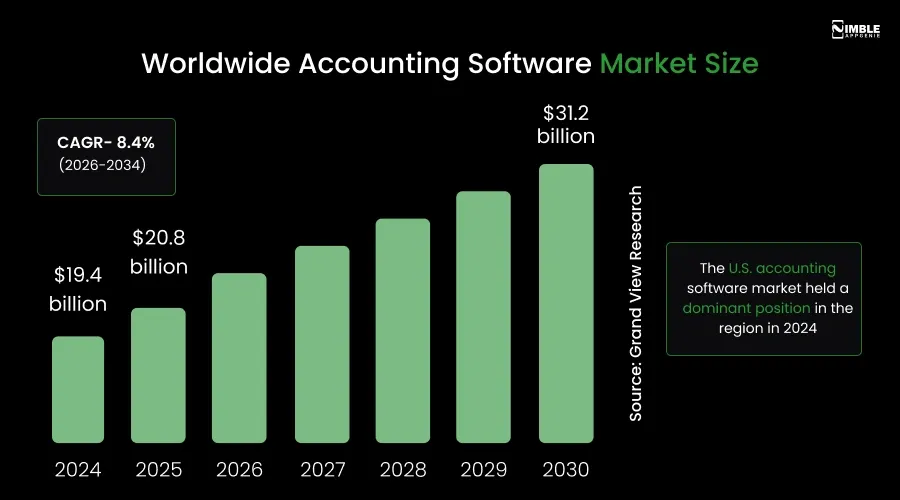
- The worldwide market size of accounting software was forecasted at $19.38 billion in 2024, and it is forecasted to hit $31.25 billion by 2030.
- The current customers of QuickBooks are approximately 97,874, and the market share is 82.01%.
- The revenue generated by cloud-based accounting software solutions was 68.08% in 2025, and it will grow by 10.15% CAGR through 2031.
- Around 70% of SMEs are using accounting software globally.
- The revenue growth from cloud accounting adoption in 2025 is expected to be more than 15% higher year over year.
The numbers say two things very clearly. First, the market is growing fast, and it is not done growing. Second, most of that growth is coming from SMEs and cloud-first tools, which is exactly the segment a new, custom-built accounting product can target.
Here is the critical insight. QuickBooks holds around 62% market share, but it built that share by being generic enough for everyone. That same genericity is why construction companies, healthcare businesses, and SaaS companies constantly complain that QuickBooks does not quite work for them.
That gap between what QuickBooks offers and what specific industries actually need is the entire business case for developing custom accounting software.
Must-Have Features for Accounting Software Development like QuickBooks
Your feature list is the difference between what software businesses pay for and the software they abandon after the free trial. When you are developing accounting software, it is vital to carefully choose them. Here is what your product needs, split into core MVP features.
| Feature | Description | Why It Matters |
| Invoice & Billing | It creates, sends, and tracks professional invoices. Supports recurring invoices, partial payments, and automated reminders. | Cash flow depends on getting paid
on time. Manual invoicing leads to delays and errors. |
| Expense Tracking | It records all business expenses, autocategorizes them, and supports receipt
scanning via mobile, tracks mileage. |
Businesses lose money on
untracked expenses. Autocategorization saves hours of manual entry. |
| Bank Reconciliation | It syncs with bank accounts, matches
transactions automatically, and flags discrepancies. |
Manual reconciliation is time-consuming and error-prone.
Automation cuts the monthly close time drastically. |
| Accounts Payable | It manages vendor bills, payment schedules, and outstanding dues. | Late payments damage supplier relationships and can attract penalties. |
| Accounts Receivable | Tracks customer payments,
outstanding balances, and overdue accounts. |
Knowing who owes you money, and by when, is critical for cash flow management. |
| Payroll Management | Calculates salaries, deductions, and
taxes. Generates payslips. It supports multi-state or multi-country tax rules. |
Payroll errors cause compliance
issues and employee dissatisfaction. |
| Financial Reporting | Generates P&L statements, balance sheets, cash flow reports, and tax summaries. Customizable by date
range or department. |
Decision-makers need accurate
reports. Investors and auditors require them. |
| Tax Management | Calculates sales tax, VAT, or GST. It supports filing for multiple jurisdictions. | Tax compliance is non-negotiable.
Errors lead to penalties. |
| Multi-currency Support | Handles transactions in different currencies with real-time exchange rates. | Businesses with international clients
or vendors need this built in from day one. |
| User Roles & Permissions | Different access levels for accountants, managers, and admins. | Sensitive financial data must be protected. Not everyone needs to see everything. |
| Mobile App | Full-featured iOS and Android app with
offline mode, biometric login, and real-time sync. |
Over 41% of accounting work now happens on mobile. A poor mobile
experience kills adoption. |
| Dashboard & Analytics | Visual overview of financial health, income, expenses, unpaid invoices, and cash position. | Business owners want a quick pulse on their finances without digging into reports. |
Advanced Features to Develop Accounting Software like QuickBooks
Once your core product is stable, these advanced features help you compete at a higher level. These features increase stickiness, better user retention, expand your addressable market, and command higher pricing.
You should build them based on what your paying users ask for most. Let’s take a look at the advanced features.
| Advanced Feature | Description | Best For |
| AI-Powered Categorization | It uses machine learning to autocategorize transactions based on patterns. | High-volume businesses that want to reduce manual bookkeeping. |
| Audit Trail | Logs every change made to financial records with the user and timestamp. | Businesses that need regulatory compliance and internal accountability. |
| Project-based accounting | Tracks income and expenses per project or job site. | Construction, real estate,
consulting, and agency businesses. |
| Inventory Management | Tracks product stock levels, purchase orders, and COGS. | Product-based businesses, retailers, and manufacturers |
| Budgeting & Forecasting | Set budgets, compare actuals vs. projections, and run financial forecasts. | Finance teams that plan
quarterly or annually. |
| Multi-Entity/Multi-Company | Manages books for multiple businesses
entities from one login. |
Holding companies, franchises, and accounting firms manage client accounts. |
| Third-party Integrations | Connects with CRMs, payment gateways, ERPs, e-commerce, and more. | Businesses with an existing tech stack that need accounting plugged in. |
| Document management | Attach receipts, contracts, and bills directly to transactions. | Businesses that need paperless records for audits and compliance. |
| Industry-Specific Note: If you are developing accounting software like QuickBooks for real-estate developers, your advanced features list includes project-level P & L tracking, construction draw schedule management, lender reporting, and lien waiver generation. These are the features no generic platform offers, and real estate developers will pay a premium for a tool that manages them properly. |
How to Develop Accounting Software like QuickBooks?
To create accounting software like QuickBooks, you have to follow a thorough roadmap. Developing it is not a single project; it is a complete journey. Take a look at the QuickBooks software development process below.
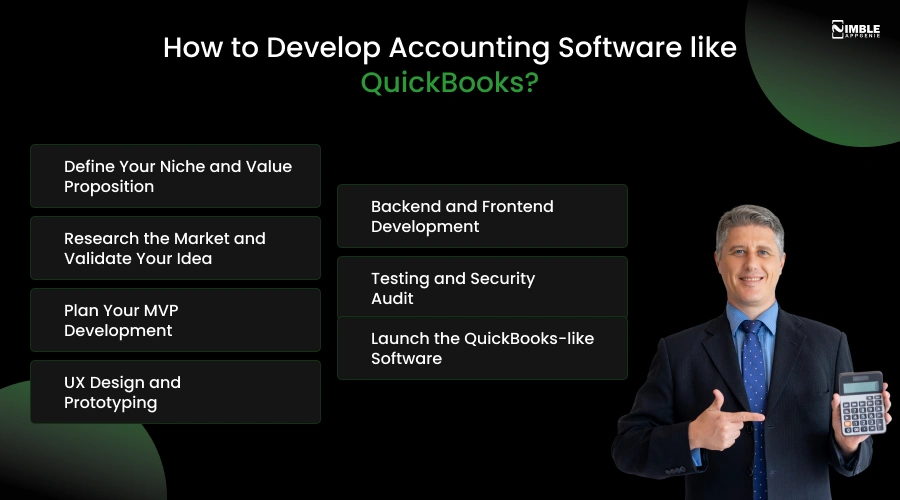
Step 1: Define Your Niche and Value Proposition
Do not build accounting software for everyone; that is QuickBooks’s job, and they have a year’s head start. You have to choose one market or niche. For example, real estate developers, construction companies, healthcare clinics, and SaaS businesses.
To find your niche, read the negative reviews on G2 and Capterra for every major accounting tool. The most common complaints are about your product roadmap. Industries with the most complaints, the highest willingness to pay, and the fewest specialised alternatives are your best starting points.
Step 2: Research the Market and Validate Your Idea
Now you need evidence that real businesses will pay for what you are developing. This step is where most founders cut corners, and where the expensive failures originate.
Talk to 20-30 real people in your market before any development begins. Just ask them how they currently handle accounting, what breaks, and what they would pay to fix it. At the same time, map your competitors based on pricing, integrations, and pain points in their user reviews.
Use this market research to build a feature priority matrix. List every feature you are considering and score each one on user demand, development effort, and competitive differentiation. The features that score high on demand and differentiation but low on effort are your MVP.
Step 3: Plan Your MVP Development
An MVP is not a demo. It is the smallest working version of your software that real users can pay for. When you develop accounting software like QuickBooks, it covers user login with role-based access, a chart of accounts, a general ledger, expense tracking, etc.
This stage also means making architectural decisions; your software architecture patterns determine whether you can scale later without rebuilding everything. Monolithic or microservices, single database or per-client isolation. These choices matter more than most people realise when making them.
Related Read: How to Build an MVP?
Step 4: UX Design and Prototyping
Accounting software has a reputation for being hard to use. That is your competitive advantage, if you get the design right. You can start with user flows, not visuals. Map every journey from signup to generating a report.
Now find where users will get confused and remove those moments before a developer touches the code. Then, wireframe in low-fidelity and test with 5-10 real users from your target market.
Their confusion points will surprise you. You can move to high-fidelity Figma design only after the flows make sense to someone who did not build it.
Step 5: Backend and Frontend Development
Custom accounting software development like QuickBooks runs in two-week sprints. Working features delivered at the end of every sprint. The backend is where accounting logic lives, like a double-entry bookkeeping engine, tax calculations, etc.
This is not standard web development. It needs developers who understand financial logic. Security is built in from day one: AES-256 encryption, TLS 1.3, multi-factor authorization, and role-based access control.
If your platform integrates with core banking software at scale, PCI-DSS compliance applies too.
Step 6: Testing and Security Audit
A bug in accounting software is not just a bad experience; it is a wrong tax return or a broken balance sheet. Testing here is not optional, and it is not light. You can run unit tests on every accounting formula. Test every integration under failure conditions.
Load test at 10x your expected peak; tax season will spike your traffic hard. Then bring in an independent security firm for a penetration test before launch. If enterprise clients are on your roadmap, SOC 2 Type I certification is required.
Step 7: Launch the QuickBooks-like Software
Now, you can launch a beta group of real users from your target market first, paying users. Thoroughly check how they actually use the software, not how you expected them to. When you go public, your onboarding flow is everything.
Build a data import wizard that accepts QuickBooks and Xero exports. Give users a setup checklist for their first invoice, first bank connection, and first report. After launch, build only what paying users ask for. Their requests are for a product strategy.
QuickBooks Alternatives: Where the Market Gaps Are
Knowing what existing accounting tools do and where they fall short helps you find the gap your product can fill. We have created a comparison table of QuickBooks alternatives. Take a look.
| Software | Best for | Pricing/Month | Key Gap | Your Opportunity |
| QuickBooks Online | US-based SMBs | $38 – $275 | No industry specialisation, and it is expensive to scale | You can build a niche version that fits better and costs less |
| Xero | Global teams, multi-currency | $20 – $80 | Weak US payroll, and it is limited to domestic CPA support | Stronger US payroll + local tax compliance |
| FreshBooks | Freelancers and service firms | $19 – $55 | No inventory; not suited for product businesses | Inventory-first businesses like retail, manufacturing |
| Zoho Books | Small businesses in the Zoho ecosystem | Free to $275 | Complex UI and limited to open API access | Cleaner UX + developer-friendly API layer |
| Wave accounting | Micro-businesses, sole traders | Free and paid add-ons | Not scalable and no payroll in most markets | Scalable upgrade path for growing businesses |
| Sage Intacct | Mid-market enterprises | $400 – $800+ | Very expensive and steep onboarding curve | Affordable mid-market depth without the complexity |
Every major tool has a real gap. The businesses caught in that gap are actively looking for an alternative to QuickBooks.
When you develop accounting software like QuickBooks that solves one of these specific issues better than anyone else, you do not need to compete on price or brand recognition. You compete on fit, and fit always wins.
Tech Stack for Developing Accounting Software Like QuickBooks
Your technology choices will shape how your software performs, how fast you can launch, how easy it is to maintain, and how well it scales. The table below showcases the cutting-edge tech stack for creating software like QuickBooks.
| Technology Layer | Recommended Tech Stack |
| Frontend Development | React.js, Angular, Vue.js |
| Backend Development | Node.js, Python, Java, .NET |
| Database | PostgreSQL, MySQL, MongoDB |
| Cloud Hosting | AWS, Microsoft Azure, Google Cloud |
| Payment Gateway Integration | Stripe, PayPal, Razorpay |
| Authentication & Security | OAuth 2.0, JWT, Multi-Factor Authentication |
| AI & Automation | OpenAI API, TensorFlow, Machine Learning Models |
| Accounting APIs | Plaid, Yodlee, QuickBooks API |
| File Storage | Amazon S3, Google Cloud Storage |
| Data Encryption | SSL/TLS, AES-256 Encryption |
One important principle: build fintech API-first. Your backend should serve data through well-documented APIs. This makes mobile app development faster, allows third-party integrations, and lets you build partner ecosystems later, just like QuickBooks did.
How Much Does it Cost to Develop Accounting Software like QuickBooks?
The cost to build accounting software like QuickBooks can range between $25,000-$250,000. This cost can vary depending on the complexity and scale of features. The numbers below are based on real project data, not optimistic estimates designed to get you to sign a contract.
| Software Complexity | What’s Included | Estimated Cost | Timeline |
| MVP or Starter | Core GL, invoicing, expense tracking, bank reconciliation, 4 financial reports, multi-user access. | $25,000 to $80,000 | 3-5 months |
| Mid-Level Product | MVP + payroll, tax module, mobile app, Stripe & Plaid integration, custom reports, API access | $80,000 to $160,000 | 5–8 months |
| Full Platform | All above + AI auto-categorisation, multi-currency, industry-specific modules, white-label, SOC 2 compliance, enterprise SSO | $160,000 to $250,000 | 8-10 months |
What Drives Cost Up?
- Feature Scope: Every module added to the scope increases the timeline. Payroll, multi-currency, and AI automation each add 6-10 weeks of development time per module.
- Third-party integrations: Each integration, like a payment gateway, CRM costs $2000-$10,000 in development time plus ongoing maintenance.
- Team Location: US-based developers bill $120-$200 per hour. Equivalent-skill developers in the USA or Europe cost $35-$75 per hour. Offshore-hybrid teams reduce the cost to develop accounting software like QuickBooks by 40-60%.
- Compliance and Security: SOC 2 Type I certification costs $15000-$30000. PCI DSS compliance increases the cost. Neither is optional if you want enterprise clients.
- Post-launch Maintenance: Plan for 15-20% of initial development costs per year for ongoing updates, bug fixes, security patches, and new features.
Budget Reality Check: Most serious account software projects fall between $75,000-$250,000 for a market-ready product.
Projects that exceed budget almost always do so because the feature scope was not clearly defined and agreed upon before development started. You should fix the scope and fix the budget.
Challenges in Accounting Software Development Like QuickBooks and Its Solution
The challenges to create accounting software like QuickBooks are:
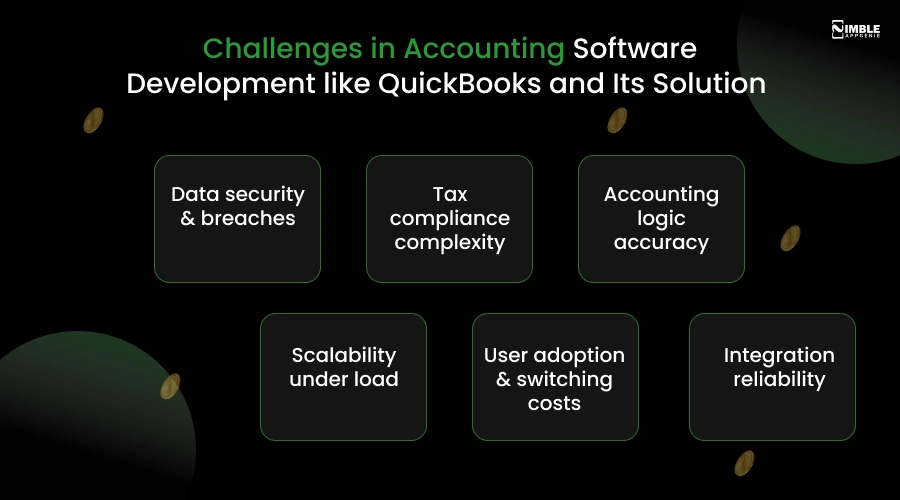
The challenges are real. Every serious accounting software project encounters them. Knowing they exist before you start means you can plan around them instead of discovering them at the worst possible time. Let’s understand each challenge along with its possible solutions.
1. Data Security & Breaches
Financial data is the #1 cybercrime target. One breach permanently destroys user trust and invites regulatory action.
Solution:
You can implement AES-256 encryption for all stored data and TLS 1.3 for all data in transit. Also, you can use role-based access control, multi-factor authentication, and build a tamper-proof audit trail from day one. Conduct quarterly penetration tests by an independent firm.
2. Tax Compliance Complexity
Tax rules change constantly across jurisdictions, states, and industries. Hard-coding tax logic into your codebase means every law change is a development sprint.
Solution:
You can build a modular tax engine that reads from a configurable rules library. API-connect to Avalara or TaxJar for real-time US and international tax rates. When tax law changes, you update the library, not the core application.
3. Accounting Logic Accuracy
Double-entry bookkeeping must always balance to zero. A rounding error or off-by-one mistake in the general ledger creates incorrect financial reports, a legal and trust problem for your users.
Solution:
You can hire a dedicated development team with fintech experience who understand double-entry logic. Write automated unit tests for every accounting formula. Besides, run parallel reconciliation checks against a reference ledger throughout QA. You should never treat accounting bugs as minor issues.
4. Scalability Under Load
An MVP that manages 500 users smoothly can collapse at 50,000. It is during the year-end tax season when every user is active simultaneously.
Solution:
You can design for horizontal scalability from the first sprint. Besides, use PostgreSQL with read replicas, separate your queries, implement Redis caching for dashboards, and load-test at 10x your expected peak usage before launch.
5. User Adoption & Switching Costs
Users have years of financial history in QuickBooks. Even if your software is better, migrating their data feels risky and painful, so they stay where they are.
Solution:
You can build a data import wizard that accepts QuickBooks exports, Xero exports, and CSV files with automatic field mapping. Besides, offer guided onboarding for the first 30 days, live chat support, and a dedicated success manager for the first 90 days. It is best to make switching feel safe.
6. Integration Reliability
Third-party APIs update without warning, breaking integrations at the worst possible time.
Solution:
Build all integrations through an API abstraction layer. When Stripe updates its API, you update one module, not your entire codebase. You can build retry logic, error alerting, and automatic reconciliation fallback into every integration from day one.
None of these challenges is unique. Every accounting software development team faces them. The difference is whether your development partner has already solved them on previous projects, or whether they are solving them for the first time at your expense.
How Nimble AppGenie Helps You Build Accounting Software Like QuickBooks?
Nimble AppGenie is a custom software development company that has helped startups, SMBs, and enterprises create financial products from the ground up.
We do not just write code. We thoroughly understand the accounting logic, the compliance requirements, and the user experience decisions that separate software people abandon for software people pay for year after year.
What do we bring to your project?
- Full-cycle development: From discovery and UX design to development, testing, and launch.
- Fintech expertise: We have built products in banking, lending, mortgage, and accounting, so we know where the complexity hides.
- Custom architecture: We design your data model and tech stack around your specific use case.
- Compliance-ready builds: GDPR, SOC 2, and local tax regulation support baked in from the start.
No matter if you are creating a QuickBooks-like software for real estate developers, a free accounting software alternative for small businesses, or an enterprise-grade solution with AI-powered automation, Nimble AppGenie has the team to build it.
We have helped businesses go from a product idea on a napkin to a live, revenue-generating software product. We can do the same for you. Share your idea, and we will help you build a plan, a budget, and a path to launch QuickBooks alternatives.
Conclusion
The window to develop accounting software like QuickBooks is wide open. It has dominated the general market for decades, but the shift to cloud, mobile, AI, and industry-specific products is creating real opportunities for focused competitors.
The businesses that win are not the ones trying to out-QuickBooks. They are the ones that go deep for a particular industry, use cases, or geography, and build something better for that audience.
If you are serious about developing accounting software like QuickBooks, the path is clear: just start with your users, build a focused MVP, and iterate based on real feedback.
FAQs

Niketan Sharma, CTO, Nimble AppGenie, is a tech enthusiast with more than a decade of experience in delivering high-value solutions that allow a brand to penetrate the market easily. With a strong hold on mobile app development, he is actively working to help businesses identify the potential of digital transformation by sharing insightful statistics, guides & blogs.
Table of Contents




No Comments
Comments are closed.