

 Free Consultation
 PCI-DSS Compliant
 GDPR Ready
 ISO 27001
 NDA Protected
 AI Services
 AI App Development
 Generative AI Development
 AI Chatbot Development
 AI Integration Services
 AI Consulting Services
 AI For Fintech
 AI Financial Assistant Solution
 AI Insurance Agent Development
 Tech Stack
 OpenAI / GPT-4
 Claude / Anthropic
 Gemini / Google AI
 Llama / Open Source
 LangChain / LlamaIndex
 Pinecone / Pgvector
 AWS / Azure AI


 Fintech Solution
 Core Fintech
 App Development
 Neobank Solutions
 eWallet Solutions
 Lending Software
 Banking Solutions
 BNPL Solutions
 BNPL Solutions
 Insurance App
 Wealth Management
 Crypto & DeFi
 Blockchain Development
  Payroll Software
 DeFi Solutions
 Crypto Wallet
 Crypto On/Off Ramp
 Crypto Exchange
 Trading Platform
 Payments
 Compliance
 Regulations & Compliance
 Fraud Detection
 Lending Ecosystem
 P2P Lending Platform
 Mortgage Software
 Engagement
 Fintech Outsourcing

 Mobile Development
 Mobile App Dev
 iOS App Development
 Android App Development
 React Native
 Flutter Development
 Web Solution
 Node.js Development
 React.js Development
 Angular Development
 App Services
 UI/UX Design
 App Maintenance
 By Stage
 MVP Development
 Industry Solutions
 Healthcare App Dev
 Education App Dev
 Travel App Dev
 Real Estate App Dev
 Logistics Software
 Social Media App

 Hire Mobile Developers
 Hire iPhone Developers
 Hire Android Developers
 Hire React Native Devs
 Hire Flutter Developers
 Hire Web Developers
 Hire Node.js Developers
 Hire Angular Developers
 Hire PHP Developers
 Hire Laravel Developers
 How It Works
 Pre-Vetted Developers
 Ready In 48 Hours
 NDA From Day One
 Replace Guarantee
 Company
 About Us
 Our Work Process
 Portfolio
 Case Studies
 Blog / Insights
 Careers
 Contact Us
 Awards
 Recognition


 Offices



Key Takeaways:
- Software architectural patterns are easy ways to design how your software app is built and how different parts work together, so everything runs smoothly.
- Choosing the right software architecture pattern helps your app scale easily, add new features faster, and avoid costly problems later.
- There are many types of architecture patterns for software, like monolithic, microservices, layered, and event-driven architecture, and each one fits different project needs.
- The software application architecture patterns for mobile apps are MVC, MVP, and MVVM.
- A good software as a service architecture keeps your code clean, improves performance, and makes it easier for teams to work together.
- The software architecture mistakes that developers make are over-engineering, ignoring stability, not thinking about security, and choosing patterns based on hype.
- The best architecture software pattern is not the most complex one, but the one that fits your team size, budget, and future growth plans.
Have you ever thought about why some applications run very smoothly while others crash under pressure? The answer is due to software architecture patterns.
You can think of it like a blueprint of a multi-storey building. Before a single brick is laid, an architect decides how many floors there will be, where the rooms go, and how everything connects.
Software works exactly in the same manner. Before developers write the first line of the code, they need a plan, a pattern. Then it decides how different parts of the system will communicate with each other.
At Nimble AppGenie, we have developed plenty of apps in different industries like fintech, healthcare, e-commerce, and more. And every single time, the first big decision we make is: which architecture pattern fits this product best?
In this guide, we will discuss all the major architectural patterns in software architecture, types, benefits, and other vital aspects. If you are a startup founder, a product manager, or a developer focusing on strong fundamentals, this guide is the best fit for you.
So, let’s begin!
What are Software Architecture Patterns?
A software architecture pattern is a general, reusable solution to a commonly occurring issue in software design. In easy words, it is a proven way of organizing your code and the different parts of your application so that everything works well together.
These patterns are not invested in from scratch every time. They are the outcomes of years of experience from developers who faced the same problems. Scaling issues, slow performance, messy code, and finding smart ways to solve them are the problems.
But knowing about software architecture is equally important. So, architectural design software is the high-level plan or blueprint that decides how a software system is organized.
Let’s understand this in a fast way:
- Your app is like a city.
- Different services are like different departments in that city.
- The architecture pattern is the city planning, deciding how roads connect, where the utilities go, and how everything is organized.
You can now choose a bad plan, and your city is a traffic nightmare. Or you can choose a smart plan, and your city grows effortlessly. The same is true for applications.
Why Do Software Architecture Patterns Matter?
Skipping proper architecture is one of the most expensive mistakes a software project can make. A startup develops a mobile app quickly without thinking about structure. It works for 1000 users. Then it hits 100,000 users, and suddenly everything breaks.
The server crashes, features take months to add, and fixing one bug creates five new ones. But the right architecture pattern helps you:
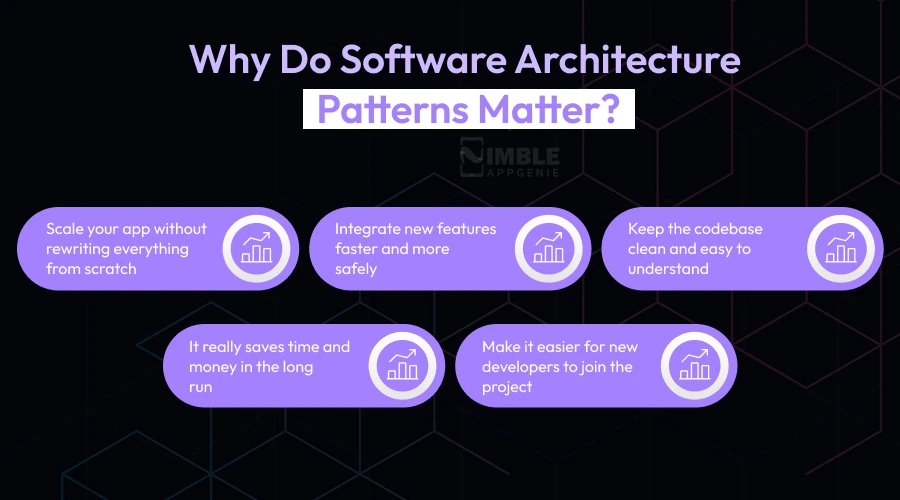
- Scale your app without rewriting everything from scratch.
- Integrate new features faster and more safely.
- Keep the codebase clean and easy to understand.
- It really saves time and money in the long run.
- Make it easier for new developers to join the project.
Simply put, architecture patterns are the difference between building an app that lasts and building an app that becomes a maintenance headache in six months.
12 Most Different Types of Software Architecture Patterns
Let us go through the most popularly used modern software architecture patterns one by one. For each one, we will explain what it is, how it works, and when you should use it.
1. Monolithic Architecture
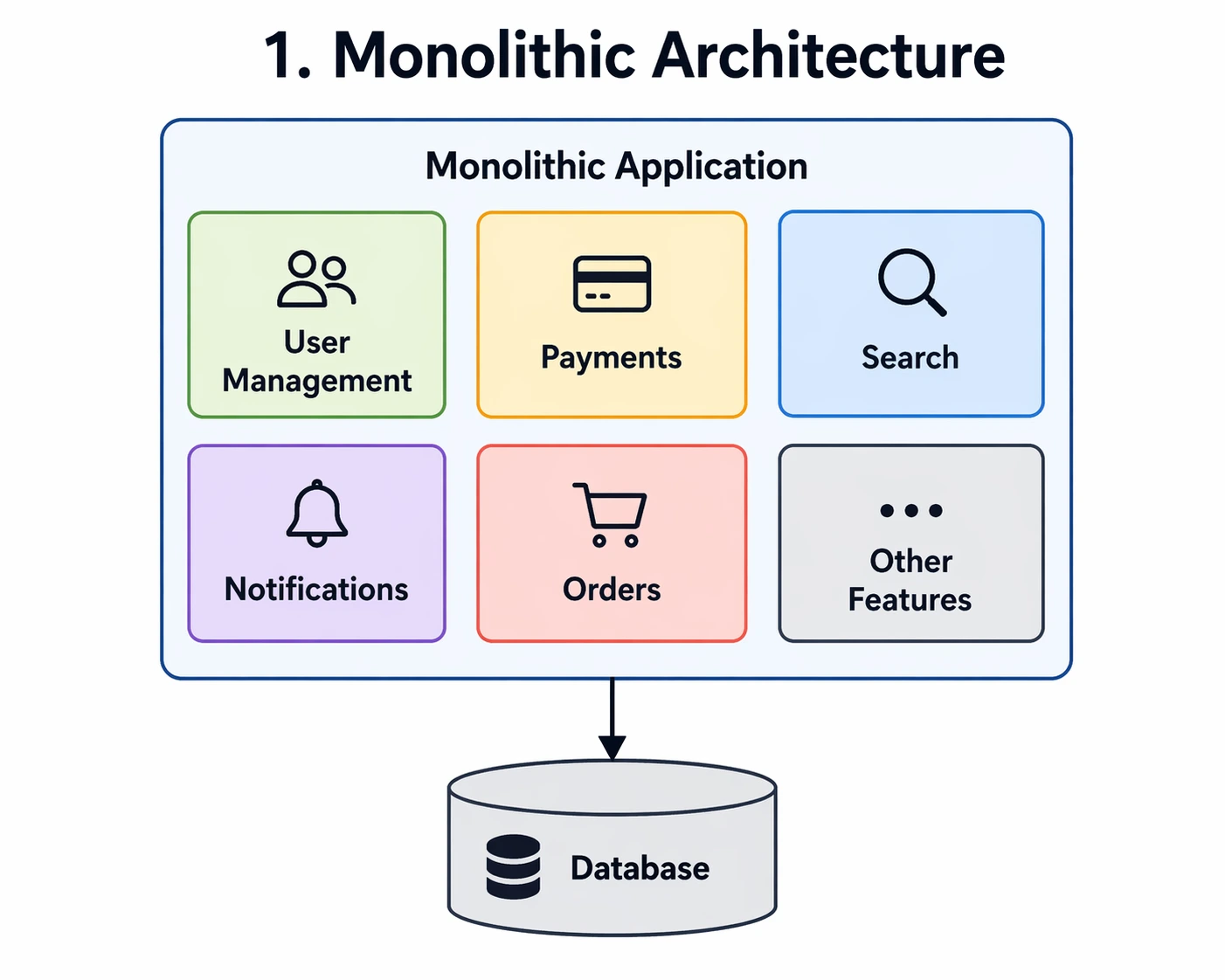
A monolithic application is created as one large, unified block. All the features, like user management, payments, push notifications, and search, are packed together into a single codebase and deployed as one unit.
When it works well:
- Small teams building MVPs
- Early-stage startups that need to ship fast
- Simple apps with limited scope
When it does not work well:
- When the app grows large and complex
- When you need different parts of the app to scale independently
- When multiple large teams work on the same app at the same time
2. Microservices Architecture
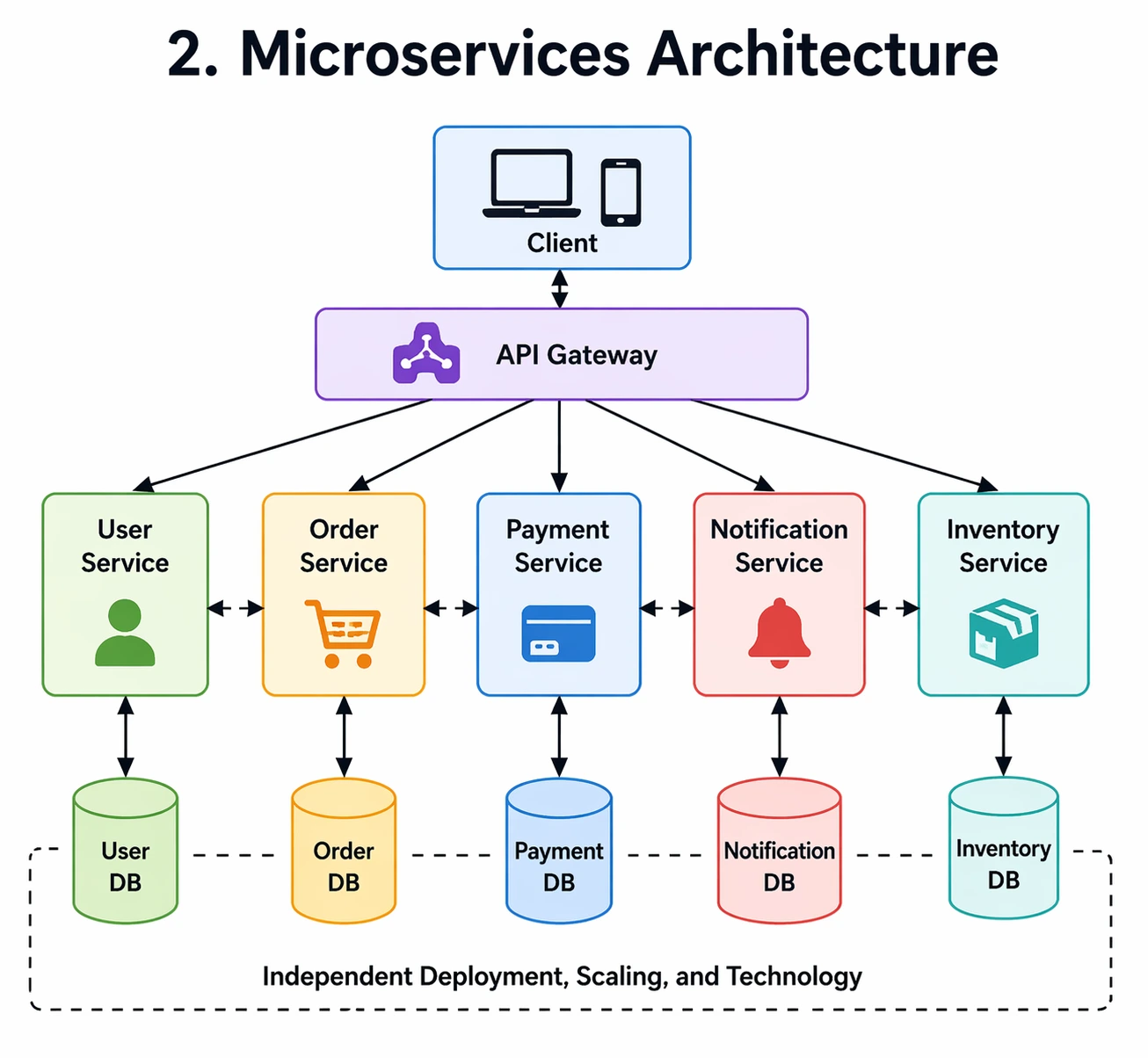
Microservices break the app into small, independent services. Each service does one task, for example, one service manages payments, another handles user login, and another manages notifications. They all communicate with each other through APIs.
The microservices pattern in mobile app development powers companies like Netflix, Amazon, and Uber. When Netflix suggests a show, that is one service. When you search for a title, that is another service. Developers can update, scale, or fix each without touching the others.
When it works well:
- Large, complex applications that need to scale
- Teams that work on different features simultaneously
- Products that need high availability and zero downtime
When it does not work well:
- Small projects where the overhead is not worth it
- Teams without experience managing distributed systems
3. Layered (N-Tier) Architecture
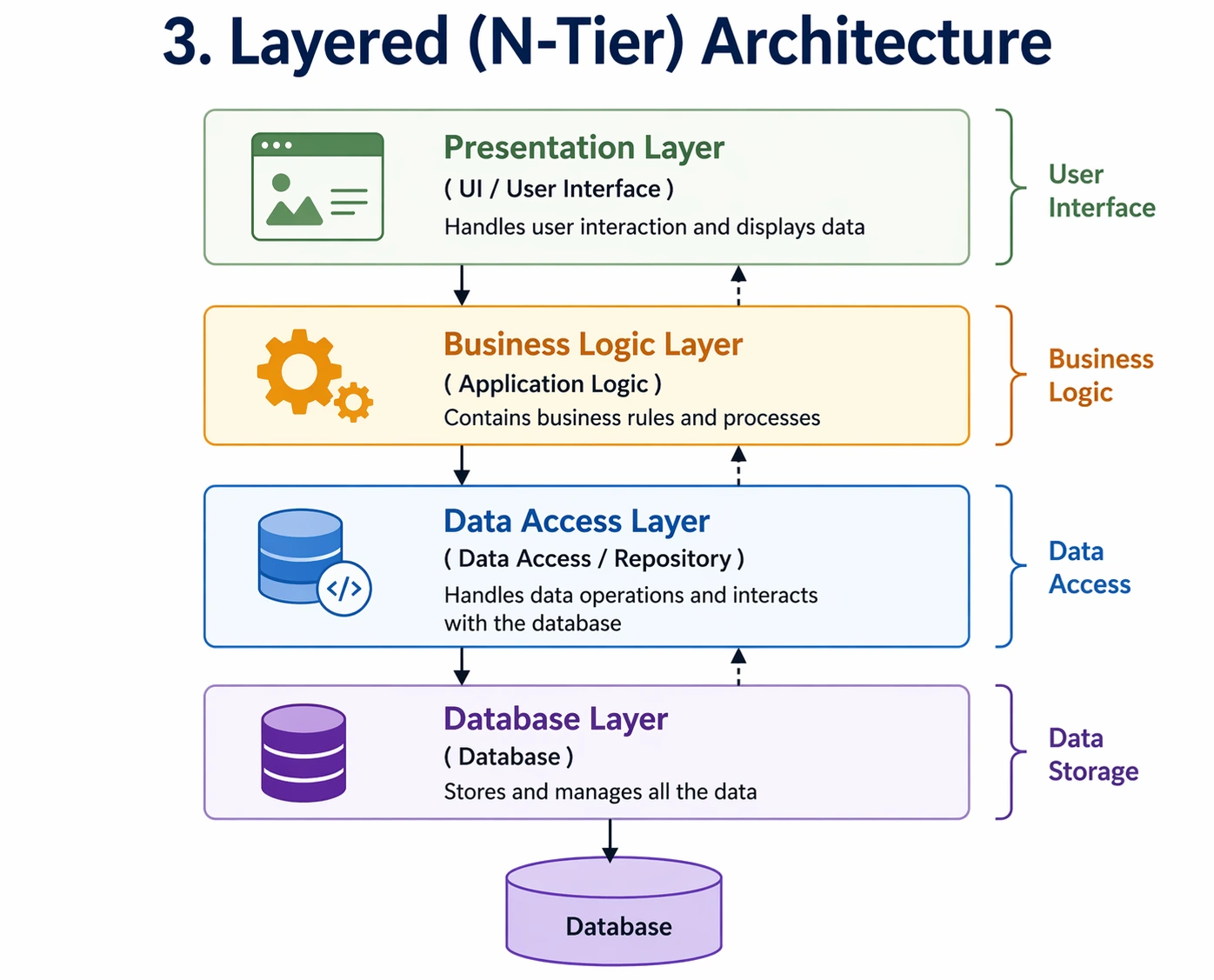
The layered architecture pattern, or N-tier pattern, is the best architecture software pattern that organizes code into horizontal layers, where each layer has a particular responsibility. The most common setup has four layers:
- Presentation Layer – What the user sees
- Business Logic Layer – The rules and processing of the app
- Data Access Layer – How data is read and written
- Database Layer – Where the data is stored
Every layer only communicates to the layer directly below it. This separation keeps the code organised and makes it really easy to maintain.
When it works well:
- Enterprise business applications like ERP or CRM systems.
- Web applications with a clear separation of frontend and backend.
- Projects where multiple developers need to work on different parts independently.
When it does not work well:
- For small projects, the extra boilerplate code and jumping between layers is overkill.
- More layers often mean more servers to manage and pay for.
- The rigid structure slows down quick changes and early-stage pivots.
4. Event-Driven Architecture
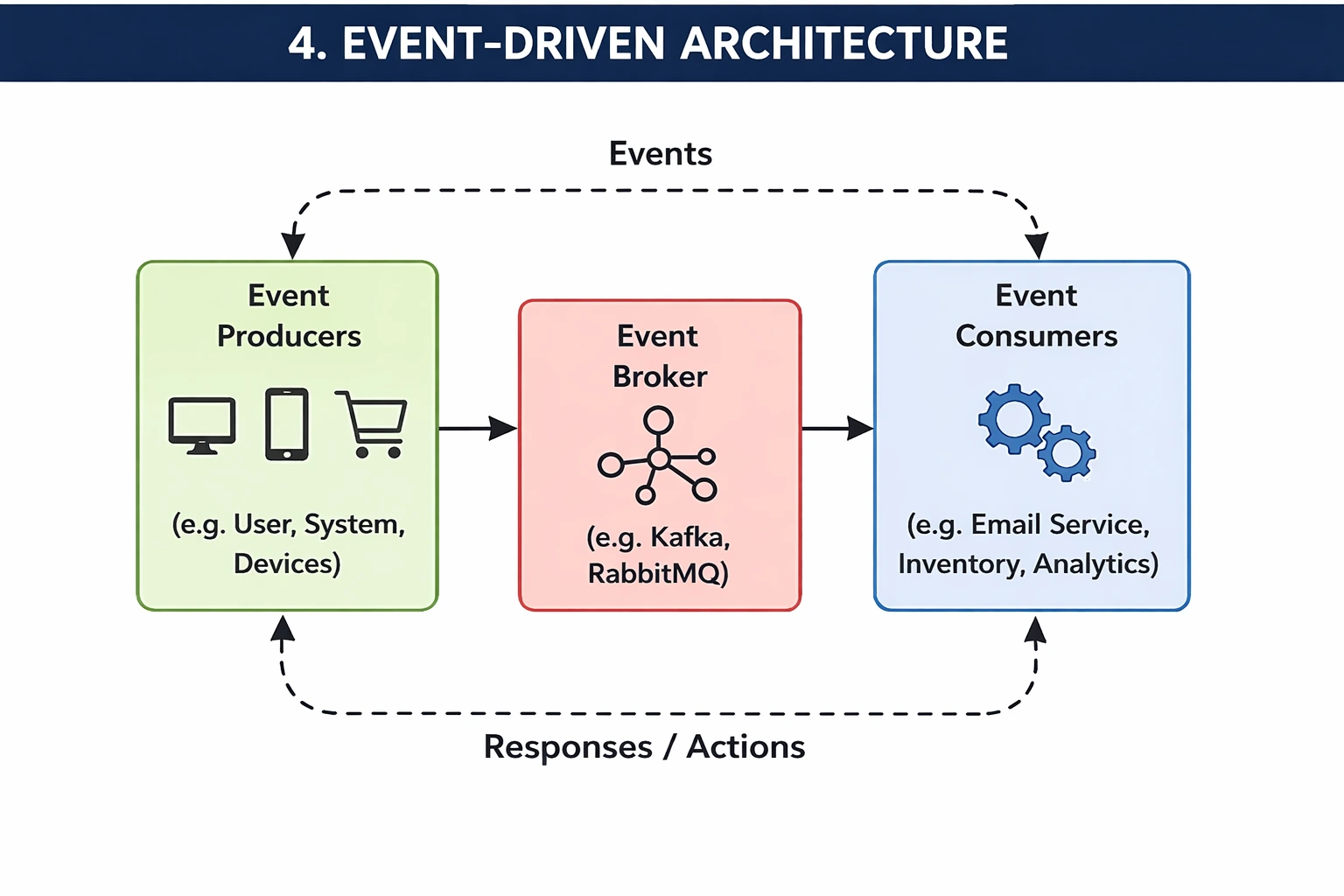
In an event-driven architecture pattern, things happen in response to events. An event is simply something that occurs: a user clicks a button, a payment is made, a file is uploaded. When an event occurs, it triggers a reaction in the system.
Let’s understand this with an example. When you place an order on an e-commerce app. Every single event triggers many reactions: your inventory is updated, a confirmation email is sent, the delivery team is notified, and your payment is processed.
All of this happens at the same time, driven by that one event.
When it works well:
- Real-time applications like live chat, the stock market, and social feeds.
- IoT or Internet of Things systems.
- Apps that need to handle many things happening at the same time.
When does it not work well:
- It’s harder to track a single request because the logic is scattered across many services.
- Systems are not updated instantly, which can lead to temporary data mismatches.
5. Serverless Architecture
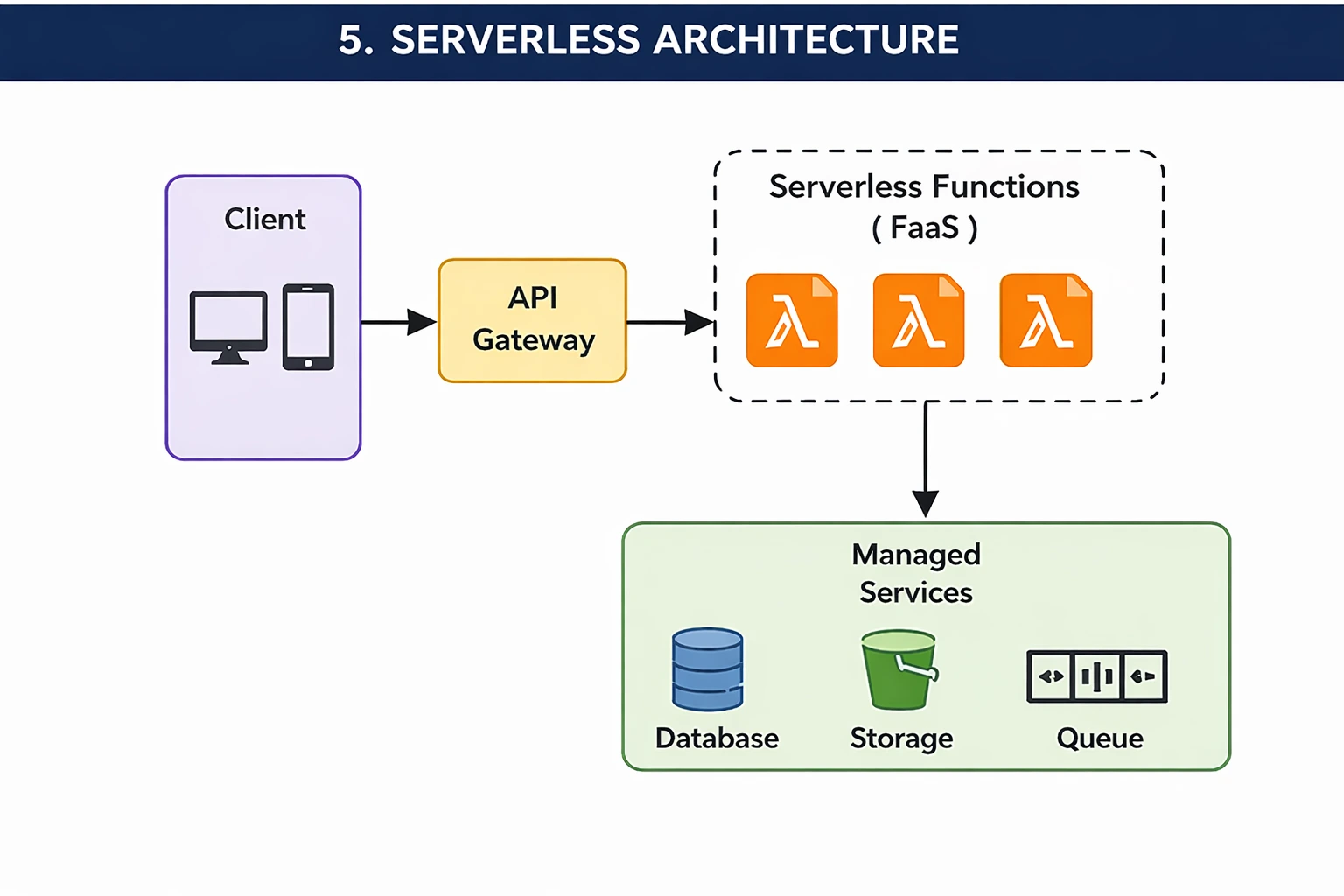
Despite the name, serverless does not mean there are no servers. It means developers do not have to manage them. A cloud provider like AWS, Google Cloud, or Azure runs and scales the servers for you. You only pay for the exact computer time you use.
When it works well:
- Apps with unpredictable or spiky traffic.
- Startups want to reduce infrastructure costs.
- Background processing tasks like sending emails or resizing images
When it does not work well:
- Apps that need consistent, low-latency responses due to cold start delays
6. Service-Oriented Architecture
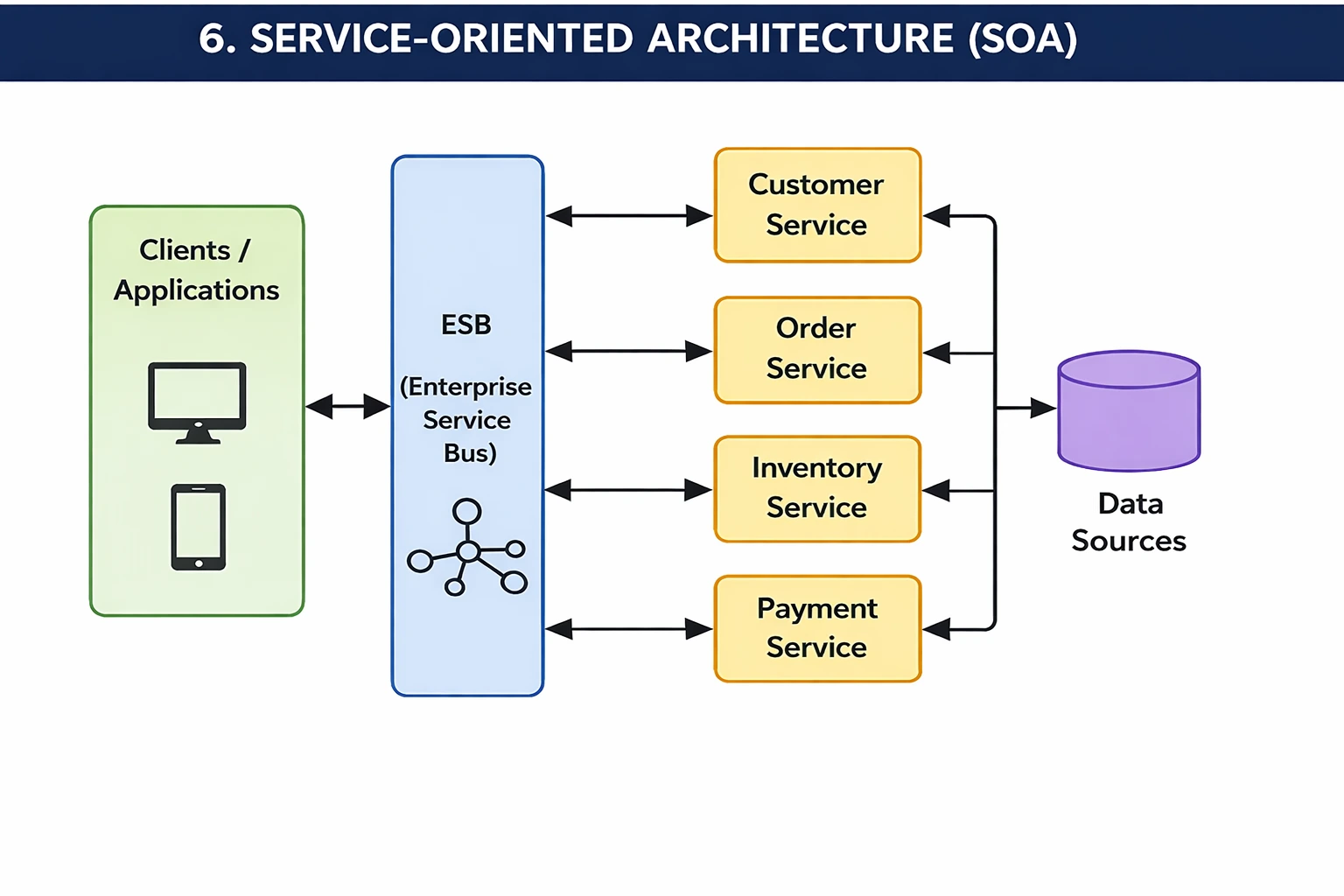
SOA is a design style where different parts of an application are built as services that communicate over a network. It is similar to microservices, but the services in SOA are typically larger and share a common communication layer called an Enterprise Service Bus.
SOA is widely used in large enterprises that have multiple systems, like a CRM, an ERP, and an HR system that need to talk to each other.
When it works well:
- Large enterprises are integrating multiple existing systems.
- Organisations that need reusable business services across departments.
When it does not work well:
- Building and maintaining SOA needs more time, which can increase the cost.
- Services communicate over a network, which can make the system slower.
7. Client-Server Architecture
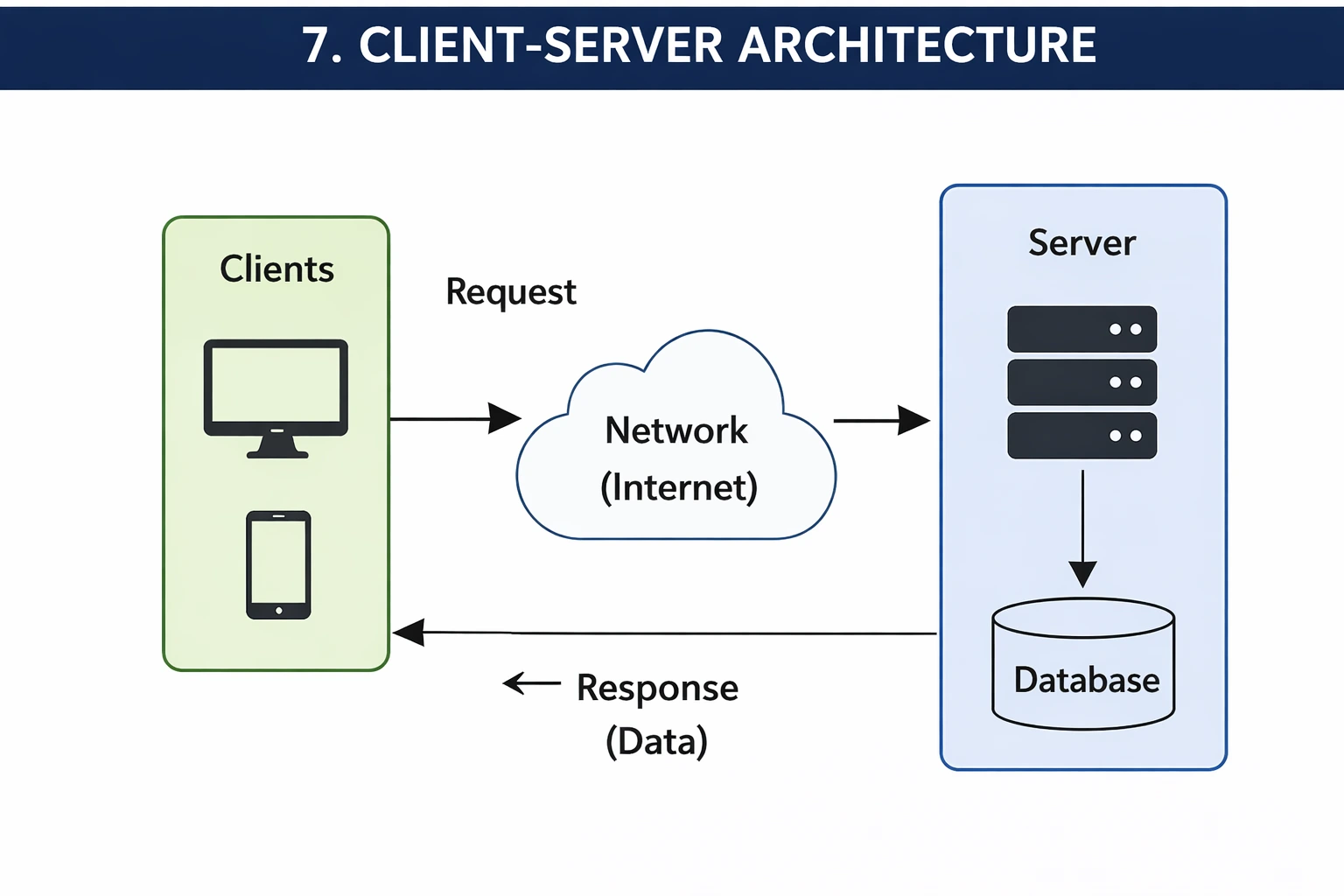
This is one of the oldest and most common patterns. The client (your browser or app) requests something, and the server responds with the data. Think of a restaurant: you (the client) place an order, the kitchen (server) prepares it, and sends it back.
Almost every website you visit uses this pattern. Your browser asks the server for a page, the server sends back the HTML, CSS, and JavaScript, and your browser displays it. In client-server systems, tools like Is It Down For Everyone can help teams quickly check whether a website or application outage is affecting all users or only a specific local connection.
When it works well:
- Web applications, mobile apps, and SaaS platforms
- Any system where a user interface needs to interact with a backend
When it does not work well:
- If the main server stops working, the whole system can go down.
- When too many users connect at the same time, the server can become slow or overloaded.
8. CQRS and Event Sourcing
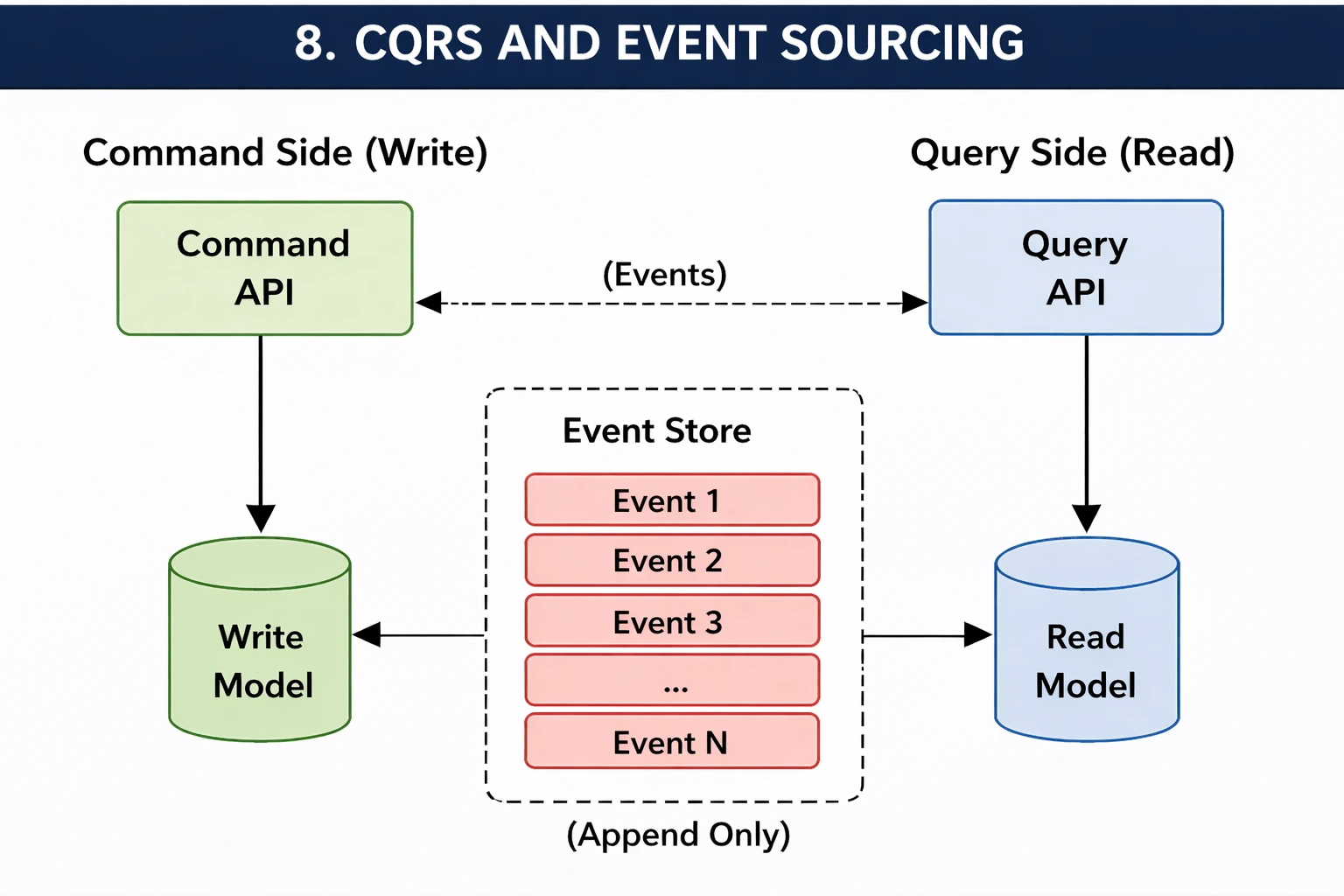
CQRS stands for Command Query Responsibility Segregation. That is a mouthful, so here is the simple explanation. This software architecture pattern separates the way you read data from the way you write data.
Event Sourcing is often paired with CQRS. Instead of just saving the current state, you save every change that has ever happened. So instead of storing a balance = $500, you store: deposited $200, withdrew $100, deposited $400. This gives you a complete audit trail.
When it works well:
- Fintech applications where every transaction must be tracked.
- High-traffic apps where read performance needs to be maximised.
- Systems that need a full history of every action, like healthcare and compliance-heavy industries.
When it does not work well:
- Takes more time and effort to build compared to simple systems.
- Adds extra complexity because the data and logic are split into many parts.
- Finding and fixing issues becomes harder since everything is stored as events.
9. Microkernel Pattern
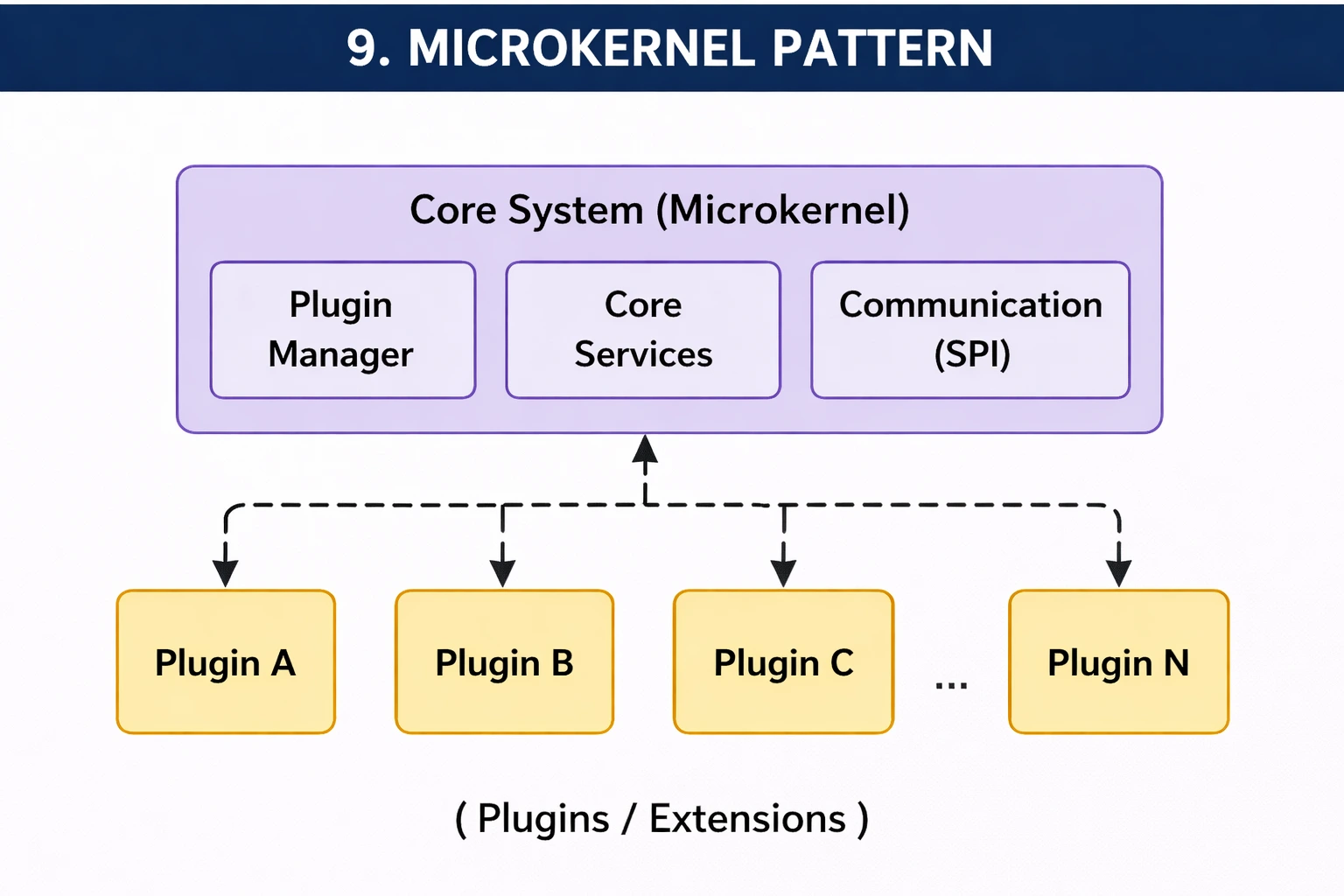
The microkernel pattern is a way to design software so that the main system stays small and simple. Also, the developers can add more features when required. The main part, which is the core, does only basic work, and all other features come as small add-ons.
You can add or remove these plugins anytime without affecting the main system. This makes the software easy to update, flexible, and easy to manage.
When it works well:
- When you need to add new features often.
- You want a system that is easy to update and change.
- When different parts can work independently.
When it does not work well:
- The system is very simple and does not need extra features.
- When too many plugins make it slow or hard to manage.
- Fast performance is needed, and extra layers can cause a delay.
10. Pipe-filter Pattern
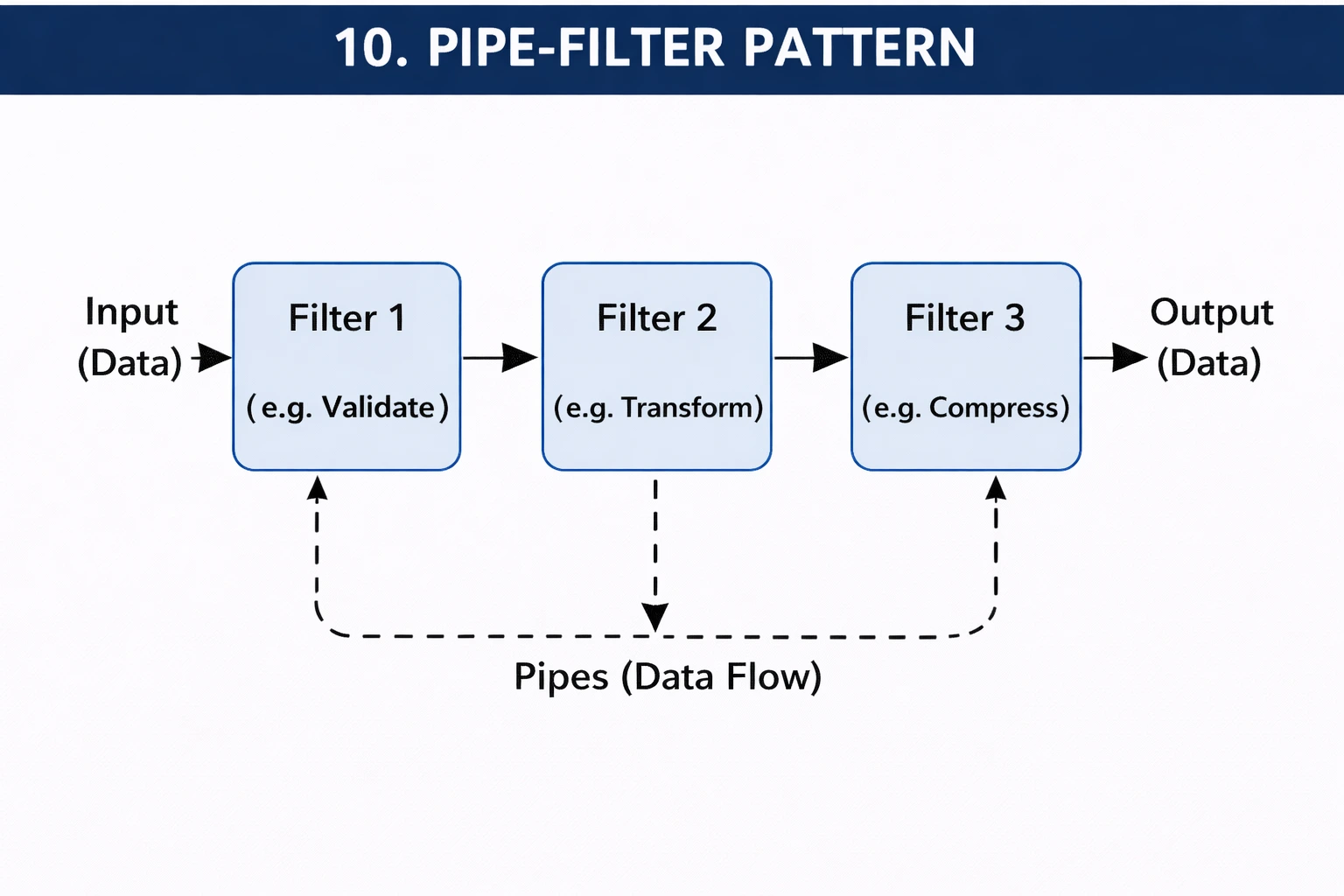
The Pipe filter architecture software pattern is a really easy way to organize how the data moves inside a system. In this pattern, the work is divided into small steps called filters, and these steps are connected by pipes.
Each filter does one small task on the data and then passes the result to the next filter through a pipe. For example, if you upload an image, one filter might resize it, the next might add a watermark, and another might compress it.
Each step works on its own and does not depend on how other steps work internally. This makes the system easy to understand, easy to update, and easy to reuse, because you can change or replace one filter without affecting the others.
When it works well:
- Works best when a task can be split into small, simple steps.
- Helps when you want a clear and smooth flow of data from one step to the next.
- Good choice when some steps may need to be reused or changed later.
When it does not work well:
- Not suitable when steps need to share a lot of data with each other.
- Creates problems when the process is complex and does not follow a straight flow.
- Can become slow if there are too many steps and the data keeps moving again and again.
11. Peer-to-Peer Architecture Pattern
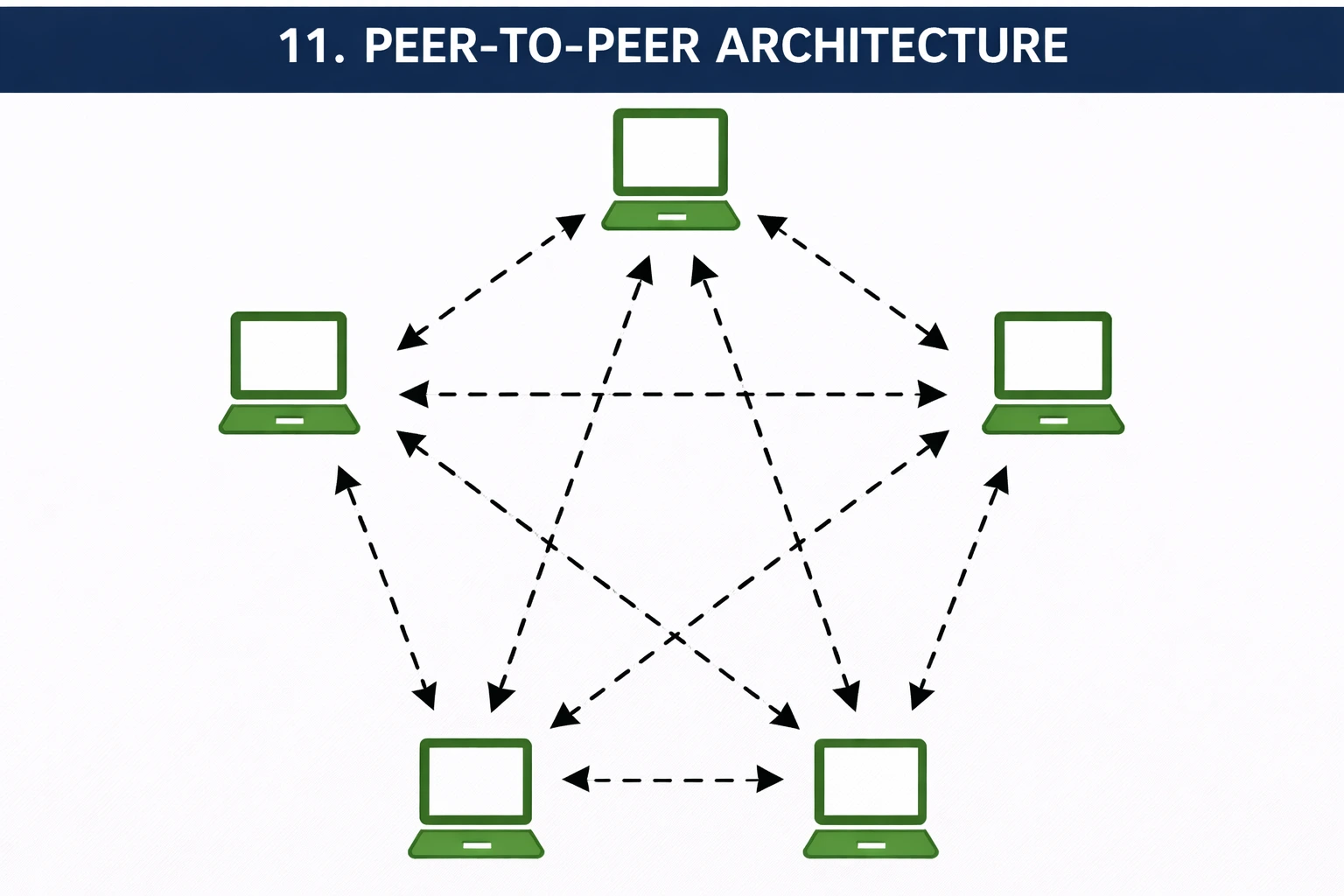
In this architectural design software pattern, all computers are equal. There is no main server. Every computer can send and receive data directly from other computers.
This works well when many users are sharing data, because the work is divided among all of them. Additionally, it keeps running even if some users leave.
When it works well:
- When you want to share files directly between users
- When there is no need for a central server
- When many users are connected and can share data
When it does not work well:
- When you need strong control or security
- When data must be managed from one place
- When some users have slow or unstable internet
12. Broker Architecture Pattern
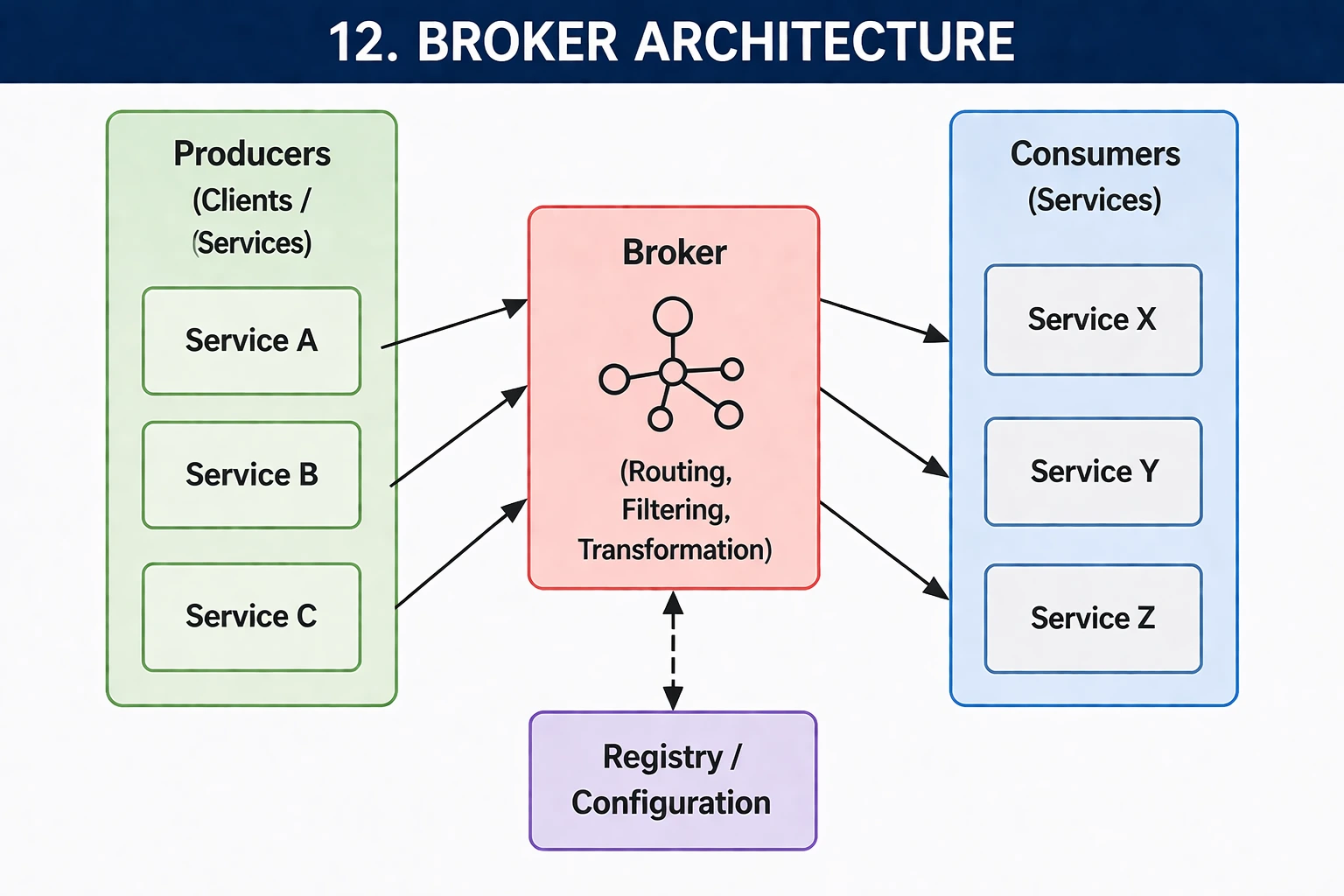
The broker architecture pattern uses a middle component known as a broker. It helps different parts of a system to communicate with each other. Instead of communicating directly, services send their request to the broker, and the broker passes them to the right service.
This makes the system more organised and easier to manage.
When it works well:
- When different services need to communicate
- When systems are large and spread out
- When you want to keep parts of the system separate
When it does not work well:
- When the broker becomes too busy or overloaded
- When a fast response time is very important
- When the broker fails, it can affect the whole system
Comparative Analysis of Different Software Architectural Patterns
So far, we have looked at different types of software architecture patterns. But the real question is, which one should you choose from your own project? Making the right choice is vital because it affects your software performance.
Let’s take a look at the comparison table below that will help you understand which pattern fits best based on your requirements.
| Pattern | Overview | Structure | Communication | Data Handling | Scalability | Advantages | Limitations |
| Layered (N-Tier) | This pattern divides the system into layers like presentation, business logic, and data access. Each layer has a specific role. | Organized in stacked layers where each layer depends on the one below it. | Layers communicate directly in a top-down manner. | Usually uses a single shared database. | Scaling is difficult because layers are tightly connected. | Easy to build, understand, and maintain for simple systems. | Performance issues due to multiple layers; not ideal for complex scaling. |
| Monolithic | The entire application is built as a single unit where all components are connected and run together. | Single codebase with tightly coupled components. | Internal function calls within the same system. | Shared database for all features. | Hard to scale specific parts independently. | Simple to develop and deploy in early stages. | Becomes difficult to manage and update as it grows. |
| Microservices | The application is split into small independent services, each handling a specific function. | Loosely coupled services deployed separately. | Services communicate using APIs or messaging systems. | Each service often has its own database. | Highly scalable, as each service can scale independently. | Flexible, easy to update, supports continuous delivery. | Complex to manage, requires a strong DevOps setup. |
| Event-Driven | The system reacts to events, where one component triggers actions in others. | Components are loosely connected through events. | Communication happens via event brokers or queues. | Data is distributed and updated asynchronously. | High scalability due to asynchronous processing. | Fast and efficient for real-time applications. | Difficult to debug and track data flow. |
| SOA (Service-Oriented Architecture) | Uses reusable services that communicate over a network, often managed by a central system. | Services are larger and connected via a central bus (ESB). | Communication happens through an enterprise service bus. | Can use shared or separate databases. | Scalable but slower due to centralized communication. | Promotes reusability and integration across systems. | Complex and slower compared to microservices. |
| Client-Server | Clients request services and servers respond, commonly used in web applications. | Two main parts: client interface and central server. | Request-response communication model. | Data is stored centrally on the server. | Moderate scalability depending on server capacity. | Easy to manage and secure centrally. | The server can become a bottleneck. |
| Peer-to-Peer | All nodes act as both client and server, sharing resources directly. | A decentralized network with equal nodes. | Direct communication between nodes. | Data is distributed across all nodes. | Highly scalable. | No single point of failure. | Security and control are challenging. |
| Broker | Uses a broker to manage communication between different components. | Components are decoupled and connected via a broker. | The broker handles message passing between services. | Data is distributed across components. | High scalability. | Reduces direct dependency between components. | Adds extra complexity and latency. |
| Pipe & Filter | Data flows through a sequence of processing steps (filters). | Independent filters connected via pipelines. | Each filter processes data and passes it forward. | Data is processed in streams. | Highly scalable, especially for parallel processing. | Reusable components, easy to test. | Not suitable for interactive systems. |

Microservices vs Monolithic Architecture: Which One Should You Pick?
Choosing between microservices and monolithic architecture depends on your project’s needs. Monolithic is quite simple and faster for small apps.
However, microservices provide better flexibility and scaling for larger systems. The table below can help you understand which approach fits your product best.
| Factor | Monolithic | Microservices |
| Team size | Small teams | Large, multiple teams |
| Stage | MVP or early stage | Growth or scale stage |
| Development speed | Faster to start | Faster at scale |
| Scalability | Limited | Highly scalable |
| Complexity | Lower | Higher |
| Cost to start | Lower | Higher |
| Best for | Startups and simple apps | Complex and large-scale apps |
The most famous companies often start with a monolith and migrate to microservices as they scale. There is no shame in starting simple. The point is to ensure your initial architecture can change without a complete rewrite.
What Are Software Architecture Design Patterns for Mobile Apps?
Mobile applications have their own set of architecture patterns that are slightly different from backend systems.
These software architecture patterns focus on the app’s user interface, business logic, and data layer, which are organized on the device itself. The most commonly used mobile architecture patterns are mentioned below.
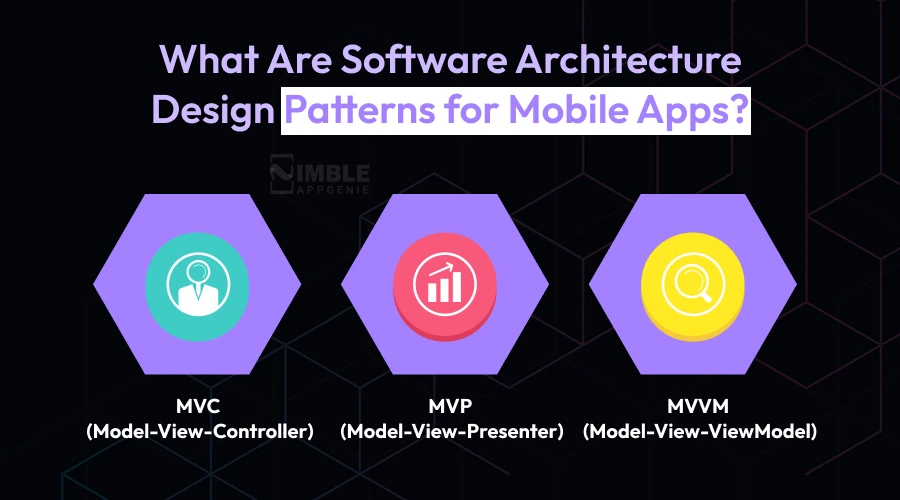
1] MVC (Model-View-Controller)
MVP is one of the oldest software architectural patterns, where the Model (data), View (what the user sees), and Controller (the logic connecting them) are kept separate. It is very easy to learn. Also, it is widely used but can get a bit messy in large applications.
2] MVP (Model-View-Presenter)
MVP is so similar to MVC, but with a presenter layer that manages all the UI logic. It is really common in Android app development and best for mobile applications that need thorough unit testing.
3] MVVM (Model-View-ViewModel)
MVVM is quite a popular choice for modern mobile apps like Android and iOS. This ViewModel software design and architecture pattern acts as a bridge between the View and the Model. It makes the code very easy to test and maintain.
Common Software Architectural Mistakes And How to Avoid Them
When you develop software, small errors in architecture can lead to big problems later. These mistakes can affect performance, scalability, and security. Below are the common architecture mistakes and ways to avoid them so your system stays stable and easy to manage.
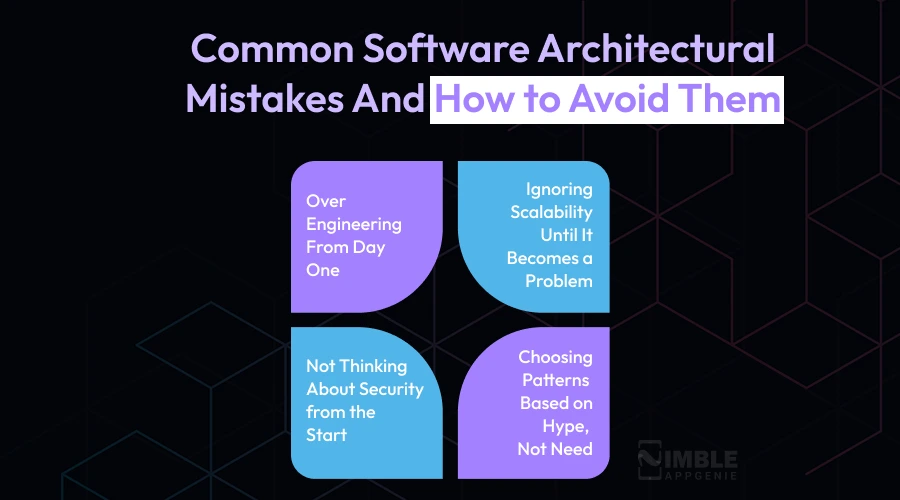
1. Over-engineering from Day One
A dedicated development team makes things very complex right from the beginning. For instance, using microservices when the product barely has any users. This just adds extra work and makes things harder to handle.
How to avoid it:
You have to keep things very simple in the beginning. You can build only what you need right now, and add complexity later when your product actually scales.
2. Ignoring Scalability Until It Becomes a Problem
Many people do not think about growth until the system starts slowing down or breaking down. By that time, fixing it is not easy.
How to avoid it:
You do not need to develop for millions of users on day one, but your system should be able to scale. A visually pleasing and well-structured setup makes it easier to scale later.
3. Not Thinking About Security from the Start
Security is frequently left for later. This can create serious issues. Once the system is developed, fixing security issues becomes much more complex and harder.
How to avoid it:
You can think about security from the beginning. Also, you should add basic protection like proper access control and safe data handling as part of your system design.
4. Choosing Patterns Based on Hype, Not Need
It is quite easy to follow trends and pick what everyone is talking about. But what works for big companies may not work for your project.
How to avoid it:
You should choose what actually fits your project requirements. Do not go for something just because it sounds advanced or popular.
How to Choose the Right Software Architecture Pattern for Your Project?
There is no one-size-fits-all answer. But here are the major questions we ask at Nimble AppGenie, a trusted software development services provider, when helping clients choose the right architecture pattern for software development.
- How big is your development team? A 3-person team and a 50-person team need very different architectures.
- What are your growth expectations? If you are planning to go from 1000 to 1 million users in 12 months, plan for scale from the beginning.
- What is your budget? Microservices infrastructure costs more to build and operate than monoliths.
- Does your industry have compliance requirements? Fintech and healthcare need audit trails and data segregation built in from day one.
- What is your project delivery timeline? Need to launch in 8 weeks? Monolith might get you there faster. Developing for the next 5 years? Invest in a scalable architecture now.
The best architecture for software is not the most impressive one. It fits your product, your development team, and your goals right now while giving you room to scale.
Final Thoughts
Software architecture patterns are a business decision that affects your budget, timeline, user experience, and ability to scale.
If you are developing a simple software application, a real-time fintech platform, or an AI-powered software, the architecture you choose on day one will shape everything that comes after.
At Nimble AppGenie, enterprise architecture software is one of the first and most essential discussions we have with every client. We take the time to understand your business goals, team, and target audience, and then we recommend an architecture that serves all three.
Thus, if you are planning a new product or looking to rearchitect an existing one, it is best to consult with a team. We would love to assist you in building bespoke software architecture solutions that last.
FAQs

Madan is the Backend Solutions Architect at Nimble AppGenie, specializing in the design of secure, high-concurrency systems that power complex mobile ecosystems. With deep expertise in server-side logic and database management, he ensures every platform is built with enterprise-grade security. In his free time, he is an avid researcher of emerging technologies; he spends his time deconstructing the latest backend frameworks and reading technical papers to ensure our solutions remain at the absolute forefront of industry innovation.
Table of Contents




No Comments
Comments are closed.