

 Free Consultation
 PCI-DSS Compliant
 GDPR Ready
 ISO 27001
 NDA Protected
 AI Services
 AI App Development
 Generative AI Development
 AI Chatbot Development
 AI Integration Services
 AI Consulting Services
 AI For Fintech
 AI Financial Assistant Solution
 AI Insurance Agent Development
 Tech Stack
 OpenAI / GPT-4
 Claude / Anthropic
 Gemini / Google AI
 Llama / Open Source
 LangChain / LlamaIndex
 Pinecone / Pgvector
 AWS / Azure AI


 Fintech Solution
 Core Fintech
 App Development
 Neobank Solutions
 eWallet Solutions
 Lending Software
 Banking Solutions
 BNPL Solutions
 BNPL Solutions
 Insurance App
 Wealth Management
 Crypto & DeFi
 Blockchain Development
  Payroll Software
 DeFi Solutions
 Crypto Wallet
 Crypto On/Off Ramp
 Crypto Exchange
 Trading Platform
 Payments
 Compliance
 Regulations & Compliance
 Fraud Detection
 Lending Ecosystem
 P2P Lending Platform
 Mortgage Software
 Engagement
 Fintech Outsourcing

 Mobile Development
 Mobile App Dev
 iOS App Development
 Android App Development
 React Native
 Flutter Development
 Web Solution
 Node.js Development
 React.js Development
 Angular Development
 App Services
 UI/UX Design
 App Maintenance
 By Stage
 MVP Development
 Industry Solutions
 Healthcare App Dev
 Education App Dev
 Travel App Dev
 Real Estate App Dev
 Logistics Software
 Social Media App

 Hire Mobile Developers
 Hire iPhone Developers
 Hire Android Developers
 Hire React Native Devs
 Hire Flutter Developers
 Hire Web Developers
 Hire Node.js Developers
 Hire Angular Developers
 Hire PHP Developers
 Hire Laravel Developers
 How It Works
 Pre-Vetted Developers
 Ready In 48 Hours
 NDA From Day One
 Replace Guarantee
 Company
 About Us
 Our Work Process
 Portfolio
 Case Studies
 Blog / Insights
 Careers
 Contact Us
 Awards
 Recognition


 Offices



Businesses often encounter challenges with manual billing, including delays in bulk invoice processing, difficulties with multi-currency billing, slow payment collection, and inefficient payment tracking, which can result in revenue loss, customer dissatisfaction, poor financial visibility, and a decline in business credibility. What’s the fix?
Here, billing software development comes to the rescue.
Billing software is a digital tool that financial managers use to automate the process of invoice creation and management, payment tracking, and financial transactions management.
Through billing system development, businesses can achieve better business insights that lead to diminished errors, boosted efficiency, and improved cash flow.
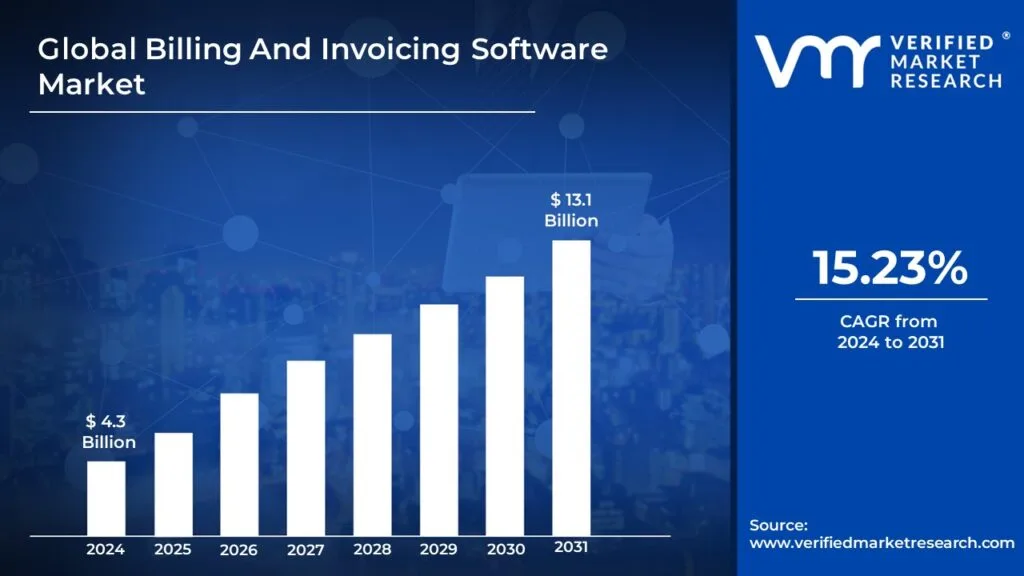
A report by Verified Market Research states that by 2031, the billing and invoicing software market size valuation will reach $13.1 billion at a CAGR of 15.23%, increased from $4.3 billion in 2024.
Whether you are a finance manager, accountant, or business owner, you should go for a billing system development meeting the demand for cloud-native, compliance, AI, and automation.
Don’t worry, you can cope with the revolutionary digital landscape next year by choosing custom billing software development.
The billing software development guide 2026 will talk about custom billing software development.
You will also know the average billing software development cost, key billing software features you should incorporate, tech stack, architecture, and more.
Let’s get started!
What Is Billing Software?
Billing software, as the name suggests, is a tool built to overcome the challenges that finance managers usually face with a manual system.
Business owners enjoy leveraging the power of billing software for invoice automation, multi-currency billing, tax-calculation automation, and every account-relevant job that boosts productivity, avoids payment leakages, makes financial visibility robust, and diminishes churn rates.
Why Businesses Need Billing Software in 2026
In the digital-first space, businesses operate at a faster pace, and here, manual billing lags to match the steps of increasing demands, customer expectations, and compliance shifts.
In 2026, modern billing software will become compulsory for boosting accuracy, streamlining financial operations, and ensuring consistent revenue flow.
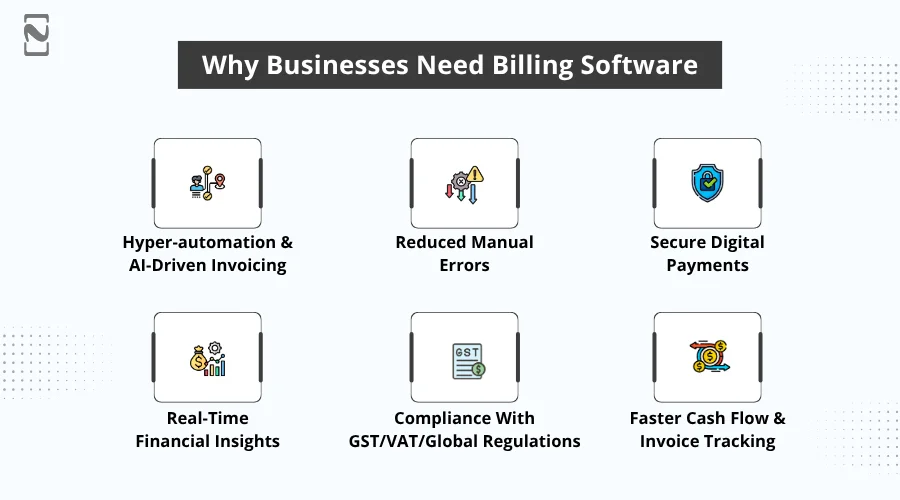
1. Hyper-automation & AI-Driven Invoicing
AI billing software, powered by advanced technology, automates invoice creation, anomaly detection, and tax calculation.
By using these, businesses process bills rapidly with minimal human interference.
2. Reduced Manual Errors
An automated billing system reduces common mistakes, like wrong tax entries, duplicate invoices, and incorrect totals that result in increased precision and mitigated revenue leakage.
3. Secure Digital Payments
Payment gateway integration in billing software lets users reap the benefits of encrypted, quick, and compliant transactions that empower them to mitigate collection delays and propose multiple payment options.
4. Real-Time Financial Insights
Billing dashboard features analytics that facilitate users with instant visibility into expenses, revenue, customer behavior, and pending payments, enabling smarter decision-making.
5. Compliance with GST/VAT/Global Regulations
GST billing software development comes up with the power of automated HSN/SAC mapping, error-free GST/VAT calculations, and built-in tax rules.
By utilizing these PCI DSS-compliant billing systems, businesses adhere to the relevant regulations and avoid penalties.
6. Faster Cash Flow & Invoice Tracking
Billing and invoicing software automates recurring billing, reminders, and real-time tracking, diminishing outstanding invoices, ensuring timely payments, and boosting overall cash flow.
That’s why businesses looking to lead the pack, adapting to evolving business requirements and customer expectations, should choose billing software development in 2026.
Master Classification of Billing Software
(i) Types of Billing Software – Based On Platform And Accessibility
The top three major billing software that are chosen for distinct business needs are:
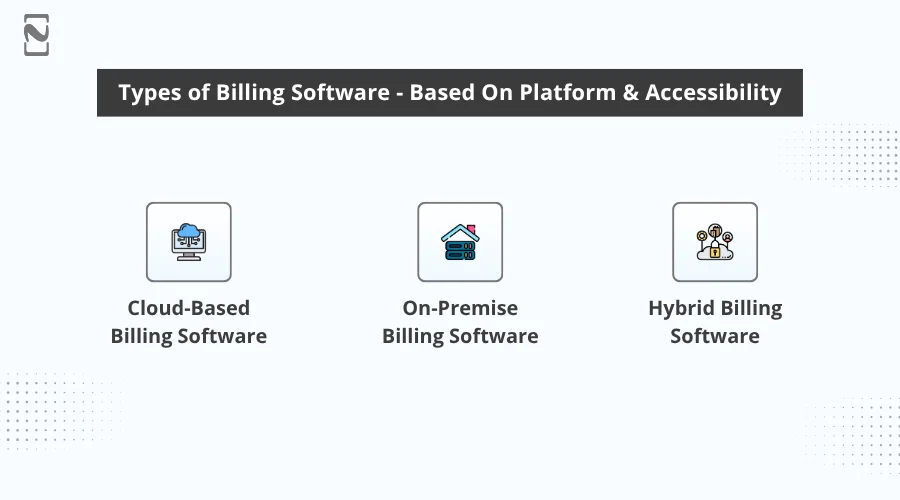
1. Cloud-Based Billing Software
A web-hosted billing system, cloud billing software, that users can access from any device and benefit from real-time data sync, lower upfront cost, automatic updates, high scalability, and effortless integration with third-party tools and payment gateways.
2. On-Premise Billing Software
This automated billing system is locally installed and hosted on the company’s internal servers, excels in providing complete control, improved data privacy, and high customization.
But note that, on-premise billing software demands hardware, in-house IT support, and most importantly, higher upfront costs.
3. Hybrid Billing Software
A combined model, hybrid billing software, performs key billing operations on-premise; on the other hand, the advanced modules run through the cloud, including reporting, payments, analytics, and automation, offering businesses scalability, flexibility, and powerful security control.
A Quick Recap of Types of Billing Software – Cloud-Based vs On-Premise Billing System vs Hybrid Billing Software
| Feature / Factor | Cloud-Based Billing System | On-Premise Billing System | Hybrid Billing System |
| Deployment | Hosted on cloud servers | Installed on local company servers | A combination of on-premise and cloud modules |
| Cost | Low upfront cost as it’s subscription-based | High upfront (includes cost for hardware and setup) | Medium cost (demands flexible licensing) |
| Scalability | Highly scalable | Limited without hardware upgrades | Moderately scalable |
| Accessibility | Access from anywhere, any device | Accessible only within the office network | Local access with remote cloud access |
| Security Control | Managed by a cloud provider | Fully controlled by business | Shared control (embracing local and cloud security) |
| Maintenance | Handled by the vendor | Requires an in-house IT team | Mixed maintenance (vendor and IT) |
| Updates | Automatic updates & patches | Manual updates | Cloud modules auto-update, and local modules are manual |
| Integration | Easy integration with APIs & payment gateways | Limited integrations unless custom-built | Flexible integrations via cloud APIs |
| Data Storage | Hosted on the cloud | Stored in the company’s servers | Split between local storage & cloud |
| Ideal For | Startups, SMEs, fast-growing businesses | Enterprises with strict data policies | Mid-to-large businesses needing control and scalability |
(ii) Types of Billing Software – Use-Case Based
Below, we will talk about the billing software types based on business model, industry, or operational use case, but not by deployment or platform.
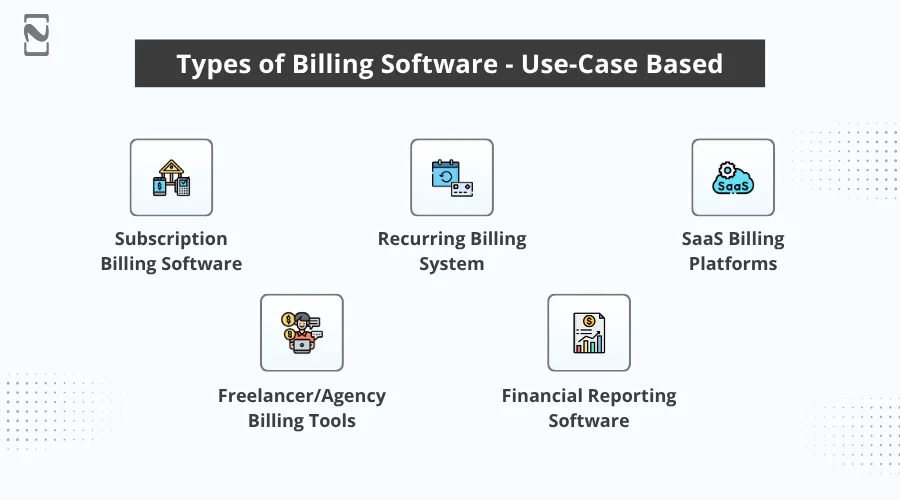
1. Subscription Billing Software
Subscription billing software manages automated renewals, recurring billing cycles, plan upgrades/downgrades, prorated charges, and subscription lifecycle management for membership, SaaS, and service-based businesses.
Target Users: SaaS companies, gyms, membership platforms, and digital service providers.
2. Recurring Billing System
Such software streamlines fixed or usage-based recurring payments, subscription cycles, payment retries, proration, automated invoicing, and dunning to secure constant revenue collection.
Target Users: Gyms, membership platforms, maintenance/service providers, subscription clubs, and SaaS products with simple recurring models.
3. SaaS Billing Platforms
SaaS billing software, also known as end-to-end billing platforms, is perfect for SaaS businesses proposing metered usage billing, subscription billing, multi-currency support, dunning management, and customer self-service portals. These can easily integrate with a b2b SaaS quote-to-cash software to create the entire revenue lifecycle for a SaaS business.
Target Users: SaaS startups, enterprise SaaS providers, and B2B and B2C cloud businesses.
4. Freelancer/Agency Billing Tools
These are lightweight invoicing tools that are chosen to handle client billing, project expenses, automated payment reminders, and time tracking with minimal complexity.
Target Users: Freelancers, digital agencies, consultants, marketing agencies, creative studios, and small professional service providers.
5. Financial Reporting Software
Such reporting software facilitates the generation of revenue reports, expense summaries, financial statements, and real-time dashboards that effortlessly integrate with billing systems to provide comprehensive financial visibility.
Target Users: SMEs, enterprises, finance teams, accountants, and CFOs.
A Swift Analysis of Types of Billing Software – Business Model Based
| Type | Purpose |
| Subscription Billing Software | Handles recurring billing, renewals, and usage-based billing. |
| Recurring Billing System | Automate monthly/annual repetitive payments. |
| SaaS Billing Software | Best for SaaS businesses with metered billing and dunning. |
| Freelancer/Agency Billing Tools | Simplified invoicing & project-based billing. |
| Financial Reporting & Billing Analytics Software | Insights, dashboards, and tax reports are smoothly integrated with billing. |
(iii) Industry-Based Billing Software
These types of billing software are created for distinct business sectors with unique business requirements.
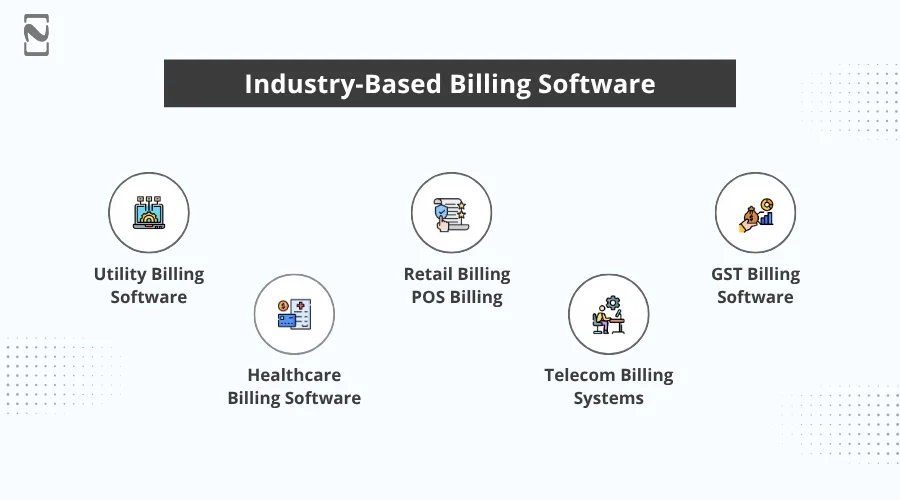
1. Utility Billing Software
Utility bill payment service providers opt for utility billing software development that eases meter readings, bulk invoice generation, automated payment reminders, and consumption-based billing.
Target Users: Electricity boards, water companies, gas providers, and waste management firms.
2. Healthcare Billing Software
Medical billing software development is ideal for healthcare service providers who supervise insurance claims, patient billing, reimbursements, medical codes, and compliance with applicable healthcare regulations.
Target Users: Hospitals, clinics, diagnostic centers, and healthcare billing agencies.
3. Retail Billing / POS Billing
POS billing software development supports supermarkets and retail shops with inventory syncing, fast checkout, GST calculation, discount management, barcode scanning, and multi-location POS operations.
Target Users: Retail stores, supermarkets, pharmacies, and restaurants.
4. Telecom Billing Systems
Such billing software is chosen by rapidly growing telecom companies that oversee call/data usage, roaming charges, large-scale customer billing operations, prepaid/postpaid plans, and network tariffs.
Target Users: Telecom companies, ISPs, VoIP service providers.
5. GST Billing Software
GST billing software development streamlines GST calculations, tax invoices, filing-ready reports, HSN/SAC code mapping, e-way bills, and compliance with GST rules for all-sized businesses.
Target Users: SMEs, wholesalers, retailers, and GST-registered businesses.
A Quick Scan of Industry-Based Billing Software
| Type | Brief Definition |
| Healthcare Billing System | Automates patient billing, coding, reimbursement, insurance claims, and health record-linked invoicing. |
| Utility Billing System | Manages metered billing, usage tracking, recurring charges, and automated invoices for public utilities. |
| Retail Billing & POS Software | Offers real-time billing, tax/VAT/GST calculation, barcode scanning, and synced inventory. |
| Telecom Billing Systems | Manages prepaid/postpaid billing, subscriber management, usage-based charging, and provisioning. |
| GST Billing Software | Generates GST-compliant invoices, manages tax reports, tracks returns, and automates compliance. |
Core Features of Billing Software
Only building billing software is not enough; including key features is essential to make the product fully functional per the expectations.
What features are required in billing software?
We have curated a table of standard and advanced features separately that you can choose for your billing software development in 2026.
► Basic Features of Billing Software
Key features of the billing software category-wise to keep confusion out of your sight.
| Feature Category | Feature Name | Brief Description |
| Billing & Invoicing | Automated Invoicing | Generates invoices automatically based on usage, subscriptions, or orders. |
| Custom Invoice Templates | Allows branded and customizable invoice designs. | |
| Multi-Currency & Multi-Language Support | Enables billing across different countries and markets. | |
| Payments | Integrated Payment Gateways | Accepts online payments (UPI, cards, wallets, ACH, and bank transfers). |
| Auto-Pay & Recurring Payments | Automatically charges customers for subscriptions or renewals. | |
| Payment Reminders & Dunning | Send reminders and retry failed payments. | |
| Tax & Compliance | GST/VAT/Sales Tax Management | Auto-calculates taxes based on regional rules. |
| Regulation Compliance (2026 Ready) | Ensures compliance with GST, VAT, HIPAA, PCI-DSS, and SOC 2. | |
| Customer & Plan Management | Customer Profiles & History | Stores customer details, billing cycles, and payment history. |
| Plan/Package Management | Creates pricing models: flat-rate, tiered, usage-based, and hybrid. | |
| Usage Metering | Usage Tracking | Tracks consumption (units, minutes, GBs, kWh). |
| Real-Time Metered Billing | Converts usage into accurate charges. | |
| Accounting & Finance | Revenue Recognition | Automate ASC 606 / IFRS 15 compliant revenue workflows. |
| Financial Reports & Dashboards | Shows AR/AP, cash flow, invoice aging, and revenue analytics. | |
| Integrations | API & Webhooks | Connects the billing system with CRM, ERP, POS, and accounting tools. |
| Accounting Integrations | Syncs with QuickBooks, Xero, Zoho Books, Tally, and ERPNext. | |
| Security | Role-Based Access Controls (RBAC) | Restrict visibility and permissions based on roles. |
| Two-Factor Authentication (2FA) | Adds secure login protection. | |
| User Experience | Customer Portal | Customers can view invoices, download reports, and make payments. |
| Admin Dashboard | Centralized console for billing, revenue, and customer management. |
► Advanced Features for Modern Billing Software
| Advanced Features | What It Does |
| AI-Driven Invoice Automation | Auto-generates invoices, predicts due dates, flags errors, and uses smart categorization. |
| Predictive Revenue Analytics | Uses AI/ML to forecast cash flow, churn, and expected revenue. |
| Smart Tax Engine | Automatically updates tax rules globally and adjusts invoices instantly. |
| Workflow Automation | Automated approvals, billing cycles, credit notes, and dispute workflows. |
| Smart Dunning Management | Uses AI-based retry logic to reduce payment failures. |
| Usage-Based Billing Engine | Real-time calculations for telecom, utilities, SaaS, and IoT devices. |
| Self-Service Custom Pricing Builder | Businesses create plans without developer involvement. |
| Blockchain-Based Audit Trail | Ensures tamper-proof transaction and invoice logging. |
| Embedded Payments | Businesses embed payment capabilities inside their own SaaS or app. |
| White-Label Customization | Fully branded portals, dashboards, and customer interfaces. |
Note: The above features vary based on compliance requirements, industry needs, and deployment models. Businesses should prioritize features aligning with billing complexity, automation goals, and transaction volume.
Billing Software Architecture – What It Should Look Like & Why It Matters for Businesses
When deciding on a modern billing software architecture, be sure it’s reliable and secure yet simple and backs business growth beyond just focusing on technicalities.
Here, we have listed some specifications that you should walk through to catch up with good architecture.
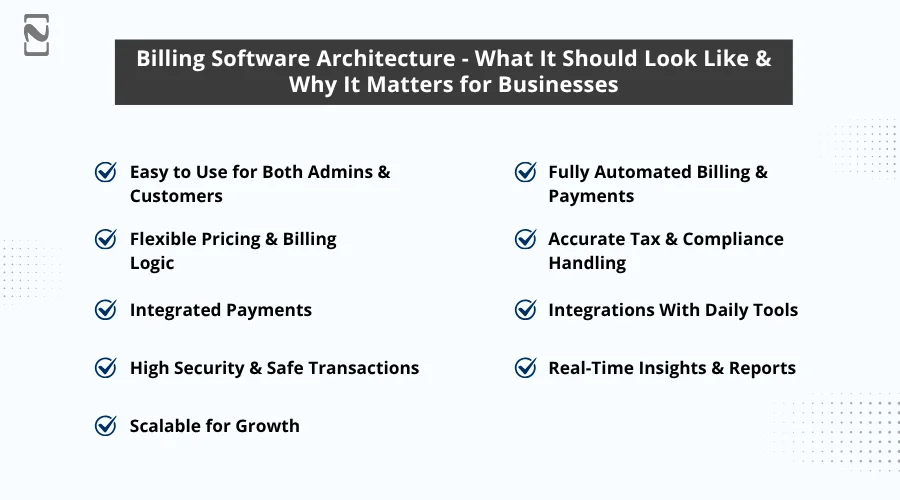
1. Easy to Use for Both Admins & Customers
Your system should have a transparent dashboard for teams and must help them manage payments, customers, and invoices.
Furthermore, it should include a self-service customer portal for effortlessly downloading invoices and making payments.
Why it matters: It leads to faster billing, fewer errors, and less customer support workload.
2. Fully Automated Billing & Payments
The billing system architecture should reinforce recurring billing, automated invoice creation, autopay, and payment reminders.
Why it matters: It helps eliminate delays, diminish manual work, and ensure constant cash flow.
3. Flexible Pricing & Billing Logic
The billing system you create should ease businesses to propose one-time billing, discounts, promotions, and add-ons, and subscription recurring, and usage-based billing.
Why it matters: Consequently, businesses can create any pricing model they want with no need for dependency on developers.
4. Accurate Tax & Compliance Handling
The architecture should embrace region-focused compliance rules and automatic GST/VAT/tax calculation features.
Why it matters: So forth, businesses can stay compliant with their international expansion, reduce audits, and avoid penalties.
5. Integrated Payments
Billing software should seamlessly integrate with global payment processors, cards, bank transfers, wallets, and UPI.
Why it matters: This way, customers can pay swiftly, and businesses can boost cash recovery.
6. Integrations With Daily Tools
Your billing software should be connected flawlessly with daily billing-relevant tools, such as accounting systems, ERP, POS, CRMs, and email/SMS systems.
Why it matters: Thus, businesses can keep their data synced and don’t carelessly perform double entry.
7. High Security & Safe Transactions
The architecture of billing software must incorporate essential security measures, like encryption, role-based access, and audit logs that can help maintain high protection and ease safe transactions.
Why it matters: When you choose billing software development, it results in safe revenue, fosters customer trust, and avoids data breaches.
8. Real-Time Insights & Reports
A modern billing system should be fully-featured, embracing aging reports, cash flow insights, revenue dashboards, and predictive analytics.
Why it matters: Businesses will know their financial performance and make informed, data-driven decisions.
9. Scalable for Growth
You should go for a scalable architecture that holds the caliber to handle higher transactions, more customers, new currencies, and pricing plans.
Why it matters: With a scalable billing system, businesses can grow smoothly.
Technology Stack for Billing Software
The billing software tech stack needs to be chosen in such a way that the developed product can ensure automated, accurate, seamless, and secure performance.
Below is the best tech stack for billing software development that you can pick to strengthen your billing system.
| Category | Examples |
| Frontend Technologies | React, Angular, Vue, Flutter |
| Backend Technologies | Node.js, Python, Java, .NET |
| Databases | PostgreSQL, MySQL, MongoDB |
| Payment Gateway Integrations | Stripe, Razorpay, PayPal, Square |
| Cloud Services | AWS, Google Cloud, Microsoft Azure |
| Push Notification | Twilio, SendGrid, WhatsApp API, SMTP |
| Security & Compliance | PCI-DSS, GDPR, Encryption, RBAC |
| Integrations & APIs | QuickBooks, Xero, Tally, Salesforce, HubSpot |
Billing Software Development Process
How to build a custom billing system?
When it comes to creating billing software, you need to ensure you follow every step leading to a scalable, secure, and next-gen product.
Let’s talk about the steps to develop a billing software solution:
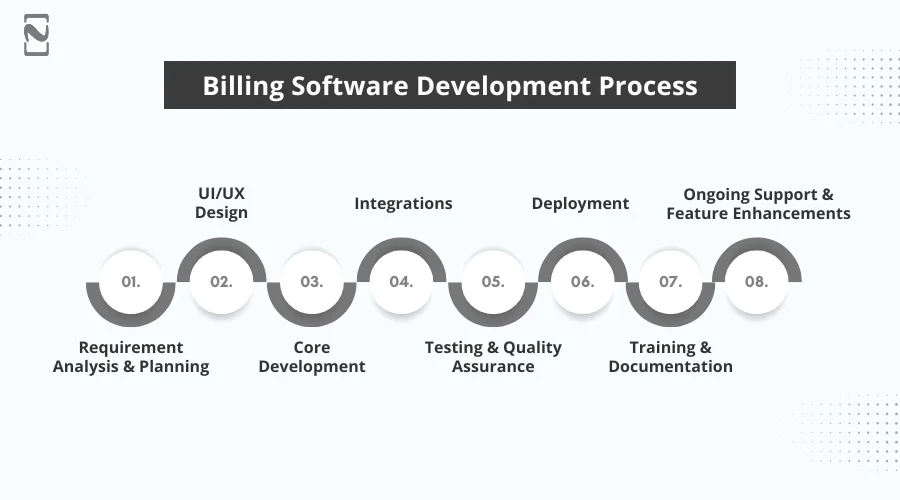
Step 1: Requirement Analysis & Planning
You should start by understanding your business model, billing requirements, tax rules, pricing structures, user roles, and integration you want for your solution.
Outcome: You will get a clear list of features you need to include, a timeline estimate, and a development roadmap that can emerge with a fully-functional software.
Step 2: UI/UX Design
Next, the creative designers craft intuitive and user-friendly screens separately for the admin panel, customer panel, mobile views, and POS interfaces.
Outcome: You will catch up with the easy-to-use prototypes and design flows that you want for your firm.
Step 3: Core Development
Ahead, the software developers build the essential modules, like the billing engine, invoicing, tax management, payments, reports & dashboard, and customer management.
Outcome: Businesses get a full-fledged billing system that covers the core operations.
Step 4: Integrations
In this software development step, you integrate the billing software with accounting tools, payment gateways, notification services, and CRM/ERP systems.
Outcome: Your billing software will provide smooth automation across platforms.
Step 5: Testing & Quality Assurance
After you build billing software for your business, let it undergo testing and conduct quality assurance to verify precision in tax calculation, billing logic, security, API flows, and performance optimization.
Outcome: This stage surges with reliable and error-free billing processes.
Step 6: Deployment
In this phase, launch the system on the cloud or on-premises based on your chosen platform and accessibility with backups, security, and monitoring.
Outcome: You will get a live and fully functional billing software.
Step 7: Training & Documentation
In this phase of the billing software development process, training is offered to finance teams, admins, and support staff that can help them enjoy working with modern systems.
Outcome: Your team can operate the system confidently.
Step 8: Ongoing Support & Feature Enhancements
Post development, your software will get support, including performance monitoring, new feature addition, and issue fixing based on the business expansion.
Outcome: You get a scalable and futuristic billing system that helps you with automated invoicing, tax calculation, with reduced manual error, secure digital payments, and more.
Cost to Develop Billing Software
How much does it cost to build billing software in 2026?
Well, there’s no such billing software cost calculator that can help you get the actual billing software price.
You need to consult with a software development company about your project requirements, timeline, and budget.
For now, we will analyze an estimated billing software development cost.
| Complexity | Estimated Development Cost (USD) |
| Basic/MVP Billing Software | $20,000 – $50,000+ with minimal features, basic invoicing, simple UI |
| Mid-Level/Custom Billing Software | $50,000 – $100,000+ with recurring billing, payment integrations, and dashboards |
| Enterprise-Grade/Advanced Billing System | $100,000 – $500,000+ that support a large user base, AI, advanced automation, and compliance |
Note: The cost to develop billing software varies depending on numerous factors like complexity, features you include, platform you decide on for deployment, and more.
The cost of billing software for startups, mid-level, and enterprise-grade billing systems differs, as there’s no one-size-fits-all solution.
Enterprise-level billing software cost is an ideal solution for businesses with an extensive user base and looking to expand their reach, embracing the latest technologies.
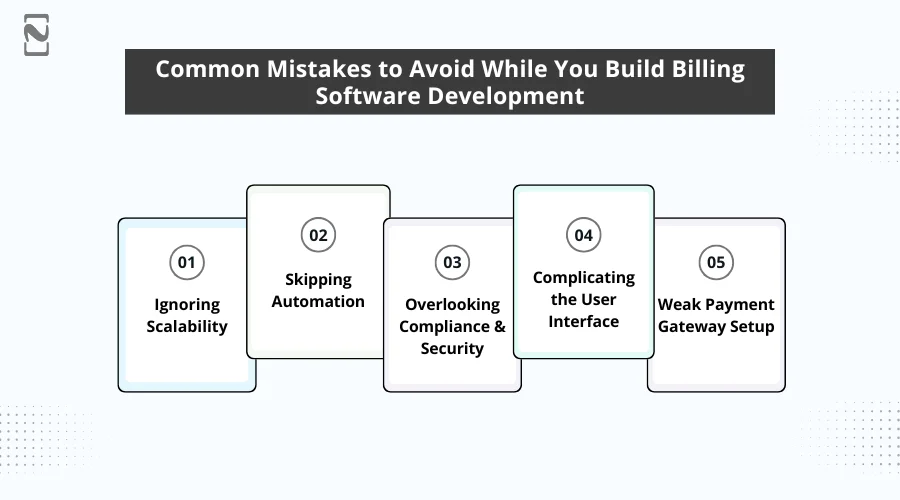
Common Mistakes to Avoid While You Build Billing Software Development
Developing billing software needs careful planning, a user-centric approach, and compliance awareness.
For that, be sure you avoid the following mistakes and save cost, time, and upcoming technical issues.
-
Ignoring Scalability
Various teams build for today’s needs only. They should know that with the growing number of transactions and when new pricing models are introduced, the system may fail or slow down.
Here, a scalable architecture leads to lasting performance and flexibility.
-
Skipping Automation
Obviously, manual reminders, invoicing, and reconciliation consume time and cause errors. Thus, businesses lose accuracy and efficiency.
You should ensure automation for the tax calculator, recurring billing, and payment follow-ups.
-
Overlooking Compliance & Security
The system, with no adherence to PCI DSS, GDPR, and GST/VAT, makes it prone to data breaches and legal risks.
Security and compliance are the foundation of any software development.
-
Complicating the User Interface
A confusing and cluttered UI results in slow adoption and increased support requests.
Opt for a clean and intuitive interface that can help boost productivity with fewer mistakes.
-
Weak Payment Gateway Setup
Choosing an unreliable or limited payment gateway brings in slow settlements, failed transactions, and a poor user experience.
Here, multi-gateway, multi-currency support can support smooth payments.
Why Choose Nimble AppGenie for Billing Software Development?
Having 8+ years of experience in software development, Nimble AppGenie has a proven portfolio in building software for different niches, embracing billing software development.
Widely spread as a trusted fintech software development company, we provide tailored billing system development services to meet the custom software requirements of businesses of all sizes.
Whether you want services for billing software development for small businesses, startups, or established enterprises, our software developers are set to provide the help you want.
But consider Nimble AppGenie? Let’s eye on the factors that will ensure your decision is right.

Key Highlights of Choosing Nimble AppGenie for Billing Software Development:
- Experience in fintech/enterprise billing
- Compliance expertise (PCI DSS, GDPR, HIPAA if medical)
- Strong portfolio
- Scalability & long-term support
- Transparent costing
- Agile development
Real-time Case Study from Our Pool of Successful Portfolios
Client: Mid-sized IT services & AMC provider
Challenges: Manual invoicing, GST compliance issues, delayed payments, and inconsistent records.
The Solution We Offered:
We created a custom cloud-based billing software powered with:
- Automated contract-based billing
- Recurring invoices with exact proration
- Integrated payment gateways
- Auto-generated GST-compliant invoices
- Real-time reporting dashboard
- Automated payment reminders via email & WhatsApp
- Role-based access for Accounts, Sales, and Management
Results Achieved:
- 360° Revenue Visibility
- 70% Reduced Billing Time
- 35% Faster Payments
- 98% Diminished in Invoice Errors
- Stress-Free GST Compliance
Still finding yourself in a muddle? No more. Collaborate with us for further assistance.
Are you looking to hire billing software developers to build enterprise billing software solutions? Connect with our experts and choose custom billing system developers from our billing software development firm!
Wrapping Lines
Billing software development is important for businesses looking to catch up with rapid cash flow, automation, and precision.
By choosing smart features, scalable technology, and secure architecture, businesses can streamline financial operations with reduced manual errors.
As billing is on its way to becoming more complicated in 2026, custom billing software development can help businesses stay competitive.
FAQs

Niketan Sharma, CTO, Nimble AppGenie, is a tech enthusiast with more than a decade of experience in delivering high-value solutions that allow a brand to penetrate the market easily. With a strong hold on mobile app development, he is actively working to help businesses identify the potential of digital transformation by sharing insightful statistics, guides & blogs.
Table of Contents




No Comments
Comments are closed.