


In a Nutshell:
- Modern expense tracking app development demands a well-planned approach with a focus on security, user-friendly design, and automation to replace manual expense management.
- Understand how to create an expense tracking app, selecting the right app type: business, personal, AI-powered, or enterprise-grade, based on market demand and user needs.
- In fintech development, it’s essential to choose the best tech stack for expense tracking app development to emerge with a compliant, high-performing, and scalable solution.
- The cost to build an expense tracker app varies based on features, platform, and AI integration, with AI-powered apps offering higher value through smart insights and predictive budgeting.
- Partnering with an experienced expense tracking app development company like Nimble AppGenie can help you build a custom expense tracking app tailored to your business goals.
Today, many individuals and organizations perform manual expense tracking, whether personal or business, and end up struggling with missed bills, overspending, and no clear financial insights.
Here, an expense tracking app comes to the rescue.
What is an expense tracking app? An application that automates financial tracking, offering users better visibility into their spending, ease of budgeting, and diminishing errors compared to manual methods.
Because of increasing business expenses from expanding operations and expanding workforce, the product demand is surging.
| The global expense management software market will expand by 2032 and reach $16.48 billion at a CAGR of 10.08%, up from $7.64 billion as recorded in 2024. |
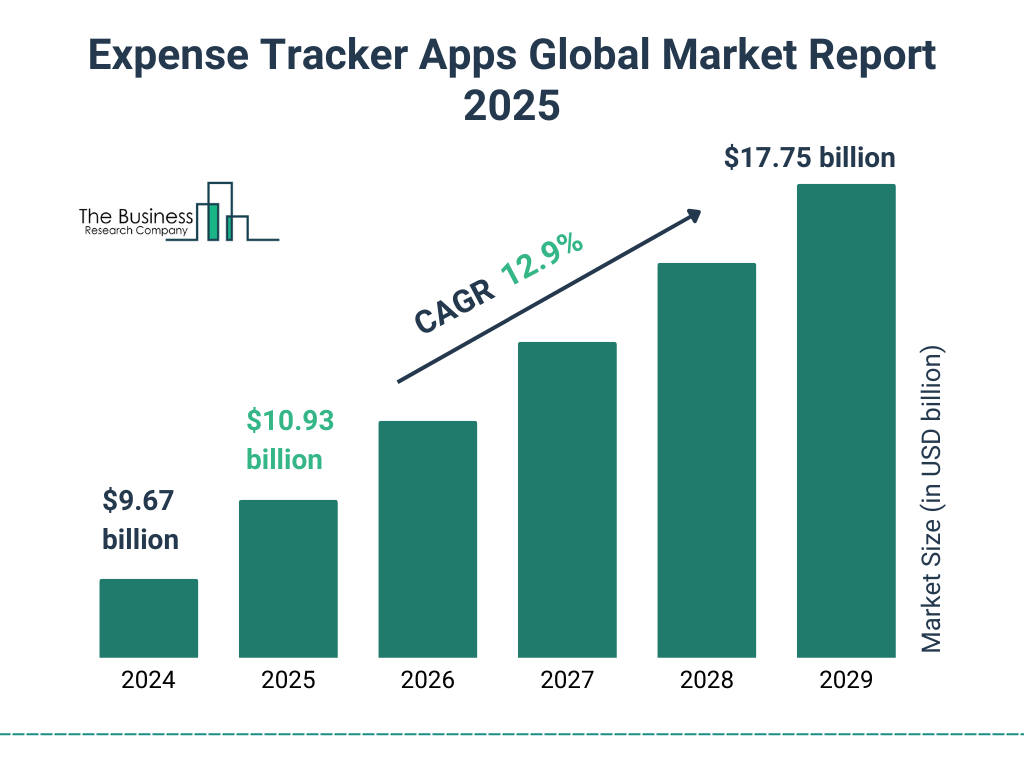
Whether you are an entrepreneur, an individual, a project manager, or a product owner, you should build an expense tracking app to streamline expense management, attain comprehensive financial visibility, and make smarter money decisions.
How to build an expense tracking app?
This expense tracking app development guide brings steps to build an expense tracking app for Android and iOS, a cost estimate, the right tech stack you should choose, features to incorporate, and a lot more.
By the end of this guide, you’ll learn the step-by-step process to build an effective, secure, and user-friendly expense tracking app that meets both business and user needs.
What is an Expense Tracking App?
An expense tracking app is a digital tool that allows users to record and monitor their spending by logging individual transactions, categorizing them (like groceries, entertainment & bills), and providing visual summaries to help individuals analyze their spending patterns and manage their budget effectively.
These kinds of apps fall under the category of budgeting and fintech apps.
Essentially, it helps you keep track of where your money is going across different categories to identify areas where you can potentially save money.
Market Demand & Business Benefits of Expense Tracking Apps
With an increasing number of users seeking tools to efficiently manage their money, the market for personal finance app development is evolving rapidly.
| According to Market Research Future’s study, the expense tracker apps market will likely expand from $5.26 billion in 2025 to $16.01 billion by 2035 at a CAGR of 11.77%. |
The key aspects that fueled the adoption of budgeting apps are the surge of smartphones and digital banking that enable users to seamlessly track expenses, make budgets, and get actionable insights in real time.
1. Growth of Personal Finance Apps
As more individuals and businesses are becoming aware of the financial edge, the more they are choosing digital solutions for expense management.
Modern apps arrive with features such as smart notifications, AI-driven spending insights, and automated tracking, which make financial management more precise and easier.
2. Businesses Are Investing in Finance Apps
Companies acknowledge that investing in expense tracking and budgeting apps meets rising user demands and improves brand credibility.
By offering value-added services, entrepreneurs can escalate user engagement, retain customers, and collect insights for better strategic decisions.
3. Monetization Opportunities
Expense tracking app development unlocks several revenue streams, embracing:
- Freemium models with premium features
- Subscription-based access to advanced tools
- Personalized offers and financial recommendations
- Integration with financial services or banks for referral fees
We will discuss the monetization strategies later in this post.
The fintech sector will reap the advantages of new business opportunities by addressing users’ pain points.
Types of Expense Tracking Apps You Can Build
Obviously, not all expense tracking applications meet the same requirements.
It relies on your audience; you can create apps for business expense management, personal finance, enterprise-level, or AI-powered automation solutions.
You should go for an app development meeting user needs and stand out in the fierce financial app development market.
| Type of App | Description | Ideal Users |
| Personal Expense Tracking App | It helps individuals monitor daily spending, set budgets, and track income vs. expenses. | Individuals, students, and freelancers |
| Business Expense Management App | It’s best for managing employee expenses, reimbursements, and financial reporting for small to medium businesses. | SMEs, startups, and corporate teams |
| AI-Powered Expense Tracking App | It leverages AI to automatically predict spending patterns, categorize expenses, and offer smart budgeting suggestions. | Tech-savvy users and businesses seeking automation |
| Enterprise Expense Management Software | Advanced solutions with analytics, integrations, and compliance features for large organizations. | Large enterprises and multinational companies |
Must-Have Features of an Expense Tracking App
To make your expense tracking app run successfully in the market, you should combine automation, simplicity, and security to meet unique user requirements.
Incorporating the right features can notably improve user experience and engagement.
Let’s break down the core and advanced fintech features every powerful budgeting and expense tracking app should include.
Core Features of an Expense Tracking App
| Features | Description | Benefits |
| User Registration & Profile | Secure account creation with personal or business details | Personalizes experience and secure user data |
| Expense & Income Categorization | Organize transactions by category | Simplifies tracking and reporting |
| Budget Planning | Set monthly or weekly budgets | Helps users manage spending and avoid overspending |
| Reports & Analytics | Generate summaries of expenses | Provides clear financial insights |
| Cloud Sync & Multi-Device Access | Sync data across devices | Ensures data is always up-to-date |
Advanced Features of an Expense Tracking App
| Features | Description | Benefit |
| Recurring Transactions & Reminders | Automate bills, subscriptions, and recurring expenses | Reduces manual entry and missed payments |
| Multi-Currency Support | Handle transactions in different currencies | Ideal for travelers and global businesses |
| Export & Integration Options | Export data to CSV or integrate with accounting software | Supports advanced financial management |
| Customizable Dashboards | Personalized views and charts | Enhances usability and user engagement |
| Smart Notifications | Alerts for overspending, bill due dates, or budget limits | Helps users stay on top of finances |
How to Create an Expense Tracking App – Step-by-Step Guide
To make your expense management app development a success, you should plan carefully, design, and develop an outstanding solution.
This section will help you with the steps that will help you build a user-friendly app, from deep market research and defining app requirements to picking the right tech stack, designing visually aesthetic UI/UX, integrating APIs, and launching the app.
How to Build an Expense-Tracking App?
Here is a step-by-step guide to the expense tracking app development process that you need to know. Let’s get right into it:
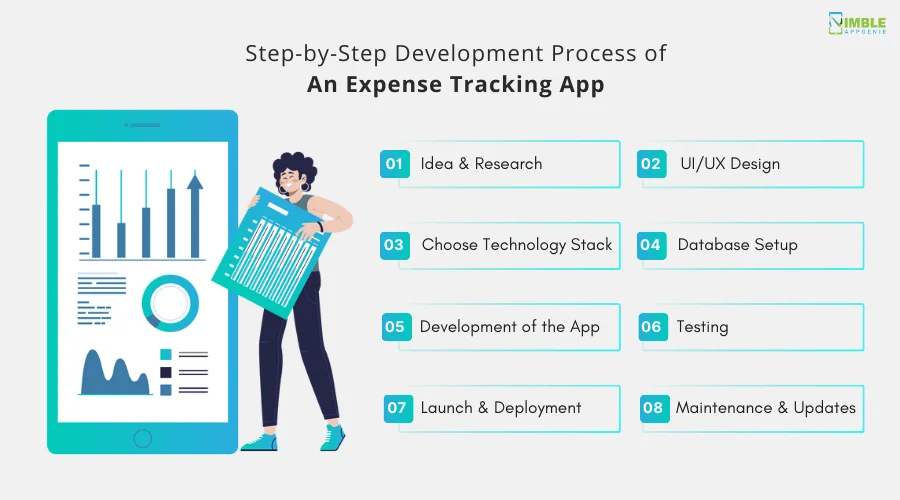
Step 1: Idea & Research
First things first, begin by defining the core purpose of the app: tracking personal or business expenses.”
Do mobile app market research on existing apps to identify features that work well and any gaps in functionality. Understand your target audience and what they need, such as budget setting, reporting, or categorizing expenses.
Make sure to create a user-friendly experience. This phase in expense-tracking app development process will define the scope and set a solid foundation for the design and development phases.
Step 2: UI/UX Design
The next step in building an expense-tracking app is to focus on UI/UX design of your fintech app.
Focus on creating an intuitive layout where users can input, view, and categorize their expenses.
Design a simple, clean dashboard that highlights key data like total expenses, categories, and upcoming bills.
Make the app responsive across devices with smooth navigation.
Plus, ensure the color scheme and icons reflect clarity and easy usability. Use design tools like Figma or Sketch to prototype, mobile app wireframe, and refine designs before starting development.
Step 3: Choose Technology Stack
Selecting the right financial technology stack is important in the development process.
For mobile apps, consider using frameworks like Flutter or React Native for cross-platform development. If you choose native development, opt for Swift for iOS or Kotlin for Android.
Backend technologies like Node.js or Django can handle data storage, while databases like Firebase o
r PostgreSQL will store user data securely.
Choosing the right tech stack to create an expense tracking app is crucial. But ensure the tech stack aligns with your budget and scalability requirements to accommodate future app growth.
Step 4: Database Setup
Design & Implement the database structure to store user expenses, categories, and other relevant information.
Create tables for transactions, categories, user profiles, and settings.
Ensure data is stored securely with proper encryption. Consider using cloud databases like Firebase for ease of scaling and security, or a relational database like MySQL if you need more complex queries.
Set up user authentication to maintain privacy.
Plan for efficient data retrieval, such as queries to fetch expenses by date or category for reporting.
Step 5: Development of the App
Start coding the core functionalities: expense entry, categorization, and budgeting. You can consider it the longest & most complex process to build an expense-tracking app.
Implement the best features that allow users to add, edit, and delete transactions easily. Integrate expense categories such as food, travel, and entertainment, and enable users to create custom categories.
Make sure to incorporate budgeting tools, allowing users to set limits and receive alerts when nearing their budget.
Develop reporting features for monthly or yearly expense overviews, with visual elements like graphs and charts to present data understandably.
Step 6: Testing
Testing ensures that the app functions as expected across different devices.
Begin with unit testing to verify individual features, e.g., adding transactions or generating reports. Next, conduct integration testing to ensure different components, like the frontend & backend, work seamlessly together.
Perform usability testing with real users to identify issues with navigation or functionality. Lastly, test the fintech app on various devices and screen sizes to ensure responsiveness.
Address bugs & performance issues promptly to provide users with a smooth experience.
Step 7: Launch & Deployment
Once the testing is done, prepare the app for deployment on the app stores, Google Play & the Apple App Store.
Ensure the app meets all the store guidelines, including app descriptions, screenshots, and privacy policies.
Create an effective marketing plan to generate interest, leveraging social media and app review sites.
As soon as it is approved, monitor user feedback & app performance closely. Be prepared to release updates for bug fixes, performance improvements, or new features based on user needs and feedback after launch.
Step 8: Maintenance & Updates
After the app is launched, it’s necessary to maintain your fintech app and improve its performance.
Monitor analytics to track user engagement and identify areas for improvement. Regularly update the app to fix bugs and prioritize feature requests based on demand.
Ensure that the app remains compatible with new OS updates and devices.
Stay committed to providing ongoing support to retain users and keep the app competitive in the market.
With this out of the way, there is one question that needs your immediate attention.
Technology Stack for Expense Tracking App Development
We discussed so many important things, we felt like talking about the tech stack is as important as any other.
For an expense-tracking app, the tech stack includes technologies that help build a user-friendly, scalable & secure app. It includes the frontend for user interaction, the backend for data management & the database for storing user data.
Furthermore, cloud services, infrastructure, authentication, and analytics tools are used to enhance the app’s functionality and performance.
Here’s a typical tech stack for an expense-tracking app:
| Layer | Technology | Description |
| Frontend | React Native/Flutter | Cross-platform mobile development for iOS and Android |
| Backend | Node.js/Django/Ruby on Rails | Server-side logic, handling API requests, and business operations |
| Database | PostgreSQL / MongoDB | Relational or NoSQL database for storing user and transaction data |
| Authentication | JWT / OAuth 2.0 / Firebase Auth | Secure user login and authentication mechanisms |
| Cloud Hosting | AWS / Google Cloud / Azure | Scalable hosting and storage for app data |
| API Backend | REST / GraphQL | API layer for communication between frontend and backend |
| Payment Integration | Stripe / PayPal / Razorpay | Integration for tracking and making payments |
| Analytics | Google Analytics / Mixpanel | User activity tracking and app performance monitoring |
| CI/CD pipelines | GitHub Actions / CircleCI / Jenkins | Continuous integration and deployment pipelines |
This tech stack supports a modern, feature-rich, and scalable expense-tracking app with secure authentication, easy cloud management, and effective user analytics.
How Much Does it Cost to Develop an Expense Tracking App?
On average, the cost of tracking app development can be anywhere between $20,000 to $60,000 or more.
The cost of developing a fintech app varies based on different factors, including complexity, features & development team location.
Here is a quick breakdown to let you know about the cost:
| Basis | Cost |
| Basic Expense Tracking App | $20,000-$30,000 |
| Mid-level Expense Tracking App | $30,000-$50,000 |
| Advanced Expense Tracking App | $50,000-$60,000 |
AI-powered expense tracking apps that include smart categorization, predictive spending insights, and automation, the development costs are comparatively higher because of the advanced data processing needs and additional AI/ML implementation.
Challenges in Expense Tracking App Development & Solutions
You can face several challenges while you develop a powerful mobile expense tracking app.
Here we will talk about some major ones with possible solutions.
-
Challenge #1: Data Accuracy
Solution: You should implement AI-powered automation to categorize expenses and diminish manual errors.
-
Challenge #2: Security Risks
Solution: Leverage robust encryption protocols, secure APIs, and adhere to applicable financial regulations like PCI-DSS and GDPR.
-
Challenge #3: User Retention
Solution: Businesses should provide smart insights, personalized dashboards, and notifications to keep their users engaged and returning to their app.
-
Challenge #4: Integration with Banks
Solution: By harnessing the potential of reliable APIs and performing rigorous testing, businesses can ensure smooth financial data synchronization.
-
Challenge #5: Scalability
Solution: You should build an expense tracking app on a cloud-based architecture with modular designs to manage augmenting users and transaction volumes.
Technology Stack for Expense Tracking App Development
We discussed so many important things, we felt like talking about the fintech app tech stack is as important as any other.
For an expense-tracking app, the tech stack includes technologies that help build a user-friendly, scalable & secure app. It includes the frontend for user interaction, the backend for data management & the database for storing user data.
Furthermore, cloud services, infrastructure, authentication, and analytics tools are used to enhance the app’s functionality and performance.
Here’s a typical tech stack for an expense-tracking app:
| Layer | Technology | Description |
| Frontend | React Native/Flutter | Cross-platform mobile development for iOS and Android |
| Backend | Node.js/Django/Ruby on Rails | Server-side logic, handling API requests, and business operations |
| Database | PostgreSQL / MongoDB | Relational or NoSQL database for storing user and transaction data |
| Authentication | JWT / OAuth 2.0 / Firebase Auth | Secure user login and authentication mechanisms |
| Cloud Hosting | AWS / Google Cloud / Azure | Scalable hosting and storage for app data |
| API Backend | REST / GraphQL | API layer for communication between frontend and backend |
| Payment Integration | Stripe / PayPal / Razorpay | Integration for tracking and making payments |
| Analytics | Google Analytics / Mixpanel | User activity tracking and app performance monitoring |
| CI/CD pipelines | GitHub Actions / CircleCI / Jenkins | Continuous integration and deployment pipelines |
This tech stack supports a modern, feature-rich, and scalable expense-tracking app with secure authentication, easy cloud management, and effective user analytics.
Monetization Strategies for an Expense Tracking App
Building a money management app is only worth it when you implement a monetization model. After all, if you are investing, you should implement strategies to earn it back along with revenue.
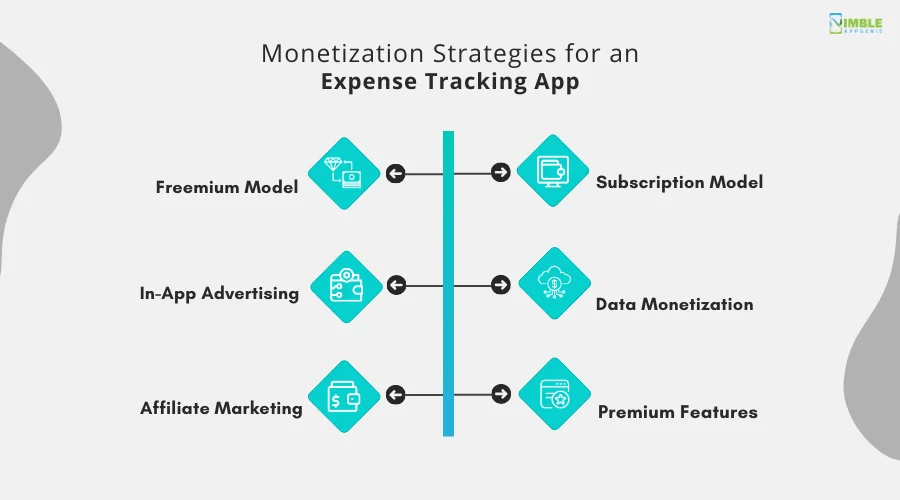
► Freemium Model
Freemium can be a great monetization strategy.
You can provide basic expense tracking features for free, and charge for premium features like advanced budgeting tools, detailed reporting, category customization, unlimited data storage, or integration with other financial platforms.
► Subscription Model
Offer different subscription tiers with varying features & price points based on user needs.
If you want your fintech app to make money, implement different monetization strategies. Consider monthly, quarterly, or annual subscription options.
► In-App Advertising
Advertising is a tried and tested method.
You can display non-intrusive ads like banner ads or interstitial ads.
Target ads relevant to users’ spending habits e.g., credit cards, & investment products.
► Data Monetization
Aggregate anonymized user data to provide insights to financial institutions or marketing companies. Ensure transparency and user privacy by clearly outlining how data is collected and used.
► Affiliate Marketing
Partner with financial institutions or product providers to promote their services within the app.
One can earn a commission when users sign up or make purchases through affiliate links.
► Premium Features
You can offer different premium features that attract users to pay.
Some amazing features include custom financial goal tracking, investment portfolio monitoring, credit score tracking & personalized financial insights.
These are some amazing features you should consider when making an expense-tracking app that can get your users interested.
How Nimble AppGenie Helps You Build an Expense Tracking App
As a leading expense tracking app development company, Nimble AppGenie is widely chosen for delivering custom fintech app development services tailored to unique business requirements.
Whether you want a custom expense tracking app development solution for SMEs, individuals, or large enterprises, or want to know how to build an expense tracking app like Mint, hire app developers who have a proven track record of creating scalable and user-focused apps.
Key Reasons to Choose Nimble AppGenie
- Custom development
- AI & fintech expertise
- Scalable architecture
- Post-launch support
Real-Time Case Study of Our Successfully Completed Project
Client: A mid-sized SME struggling with manual expense tracking and delayed reimbursements.
Challenge:
- Employees submitted expenses in diverse formats that caused delays and errors.
- Lack of real-time visibility into company spending.
- Demand for predictive insights to optimize budgets.
Solution Provided by Nimble AppGenie:
- We developed a custom expense tracking app with cloud sync and AI-powered expense categorization.
- We smoothly integrated APIs for bank accounts and payment systems for seamless transactions.
- Also, our team added dashboards with smart insights to monitor spending trends and improve budgeting.
Results Obtained:
- 70% reduced manual effort and improved the accuracy of expense reporting.
- Increased employee satisfaction due to rapid reimbursements.
- Gained real-time visibility into company expenses that helped with better financial decision-making.
Contact Nimble AppGenie for fintech development solutions to transform your manual expense management into a data-driven and automated process to deliver value to users and organizations.
Conclusion
Investing in an expense tracking app benefits users and businesses with improved financial visibility, automated expense management, data-driven decision-making, and smarter budgeting.
The increasing demand for digital finance solutions is making businesses adopt the latest expense tracking technology to stand out in the competitive fintech market.
Choose custom expense tracking app development to create feature-packed solutions tailored to meet the unique requirements of business expense management, personal finance, or AI-powered automation.
If you are planning to create an expense tracking app that can scale and run successfully, Nimble AppGenie can help you.
Contact our team of developers to discuss your needs and get started with a custom solution designed for growth and success.
FAQs

Niketan Sharma, CTO, Nimble AppGenie, is a tech enthusiast with more than a decade of experience in delivering high-value solutions that allow a brand to penetrate the market easily. With a strong hold on mobile app development, he is actively working to help businesses identify the potential of digital transformation by sharing insightful statistics, guides & blogs.
Table of Contents
No Comments
Comments are closed.