

 Free Consultation
 PCI-DSS Compliant
 GDPR Ready
 ISO 27001
 NDA Protected
 AI Services
 AI App Development
 Generative AI Development
 AI Chatbot Development
 AI Integration Services
 AI Consulting Services
 AI For Fintech
 AI Financial Assistant Solution
 AI Insurance Agent Development
 Tech Stack
 OpenAI / GPT-4
 Claude / Anthropic
 Gemini / Google AI
 Llama / Open Source
 LangChain / LlamaIndex
 Pinecone / Pgvector
 AWS / Azure AI


 Fintech Solution
 Core Fintech
 Fintech App Development
 Neobank App Development
 eWallet App Development
 Lending Software
 Banking Software Development
 BNPL Solution
 BNPL App Development
 Insurance App
 Wealth Management App
 Blockchain Development
 Payroll Software Development
 DeFi App Development
 Crypto Wallet Dev
 Crypto On Ramp Off Ramp
 Crypto Exchange Dev
 Trading Platform Dev
 Payments
 Compliance
 Fintech & Digital Regulations
 Fraud Detection
 Lending Ecosystem
 P2P Lending Platform
 Mortgage Software
 Engagement
 Outsourcing Dev

 Mobile Development
 Mobile App Dev
 iOS App Development
 Android App Development
 React Native
 Flutter Development
 Web Solution
 Node.js Development
 React.js Development
 Angular Development
 App Services
 UI/UX Design
 App Maintenance
 By Stage
 MVP Development
 Industry Solutions
 Healthcare App Dev
 Education App Dev
 Travel App Dev
 Real Estate App Dev
 Logistics Software
 Social Media App

 Hire Mobile Developers
 Hire iPhone Developers
 Hire Android Developers
 Hire React Native Devs
 Hire Flutter Developers
 Hire Web Developers
 Hire Node.js Developers
 Hire Angular Developers
 Hire PHP Developers
 Hire Laravel Developers
 How It Works
 Pre-Vetted Developers
 Ready In 48 Hours
 NDA From Day One
 Replace Guarantee
 Company
 About Us
 Our Work Process
 Portfolio
 Case Studies
 Blog / Insights
 Careers
 Contact Us
 Awards
 Recognition


 Offices


In a Nutshell:
- Over 80% of new mobile apps in 2026 have AI built into their core, not added as an afterthought.
- AI in mobile app development has changed every stage of the process: planning, coding, design, testing, and deployment.
- AI code generation tools like GitHub Copilot are compressing development timelines by 30–40%.
- On-device AI (via Core ML for iOS and TensorFlow Lite for Android) is now mainstream, not experimental.
- Automated testing with AI eliminates weeks of manual QA and catches bugs faster than any human team.
- AI mobile app development cost typically ranges from $40,000 to $300,000+, depending on complexity.
- Nimble AppGenie builds AI-native mobile apps end-to-end, from architecture to launch, so your product is ready for what users expect in 2026.
In 2026, over 80% of new mobile applications have AI built into their base – not as a shiny feature, but as the engine running the whole experience. And the shift is not only about what apps do for users, but it’s also about how apps are developed in the first place.
AI in mobile app development is transforming each stage of the process: how developers plan, how they write code, how they test it, how they deploy it, and how it improves after launch. The tools developers use today – from GitHub Copilot for AI code generation to TensorFlow Lite for on-device inference – have made things possible in weeks rather than months.
This blog is specifically about the app development process, not just the end-user features. If you are looking for a breakdown of the AI features you can add to your app, start here → AI in Mobile Apps: The Most Powerful Features You Need in 2026.
What we cover in this post: how AI is shaping the entire mobile app development lifecycle, from initial planning to the day your app goes live.
The Big Shift – From Rule-Based Apps to AI-Native Development
► What Has Changed in Mobile App Development?
Traditional mobile apps followed a fixed set of rules. That particular thing happened when a user tapped this button. Every behavior was pre-programmed. That time, personalization meant placing a name at the top of every screen. Testing meant a developer manually tapping through 50 screens on 12 different devices.
AI-native apps have a different architecture. Besides following just rules, they learn, adapt, and make real-time decisions based on what each user does. The app you open today might look and behave distinctly from the one another user opens at the same time, because the AI is changing the experience impromptu.
This is not just a feature upgrade; it’s an architectural change. The difference between a traditional app and an AI-native app is like the difference between a printed map and Google Maps – one is static, and the other learns from you.
| Traditional Apps | AI-Native Apps |
| Fixed, rule-based logic | Dynamic, learning-based behavior |
| Same experience for all users | Personalized per user in real time |
| Manual testing cycles | Automated AI-driven QA |
| Static UI | Adaptive UI that evolves |
| AI added as a feature | AI is built into the architecture |
The figures back this up. According to Gartner, 40% of enterprise applications will feature task-based AI agents by the end of 2026 – up from less than 5% in 2025. That’s an eightfold boost in one year. And more than 80% of enterprises will have adopted generative AI app development by 2026.
This shift starts before you write a single line of code. It begins with how developers plan, architect, and think about what they are creating. That’s exactly what we will walk through next.
How AI is Transforming the Mobile App Development Process – Stage by Stage?
Things get practical from here. AI-assisted mobile app development not only speeds things up, but it also alters how every stage of the app development process works.
Below is a stage-by-stage breakdown of how AI is reshaping mobile app development.
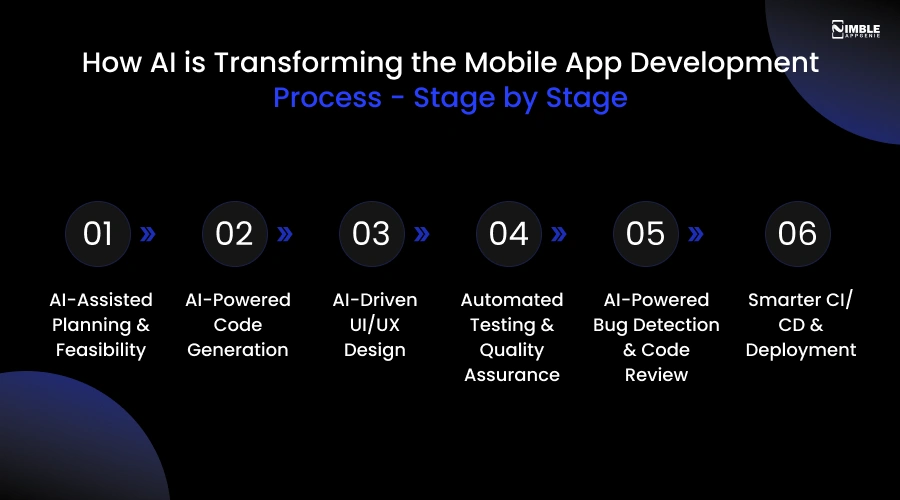
1. AI-Assisted Planning & Feasibility
Before writing code, each mobile app development project starts with a question: “Is this mobile app idea actually buildable, and what will it take?”
In the past, that question needed weeks of senior architect time. Today, AI tools for app developers can analyze similar apps, estimate timelines, suggest mobile app tech stacks, and flag possible technical debt before development starts.
AI planning tools can now:
- Analyze competitor apps in your category and identify technical patterns.
- Suggest the right mobile app architecture (native vs cross-platform, cloud AI, or on-device).
- Generate product requirement documents from natural language descriptions.
- Estimate resource needs and identify risks early.
This means product teams discover problems in week one instead of week eight. It also states that non-technical founders can have more sound conversations with their development partners from day one.
2. AI-Powered Code Generation
This area has changed most extensively. AI code generation for mobile apps is no longer experimental. Now, it’s a standard practice that professional developers follow.
Tools like GitHub Copilot mobile app development manage boilerplate code, write API connections, generate UI components, and even auto-complete complex logic.
GitHub’s research revealed that developers using Copilot accomplish tasks 55% faster. Across the whole project, AI is writing around 46% of the code.
So, the features that used to take a two-week sprint now ship in only days. AI doesn’t replace the architect; the engineering team still makes all the key architectural decisions. But it eliminates the repetitive tasks that used to take hours every day.
| For businesses, this directly reduces your AI app development cost. Less time coding boilerplate = fewer billing hours = more budget for what differentiates your product. See how this impacts cost → AI Integration Services |
3. AI-Driven UI/UX Design
UI/UX designers used to craft static wireframes that looked the same for each user. Artificial intelligence in mobile app development has made this feel outdated.
In 2026, generative AI tools in the design phase can:
- Turn rough wireframe sketches into production-ready UI components.
- Suggest layout modifications based on real user behavior data and accessibility standards.
- Generate various design variants and A/B test them before a developer writes a single line.
- Create personalized UI flows where the interface adapts to each user.
The outcome is a design process that is more data-driven, faster, and more aligned with how real users behave, not how designers think they behave.
4. Automated Testing & Quality Assurance
Ask most app developer what their least favorite part of mobile app development is. The answer is usually testing. Manual QA requires humans to tap through dozens of device configurations and hundreds of screens, which is expensive, slow, and still misses things. AI-powered automated mobile apps testing has changed it entirely.
AI testing tools can now:
- Run tests across hundreds of OS and device combinations simultaneously.
- Automatically generate test cases from the codebase.
- Identify visual regressions (things that look odd, even if the code runs).
- Predict which areas of the app are most expected to fail before a release.
QA that used to take a week now runs overnight and catches more bugs. Teams using AI-driven automated testing report 30-50% faster release cycles with fewer post-launch issues.
5. AI-Powered Bug Detection & Code Review
Beyond QA testing, AI code review tools now function as a permanent senior engineer on your team – one that reviews each pull request and never gets tired.
AI bug detection in mobile development can:
- Detect mobile app security vulnerabilities before code is merged.
- Suggest code improvements and refactors in real time.
- Flag performance issues during development, not after launch.
- Identify deprecated API calls that will break on the next OS update.
For anyone who has ever shipped an app that worked perfectly in testing and then crashed for real users on launch day – this is the layer that prevents that.
6. Smarter CI/CD & Deployment
Continuous Integration/Continuous Deployment (CI/CD) is the pipeline that takes your finished code and gets it into the app store. AI has made this more reliable, faster, and more intelligent.
AI-enhanced CI/CD pipelines can now:
- Anticipate the best time to release based on user activity patterns
- Roll back a bad update automatically if error rates increase
- Auto-scale infrastructure before demand surges, so your app doesn’t crash on launch day.
- Monitor post-launch performance and flag anomalies within minutes.
Think of it as a digital immune system for your app. It monitors the app in production and acts before humans even know something is wrong.
| If you want a step-by-step breakdown of how AI gets integrated into your app – from data collection and model training to choosing the right framework – we cover the full technical process here: AI in Mobile Apps: The Most Powerful Features You Need in 2026 → How to Integrate AI.” |
How AI Elevates the User Experience From the Ground Up?
► Personalization Built Into the Architecture
The best AI features in apps are often invisible to users. They are baked into how the app is architected.
When Nimble AppGenie develops an AI-native app, personalization is not something added in the last sprint. It’s a core design decision made in week one. The ML models, data pipelines, and real-time inference are planned from the beginning, not bolted on.
The result? An app that understands what every user wants and adjusts automatically. Content comes in the right order. Notifications pop up at the right moment. The UI can adapt based on how deeply a user engages.
This is not only good UX, but it’s a business advantage. Apps developed with AI-first architecture exhibit measurably longer session lengths, higher user retention, and better conversion rates than apps where AI was added as an afterthought.
| For a full breakdown of AI features your users will actually notice and love, see: AI in Mobile Apps: The Most Powerful Features You Need in 2026 |
AI Tech Stack For Mobile App Development in 2026
Clients usually ask: “What tools are you actually using?”
Here is a clear breakdown of the AI tech stack that empowers modern mobile app development in 2026.
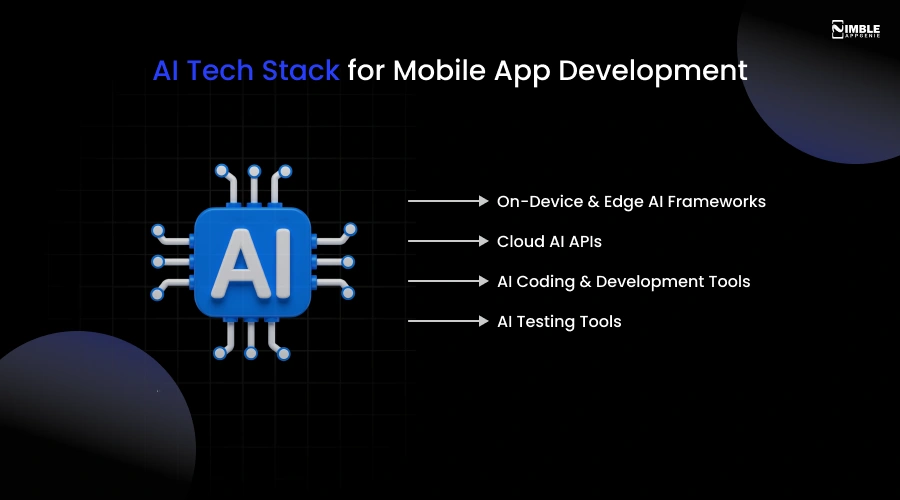
1. On-Device & Edge AI Frameworks
On-device AI means that AI runs directly on the user’s phone – no internet connection required, no data sent to the cloud. This is even more important for speed, privacy, and offline reliability.
- TensorFlow Lite Android: Google’s lightweight ML framework for mobile enables real-time object detection, recommendation models, and text classification that runs completely on-device.
- Core ML iOS Development: Apple’s framework for running ML models natively on iPad and iPhone powers natural language processing, real-time image recognition, and personalization – without a server call.
- MediaPipe: Google’s cross-platform framework for processing audio, video, and sensor data in real time. Used in gesture recognition, AR features, and pose detection.
2. Cloud AI APIs
- Google Vertex AI/ML Kit: Pre-trained models for text recognition, translation, and face detection, plus custom model training.
- OpenAI/Anthropic APIs: Large language model capabilities for content generation, conversational AI, and intelligence search within apps.
- AWS AI Services: Speech recognition, image analysis, and recommendation engines via Amazon’s cloud.
3. AI Coding & Development Tools
- Cursor / Replit Agent: AI-native IDEs that can generate complete features from natural language descriptions.
- Google Gemini Code Assist: Deep Google ecosystem integration, particularly strong for Android Studio workflows.
- GitHub Copilot: An AI pair programmer that writes code in real time alongside developers. The biggest single productivity multiplier in 2026 for mobile teams.
4. AI Testing Tools
- Testim: AI-powered test automation that adapts to UI modifications without needing manual test updates.
- Applitools: Visual AI testing that detects UI regressions a human eye would miss.
- Maestro: Mobile UI testing framework increasingly paired with AI to auto-generate test scenarios.
Quick Selection Guide –
| Need | Recommended Tool |
| On-device ML for iOS | Core ML |
| On-device ML for Android | TensorFlow Lite |
| Real-time vision / AR | MediaPipe |
| AI coding assistant | GitHub Copilot |
| Visual regression testing | Applitools |
| Cloud NLP / LLM features | OpenAI or Google Vertex AI |
Real Business Impact – What AI Delivers For App Development Teams
The question for product teams in 2026 is not “Should we use AI in our development process?” but “How quickly can we build an AI-native development workflow?”
Here are the clear numbers for AI-powered mobile app development.
| Impact Area | What AI Delivers |
| Development Speed | 30–40% faster timelines. Sprints that took 2 weeks ship in days. |
| Cost Reduction | 25–35% savings from AI coding tools + automated testing replacing manual QA. |
| Quality | More bugs caught pre-launch via AI code review and automated testing. |
| Post-Launch | AI monitoring catches issues in minutes, not days. |
| User Retention | AI-native personalization measurably improves engagement and lifetime value. |
Challenges & Risks of AI in Mobile App Development
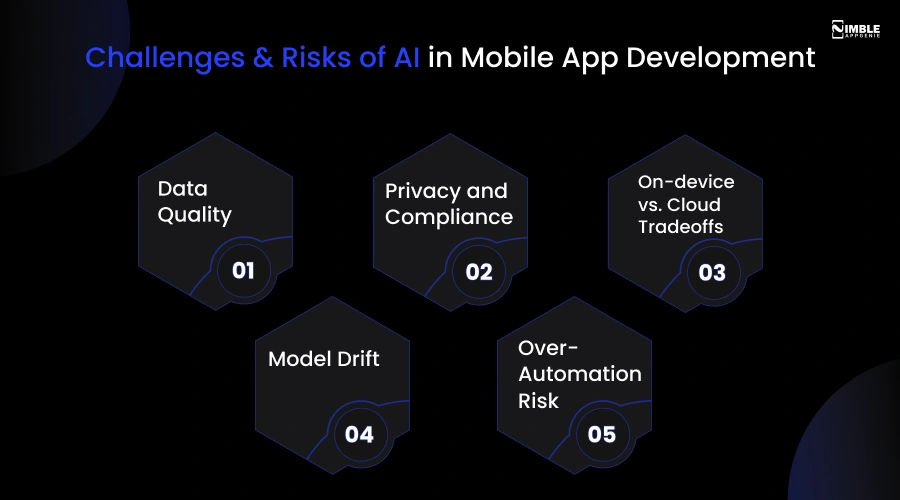
AI in mobile app development is really transformative. But not without challenges. AI-native app development also comes with real risks.
♦ Data Quality
AI is only as good as the data it learns from. Apps that depend on ML for personalization need well-structured, clean data from day one. Poor-quality data leads to poor AI behavior, and users notice immediately.
♦ Privacy and Compliance
AI features that accumulate behavioral data need a proper consent architecture developed from the start, aligned with GDPR, CCPA, India’s DPDA Act, and App Store requirements.
♦ On-Device vs. Cloud Tradeoffs
Models that work perfectly in the cloud can perform poorly when compressed for mobile hardware. Optimization is a talent, not a checkbox.
♦ Model Drift
AI models trained on past user behavior can become less precise as behavior patterns change. Apps require built-in monitoring and retraining pipelines, not a one-time setup.
♦ Over-Automation Risk
AI tools write good code, but also bad code confidently. Teams that ship AI-generated code without architectural review collect technical debt quickly.
None of these challenges is a blocker. There are design issues that can be solved with the right planning and the right AI development company.
The Future of AI in Mobile App Development
If 2026 is the year AI became the base for mobile development, what does 2027 and beyond hold?
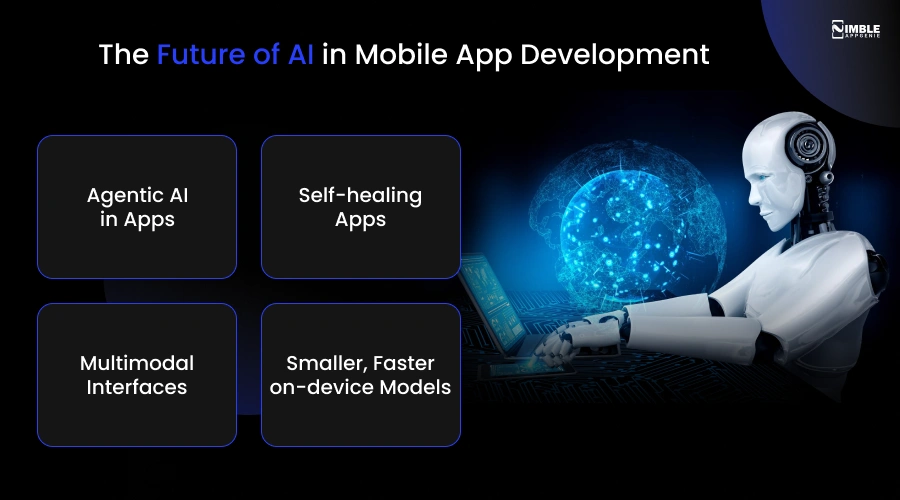
➤ Agentic AI in Apps
Right now, AI usually recommends or predicts. The next phase is AI that acts to manage multi-step tasks autonomously within apps without user input at each step.
➤ Self-healing Apps
AI monitoring systems are becoming better at not only detecting issues but fixing them automatically without a developer pushing an update.
➤ Multimodal Interfaces
Apps are moving beyond tapping. Gesture, voice, image, and text inputs are being combined into fluid multimodal experiences.
➤ Smaller, Faster on-Device Models
Model compression and hardware enhancements are putting more AI strength directly on the device each year. The gap between what apps can do offline vs. online is reducing fast.
The companies and developers building AI-native apps today are setting the basis for whatever comes next.
How Nimble AppGenie Builds AI-Native Mobile Apps?
At Nimble AppGenie, we don’t add AI to apps; we architect apps around it from day one.
That means we start with your data strategy before touching the codebase. We choose the right combination of on-device AI and cloud inference for your performance and privacy requirements. Using AI development tools, we move faster without sacrificing the architectural decisions that determine long-term quality.
Our mobile app development team has developed AI-native apps across healthcare, fintech, enterprise productivity, and retail apps where machine learning is not a feature checklist item, but the core of how the product creates value for users.
We manage the full lifecycle: planning, architecture, AI-powered development, automated testing, deployment, and post-launch app performance optimization. So, we deliver a product that evolves as AI capabilities grow.
| Explore our end-to-end AI development capabilities → AI Integration Services |
Conclusion
The transformation of mobile app development in 2026 is not a trend; it’s a structural shift in how software is built.
AI in mobile app development has reshaped every stage from how teams plan and code, to how they test and ship, to how the app learns and enhances after launch.
Top Mobile App Development Companies in USA that understand this shift and adapt accordingly are delivering better products, faster, and at lower AI app development costs than those still depending on traditional development workflows.
The best part is that AI-powered mobile app development is within the reach of any company looking to approach it with the right base. The right AI tech stack, the right development partner, and a development process created around AI from the start. Nimble AppGenie is ready to build yours.
FAQs

Sunil serves as the Lead Android Engineer at Nimble AppGenie, recognized for his expertise in building robust, scalable mobile solutions across diverse industries. From seamless API integrations to optimizing OS-level performance, Sunil focuses on delivering high-speed, secure applications that stand out in a crowded market. Outside of the tech world, Sunil is a fitness enthusiast who enjoys morning runs and finds his peace playing badminton on the weekends.
Table of Contents




No Comments
Comments are closed.