

 Free Consultation
 PCI-DSS Compliant
 GDPR Ready
 ISO 27001
 NDA Protected
 AI Services
 AI App Development
 Generative AI Development
 AI Chatbot Development
 AI Integration Services
 AI Consulting Services
 AI For Fintech
 AI Financial Assistant Solution
 AI Insurance Agent Development
 Tech Stack
 OpenAI / GPT-4
 Claude / Anthropic
 Gemini / Google AI
 Llama / Open Source
 LangChain / LlamaIndex
 Pinecone / Pgvector
 AWS / Azure AI


 Fintech Solution
 Core Fintech
 App Development
 Neobank Solutions
 eWallet Solutions
 Lending Software
 Banking Solutions
 BNPL Solutions
 BNPL Solutions
 Insurance App
 Wealth Management
 Crypto & DeFi
 Blockchain Development
  Payroll Software
 DeFi Solutions
 Crypto Wallet
 Crypto On/Off Ramp
 Crypto Exchange
 Trading Platform
 Payments
 Compliance
 Regulations & Compliance
 Fraud Detection
 Lending Ecosystem
 P2P Lending Platform
 Mortgage Software
 Engagement
 Fintech Outsourcing

 Mobile Development
 Mobile App Dev
 iOS App Development
 Android App Development
 React Native
 Flutter Development
 Web Solution
 Node.js Development
 React.js Development
 Angular Development
 App Services
 UI/UX Design
 App Maintenance
 By Stage
 MVP Development
 Industry Solutions
 Healthcare App Dev
 Education App Dev
 Travel App Dev
 Real Estate App Dev
 Logistics Software
 Social Media App

 Hire Mobile Developers
 Hire iPhone Developers
 Hire Android Developers
 Hire React Native Devs
 Hire Flutter Developers
 Hire Web Developers
 Hire Node.js Developers
 Hire Angular Developers
 Hire PHP Developers
 Hire Laravel Developers
 How It Works
 Pre-Vetted Developers
 Ready In 48 Hours
 NDA From Day One
 Replace Guarantee
 Company
 About Us
 Our Work Process
 Portfolio
 Case Studies
 Blog / Insights
 Careers
 Contact Us
 Awards
 Recognition


 Offices



Key Takeaways:
- Payroll software helps fix common problems like wrong salaries or late payments, because even one small mistake can make employees lose trust and think about leaving.
- When you develop payroll software, a custom solution works better for businesses that have complex needs like different locations, mixed teams, or special system integrations.
- The core features of payroll system development are automatic salary calculation, tax handling, and direct payments, so that work becomes faster and more accurate.
- Adding advanced features in payroll software, like fraud detection and audit tracking, makes the system safer and easier to manage as the business grows.
- To build payroll software the right way, you need to follow clear steps like understanding your needs, choosing the right system design, and making sure everything is secure and compliant.
- The cost to develop payroll software usually starts from around $25,000 and can go much higher depending on how complex and feature-rich the system is.
One wrong paycheck and your employee is already updating their resume. That is not an exaggeration, 49% of employees start job hunting after a single payroll mistake.
If you are planning to develop payroll software, that is exactly the problem you are solving. Not just late payments or calculation errors, but the deeper issue is that most payroll systems are not built for how your business actually operates.
They work fine at the start. But add a few more states, or change your pay structure, and suddenly you are the one doing the manual work the software was supposed to manage.
Custom payroll software is not about reinventing the wheel. It is about having something that grows with you, stays compliant, and does not fall apart every time your team changes.
This blog walks you through the process to build payroll software that actually fits your business. It covers the right features, the right architecture, the right stack, and a realistic view of what it costs.
So, let’s begin!
What is Payroll Software?
The payroll software is a tool that manages everything involved in paying your people. For example, calculating salaries, withholding taxes, filing with the government, and ensuring money lands in the right bank accounts.
Purchasing it off the shelf works best when you are small and simple. But developing it makes sense when your payroll has real complexity. For instance, multiple states, mixed workforces, deep integrations with your HRMS or ERP, and strict data governance requirements.
So, if you are outgrowing software like ADP or Gusto, or you are creating a payroll product for others, custom development is the right call.
Why Build Custom Payroll Software in 2026?
Off-the-shelf payroll system software is created for the average business. If your business is not average, here is why you should develop custom software that wins:
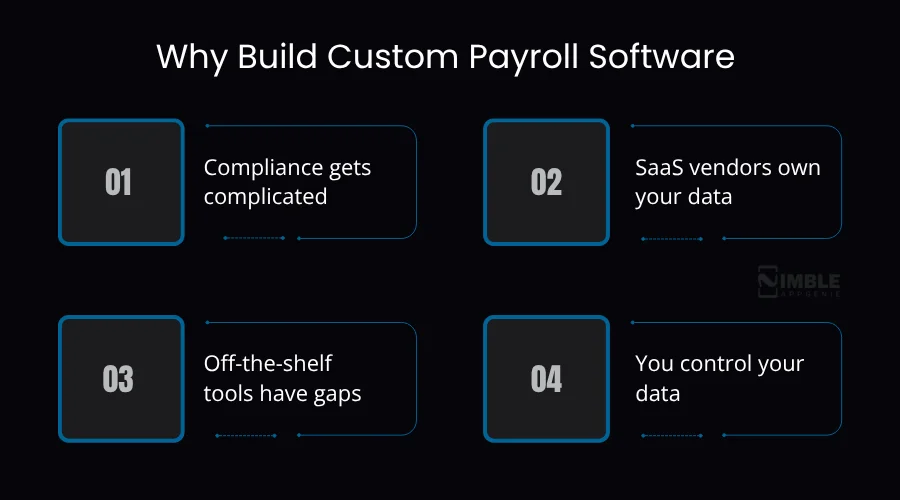
- Compliance gets complicated: Tax laws change constantly, and your vendor moves slowly. There are hundreds of payroll tax changes across U.S. states every year. A custom system allows you to update your own compliance rules instead of waiting on a vendor’s quarterly patch.
- SaaS vendors own your data: Once your data is in a SaaS payroll product, leaving is painful. They control your data, your integrations, and often your pricing. Custom software means you own everything.
- Off-the-shelf tools have gaps: Most payroll systems do not play nicely with specialized HR, time-tracking, or ERP systems. Custom software integrates the way you actually need it to, not through clunky middleware.
- You control your data: Payroll data includes bank details, SSNs, and salary information. With a custom payroll system development, you decide where it lives, how it is encrypted, and who can see it.
| The global payroll software market is expected to hit $55.69 billion by 2031. The growth is being driven by compliance pressure and companies moving away from manual processing. |
Must-Have Features for a Payroll Software
A well-designed and feature-rich payroll system is important for smooth salary management. Below are the core features you should implement in your payroll system development.
| Features | What It Does | Why It Matters |
| Automated Salary Calculation | It calculates gross pay, deductions, bonuses, and overtime automatically based on rules you set. | It eliminates manual errors that cost businesses thousands in corrections and legal penalties. |
| Tax Filing & Compliance Engine | It auto-generates federal, state, and local tax filings and keeps rules updated per jurisdiction. | 33% of small businesses face IRS penalties from payroll errors, which prevents them from. |
| Direct Deposit & Payment Processing | It pays employees through bank transfer, check, or digital wallet on a scheduled cadence. | Employees expect on-time pay. 44% consider quitting after even one paycheck error. |
| Pay Stub Generation | It makes detailed, complete pay stubs for every pay cycle with a full breakdown. | It is needed by law in most states and builds employee trust. |
| Leave & Attendance Tracking | It tracks PTO, sick days, and absence and syncs directly into payroll calculations. | It prevents overpayment and ensures accurate accrual balances. |
| Multi-State & Multi-Currency Support | It manages different tax rules, currencies, and labor laws on locations. | It is vital for any business operating in more than one state or country. |
| Employee Self-Service Portal | It allows employees to access pay stubs, tax forms, and update personal details without HR involvement. | It reduces HR admin workload by up to 40% and boosts employee experience. |
| Reporting & Analytics Dashboard | Real-time reports on payroll costs, headcount, tax liabilities, and trends. | It provides finance and HR teams with instant visibility to plan and audit. |
Advanced Features to Develop Payroll Software
Advanced features take your HR payroll software beyond basic salary processing and help handle complex tasks with ease. These features improve accuracy, save time, and support growing business needs.
Let’s take a look at the advanced features you can add while creating payroll software.
| Feature | What it does | Why it matters |
| Benefits & deducation | It automates health insurance, garnishments, and other deductions per employee. | The manual benefits tracking is where most payroll errors actually come from. |
| Contractor payroll | It separates payment flow for freelancers and contractors, with 1099 generation built in. | Many companies now pay a mix of employees and contractors. Your system requires managing both. |
| Anomaly detection | It spots odd patterns like duplicate payments, sudden pay changes, and entries that do not add up. | It catches errors and potential fraud before money leaves the account. |
| HRMS & ERP integrations | It syncs two ways with your HR software, ERP like SAP or Oracle, and accounting tools like QuickBooks. | It is no more copy-pasting data between systems or fixing mismatches at the month-end. |
| Audit trail | It records every single change made in the system, like what changed, who did it, and when. | You will need this for SOC 2, GDPR, and any external audit. You can build it in from the beginning. |
| Approval workflows | It sets up a sign-off chain before any payroll run is processed or payment goes out. | It prevents unauthorised pay changes and gives you a clear paper trail. |
| Global compliance | It manages payroll rules in countries like local tax laws, statutory requirements, and labor regulations. | If you have international employees, this is not a nice-to-have. |
| Mobile access | The full app for employees and admins to see reports, approve runs, or handle urgent payroll tasks. | Your payroll manager should not need to be at a desk to handle a pay emergency. |
How to Develop Payroll Software: Step-by-Step Process
Developing payroll software takes a clear approach where each stage helps shape a system that works smoothly.
From the first idea to the final setup, the focus stays on making payroll simple to manage, accurate in calculations, and reliable for everyday use. Below is the crucial payroll system development process.
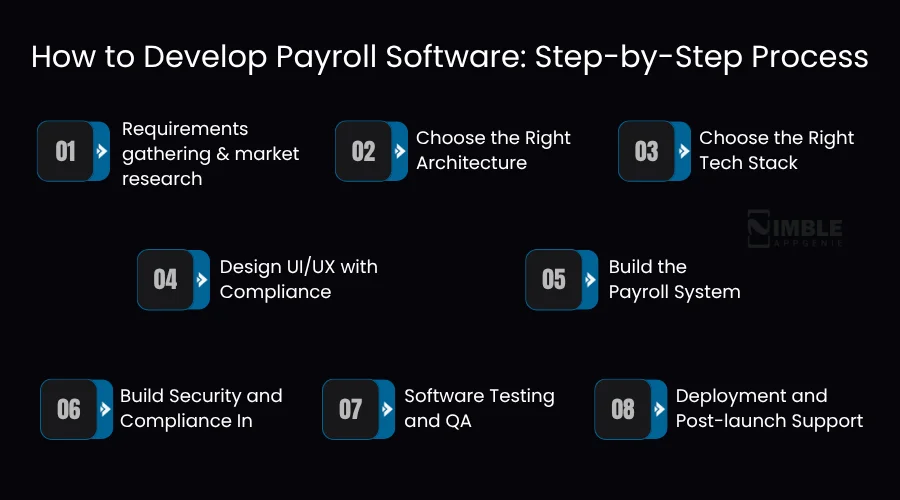
1. Requirements gathering & market research
Before you develop payroll software, you need to understand the issue you are solving and who is solving it for. First, you start with your potential audience. Are you building this for your own business, or as a product for SMBs, enterprises, or a particular industry?
Now, map out every payroll pain point your audience has today. Manual errors, compliance misses, a slow transaction processing system, and poor reporting. Then define your compliance scope.
For example, which states, countries, and employee types you need to support from day one. Finally, lock in your business model. Is this an internal system, a SaaS product, or a white-label solution? These decisions shape every architectural choice downstream.
2. Choose the Right Architecture
Monolithic architecture puts everything in a single codebase, faster to build initially, but harder to scale or update independently. For payroll, that is an issue. All need to change at different speeds, like tax calculation logic, payment processing, and compliance modules.
Microservices software architecture patterns break these into independent services. The payroll engine, tax module, payment processor, and notification system each live separately.
You can update one without touching the others, scale the high-load services, and isolate failures. For any payroll system beyond the payroll software MVP scale, microservices are the right call.
3. Choose the Right Tech Stack
Once you select the right system architecture, choose the tech stack. Just use what your dedicated development team actually has expertise in. The best stack for payroll is not the trendiest one. It is the one your payroll software developers can move fast and debug quickly in.
Let’s take a look at the tech stack table:
| Layer | What to Use |
| Frontend | React.js or Vue.js |
| Backend | Node.js, Python (Django/FastAPI), or Java (Spring Boot) |
| Database | PostgreSQL + Redis |
| Cloud | AWS, Google Cloud, or Azure |
| Authentication & login | OAuth 2.0 + Multi-Factor Authentication |
| API | REST or GraphQL |
| Payments | Stripe, Dwolla, or ACH |
| Deployment | Docker + Kubernetes |
Just keep in mind. Do not overbuild the stack in the first version. Get the core payroll engine working correctly, then optimize. The most expensive payroll projects are the ones that spent six months on architecture and never skipped.
4. Design UI/UX with Compliance
HR Payroll software has two primary user types. One is the admins who run payroll, and the other is the employee who views their compensation data. Both need very different experiences, and both need to be designed with compliance in mind from the start.
The admin dashboard should surface the full payroll run workflow with clear states at every step. For example, employee list, pay period selection, calculation review, approval chain, and payment confirmation.
The employees’ self-service portal needs clean access to pay stubs, tax forms, and personal details update flows. Every screen that touches financial data should have audit-ready logging built into the interaction. It is not added later as an afterthought.
5. Build the Payroll System
To develop payroll software, you can start with a payroll calculation system, not the dashboard, integrations, or mobile app. Once the software is solid, build payroll software integration in your next sprint.
HR software for employee records, accounting software for ledger entries, and time-tracking for hours worked. You just treat every integration like a two-way contract.
What goes in has to match exactly what comes out. Developers build solid error handling so that when something breaks, it breaks loudly and obviously, not silently in the background.
6. Build Security and Compliance In
Security is not a feature you add at the end. Payroll data is among the most sensitive information a company holds, like bank accounts and salary details. A breach here is costly and public.
Additionally, encrypt everything at rest and in transit. You should set up three levels of access. One employee sees only their own data, HR managers can run payroll and see their team, and admins have full access.
Now, get aligned with SOC 2 and GDPR requirements from the first sprint. Retrolifting compliance later costs three times as much. Every change to payroll data needs a permanent, tamper-proof audit log. That is not optional for any serious client or regulator.
7. Software Testing and QA
Payroll is a zero-error system. When something goes wrong, it is not a bug report. It is someone’s rent money. Your testing has to be thorough enough to catch the edge cases that only show up twice a year.
Test every calculation individually. For instance, overtime, bonus proration, and tax bracket changes. Now test every integration. You can run full end-to-end tests with real payroll scenarios using anonymized data.
After that, load test simulate 10x your expected employee count and ensure nothing slows down or fails. Do not run a live payroll until you have compared the system’s output against historical payroll data and it matches the same.
8. Deployment and Post-launch Support
Do not switch over from the old system in one day. Just run both systems side by side for at least one full pay cycle. Now compare every number. Only after that do you shut the old one down.
Connect all integrations before go-live, like HR, accounting, and time-tracking. Train the people who will use it. Now map every field from your old system, migrate the data, validate it, and keep backups for 90 days.
You can plan your migration carefully, but messy migration data causes more post-launch headaches than anything else. You can set aside 15 – 20% of your build cost every year for maintenance. Security standards update, new compliance requirements show up.
How Much Does It Cost to Create Payroll Software?
The cost to develop payroll software can range between $25,000 – $200,000. But it depends on how much you’re building, how complex your compliance needs are, and where your development team is based. Let’s have a look at the realistic cost breakdown:
| Complexity Type | Estimated Cost |
| MVP / Basic Payroll System | $25,000 – $50,000 |
| Mid-Tier Custom Payroll Software | $50,000 – $120,000 |
| Enterprise-Grade Payroll Platform | $120,000 – $300,000+ |
| Annual Maintenance | 15–20% of the build cost |
These are just rough estimates for payroll software development. You can add cloud hosting, third-party API integration for tax data and payment processing, and your annual maintenance budget on top.
The single biggest cost driver is compliance. Multi-state or global tax logic alone can add $40,000–$80,000 to a project. So, it is vital to be particular about your geographic scope before you start scoping the development, as it changes the price.
Why Choose Nimble AppGenie to Develop Custom Payroll Software?
Developing payroll software means getting compliance right, security right, and integrations right at the same time. This is a short list of software development companies that can actually deliver it.
Being a trusted payroll software development company, Nimble AppGenie has built fintech and HR systems for clients in different industries, with a track record of shipping a payroll system that manages real-world complexity.
What does that mean for you practically:
- You get a team that has already solved the hard payroll problems, not one learning them on your project budget.
- Full-cycle development, from requirements and architecture through QA, deployment, and ongoing compliance maintenance.
- Deep experience with the integrations that payroll systems actually need, like ADP, QuickBooks, SAP, and Workday.
- Transparent scoping: we tell you what it costs and why before development starts, not after.
If you are ready to move past off-the-shelf limitations and build payroll software, consult with Nimle Appgenie. We will scope the bespoke solution for your scale, your compliance requirements, and your timeline.
Conclusion
Custom payroll software is not just a technical project; it is a compliance and trust project. Your employees trust that they will get paid correctly. Your finance team trusts the numbers. Regulators trust the records. Get the system right, and all of that works on autopilot.
The roadmap is clear. Validate requirements first, choose microservices, and develop payroll software. No matter if you are building a custom payroll product for your own business or developing payroll management software, this guide gives you a realistic path.
FAQs

Niketan Sharma, CTO, Nimble AppGenie, is a tech enthusiast with more than a decade of experience in delivering high-value solutions that allow a brand to penetrate the market easily. With a strong hold on mobile app development, he is actively working to help businesses identify the potential of digital transformation by sharing insightful statistics, guides & blogs.
Table of Contents




No Comments
Comments are closed.