

 Free Consultation
 PCI-DSS Compliant
 GDPR Ready
 ISO 27001
 NDA Protected
 AI Services
 AI App Development
 Generative AI Development
 AI Chatbot Development
 AI Integration Services
 AI Consulting Services
 AI For Fintech
 AI Financial Assistant Solution
 AI Insurance Agent Development
 Tech Stack
 OpenAI / GPT-4
 Claude / Anthropic
 Gemini / Google AI
 Llama / Open Source
 LangChain / LlamaIndex
 Pinecone / Pgvector
 AWS / Azure AI


 Fintech Solution
 Core Fintech
 App Development
 Neobank Solutions
 eWallet Solutions
 Lending Software
 Banking Solutions
 BNPL Solutions
 BNPL Solutions
 Insurance App
 Wealth Management
 Crypto & DeFi
 Blockchain Development
  Payroll Software
 DeFi Solutions
 Crypto Wallet
 Crypto On/Off Ramp
 Crypto Exchange
 Trading Platform
 Payments
 Compliance
 Regulations & Compliance
 Fraud Detection
 Lending Ecosystem
 P2P Lending Platform
 Mortgage Software
 Engagement
 Fintech Outsourcing

 Mobile Development
 Mobile App Dev
 iOS App Development
 Android App Development
 React Native
 Flutter Development
 Web Solution
 Node.js Development
 React.js Development
 Angular Development
 App Services
 UI/UX Design
 App Maintenance
 By Stage
 MVP Development
 Industry Solutions
 Healthcare App Dev
 Education App Dev
 Travel App Dev
 Real Estate App Dev
 Logistics Software
 Social Media App

 Hire Mobile Developers
 Hire iPhone Developers
 Hire Android Developers
 Hire React Native Devs
 Hire Flutter Developers
 Hire Web Developers
 Hire Node.js Developers
 Hire Angular Developers
 Hire PHP Developers
 Hire Laravel Developers
 How It Works
 Pre-Vetted Developers
 Ready In 48 Hours
 NDA From Day One
 Replace Guarantee
 Company
 About Us
 Our Work Process
 Portfolio
 Case Studies
 Blog / Insights
 Careers
 Contact Us
 Awards
 Recognition


 Offices


Quick Answer: To validate your app idea without development, research your target problem, interview potential users, build a simple landing page to test interest, create a clickable prototype, and track real user signals.
Key Takeaways:
- App idea validation helps you check if your mobile app solves a real problem before spending money on app development.
- Start with mobile app market research using Reddit, Quora, Google Trends, App Store reviews, and online communities to understand user pain points.
- Competitor analysis helps you find market gaps, understand user complaints, and improve your app idea.
- User interviews are important for startup idea validation because they show what people actually need and how they solve problems today.
- Landing pages, clickable prototypes, and fake door tests help validate your app idea without development by tracking sign-ups and user interest.
- A no-code MVP built with tools like Bubble or Glide helps test real user engagement before full mobile app development.
- Nimble AppGenie helps founders with app idea validation, market research, prototype design, MVP development, and user feedback analysis.:
If you want to validate your app idea before spending money on development, you are making the smartest decision a founder can make in 2026. Most people do the opposite. They built it first, then found out nobody wanted it. That mistake costs a huge amount of money and time.
But the number backs this up. As per Forbes, around 42% of startups fail because there was no real market need. In the app world specifically, the average app loses 77% of its users within three days of launch. This is not a technology problem. It is a skipping-validation problem.
The good news? You do not need a whole dedicated team to validate your mobile app idea. This guide walks you through the 8-step process, real tools, and specific actions, so you know exactly what to build before you build it.
So, let’s begin!
What Is App Idea Validation?
An app idea validation is a process of testing whether your app idea solves a real problem for a real audience, before you invest time and money in development.
Let’s say, instead of cooking an entire meal and hoping people like it, you offer a small taste first. Validation is that taste test. It answers four major questions:
- Does a real problem exist that my app would solve?
- Are enough people experiencing this problem?
- Will they actually use or pay for my solution?
- Is there a clear enough market for this to become a business?
Why Must You Validate Your App Idea Before Building an App?
You must validate your app idea because it ensures you are solving a real problem for a particular audience. If your app idea does not have a real demand, every dollar of that is wasted. Here is a simple way to think about the risk:
Developing a full app costs anywhere from $30,000 to $300,000, depending on complexity, platform, and features. Most apps never recover their mobile app development cost. Validation, done right, costs you very little and often nothing at all.
Here is what skipping validation looks like in practice:
| What Founders Skip | What Happens Next |
| Market research | Develop something that 3 competitors already do |
| User interviews | Add features users never asked for; costs spiral |
| Landing page demand test | Launch to silence, zero downloads, zero reviews |
| Prototype testing | Users find UX confusing only after the full build is done |
| No-code MVP | Spend 6 months building, and discover the core idea does not work |
Validation protects you from all three of those outcomes.
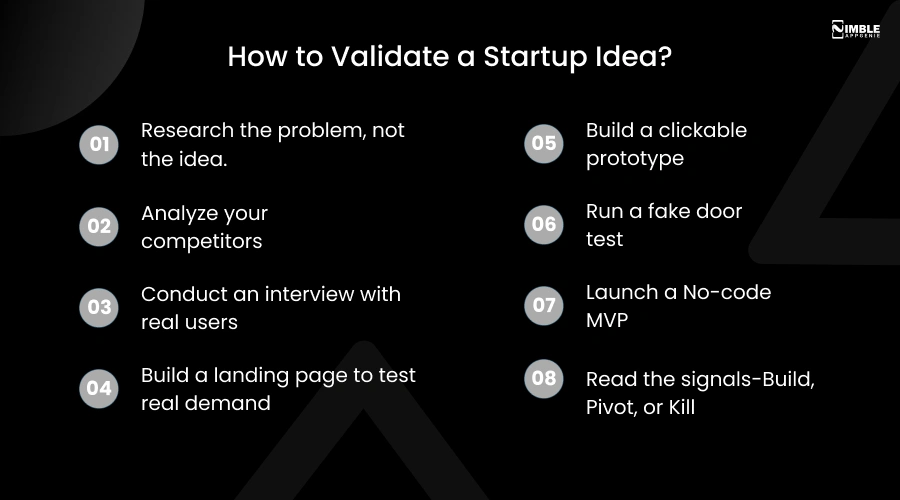
How to Validate a Startup Idea?
To validate your app idea, you have to follow some necessary idea validation steps to clearly know whether your idea will work or not in the market.
- Research the problem, not the idea.
- Analyze your competitors
- Conduct an interview with real users
- Build a landing page to test real demand
- Build a clickable prototype
- Run a fake door test
- Launch a No-code MVP
- Read the signals-Build, Pivot, or Kill
No matter if you have fintech startup ideas or other healthcare ideas, it is crucial to validate them. So, if you are planning to begin a journey as an entrepreneur, it is vital to have a great idea. Before you turn it into a real business, it is vital to see if your app idea works for the market and solves a real issue.
Let’s take a look at the crucial steps of mobile app idea validation.
1. Research the Problem, Not the Idea
Most startup founders start with a solution before they fully understand the problem. That is where validation starts going wrong. Your mobile app should solve a real, frequent, and urgent pain point, not just a ‘nice-to-have’.
Where to do this mobile app market research, particularly:
You can search “[your app category] problem” or “[your category] frustrated”. Read threads in r/smallbusiness, r/productivity, r/startups, r/Entrepreneur. Now copy every complaint that appears more than two times.
- App Store & Google Play Reviews
Search for apps similar to your mobile app idea. Filter by 1-3 star reviews. Now read them all. Users describe exactly what is missing and what frustrates them for free.
- Quora and Stack Exchange
Search “how do I solve [problem]” and “what app does [thing]”. These show you what solutions people are actively hunting for.
- Google Trends
You can type your core problem keyword. Now check if searches are growing (green light), flat (proceed with caution), or declining (red flag).
- Facebook groups and LinkedIn Communities
You can join 2-3 groups in your target niche. Scroll the last 30 days. Now count how many posts mention the problem you want to solve.
Now look for patterns. If the same frustrations keep showing up on forums, reviews, and discussions, that is real demand. That is your green light to keep going.
Pro Tip: You are not just looking for people who have the problem. You are looking for people who are actively searching for a solution and not finding a good one.
2. Analyze Your Competitors
Competition is not a bad sign. It means a market exists. If there are already apps solving the problem you want to tackle, that is actually a good sign. It means demand exists. Your job is to find the gap.
How to run a fast competitor analysis?
- Search your category on the App Store, Google Play, and Google. List the top 5 results.
- Build a simple spreadsheet with columns. It should have the app name, core features, pricing, rating, number of reviews, and last updated.
- Read their 2 and 3-star reviews, not 1-star (too emotional), not 5-star (too biased). 2-3 star reviews tell you what is almost working but failing users.
- Note their onboarding flow and download their free version. Where is it confusing? What is missing in the first 5 minutes?
- Check their last update date; an app not updated in 12+ months is vulnerable. Users are probably frustrated.
| Competitor | Core features | Ratings | Last updated | The gap you can fill |
| App A | – | – | – | Fill this in |
| App B | – | – | – | Fill this in |
| App C | – | – | – | Fill this in |
Ask yourself: What gap can my app fill? What would make users switch from what they already use? If there is zero competition, be careful. It might mean nobody has tried, or it might mean nobody needs it.
3. Conduct Interviews with Real Users
This is the step most startup sounders skip. They think they know what users want. They do not. Talking to 10-15 real people from your target audience will change your idea, and that is a good thing.
Where to find candidates:
- Post in relevant Facebook groups like “I am researching (problem). Would anyone spare 15 minutes for a quick call?”
- Search LinkedIn for your target job title and send a direct note explaining you are doing research (not selling).
- Post on Reddit in the relevant subreddit asking for volunteers.
- You can use your own network, but only if they genuinely fit the target user profile, not just friends who will be polite.
What Questions to Ask:
- Tell me about the last time you faced [the problem]. What happened?
- What do you currently use to solve this? Walk me through what you do.
- What is the most frustrating part of that current solution?
- If there were a perfect solution, what would it do?
- Would you pay for that? How much feels fair?
- Can I follow up with you when we have something to show?
Critical rule: Do not pitch your idea during the interview. Do not say, “I am creating an app that does X. Would you use it?” That question gets polite yes answers, not real ones. You should listen first and always.
4. Build a Landing Page to Test Real Demand
A landing page is one of the fastest and most effective ways to test real-world demand for your mobile application. The idea is simple. You have to describe what your app does, show its value, and ask visitors to sign up or express interest. No app is required.
What your landing page must have:
- Headline: One sentence that says what your app does and for whom. For example, the expense tracker built for freelancers.
- Sub-headline: One sentence on the main benefit. For example, track income, expenses, and GST, all in one place.
- 3 bullets benefits: Not features, only benefits. What does the user get? Time saved? Money saved? Stress removed?
- Email sign-up form: Get early access or notify me when it launches. This is your demand measurement tool.
- One optional image: A mockup or hand-drawn app wireframe. Does not need to be polished.
Free tools to build a landing page:
- Carrd.co-It builds in 30 minutes, free plan available
- Notion-It publishes a Notion page as a simple website
- Mailchimp-Landing page+email list in use
How to drive traffic to test it?
- Share in 3-5 relevant WhatsApp groups and Facebook communities.
- Post on LinkedIn with a genuine message like “I am building this, does it solve your problem?”
- Run an Instagram or Facebook ad to your target audience for 3 days.
What good looks like: 100 visitors → 20+ sign-ups = strong demand signal. 100 visitors → 2-3 sign-ups = the messaging is wrong, or the idea needs rethinking.
5. Build a Clickable Prototype
This is the important step to validate your app idea. A prototype is a visual walkthrough of your app. It looks real. Users can tap through it. But there is no code behind it. This is how you test whether your idea works before a dedicated development team touches it.
What to include in your prototype?
- The home/dashboard screen: What users see first
- The core feature flow: The main thing your app does, in 3-5 steps
- The sign-up or onboarding screen: How a new user gets started
- One key secondary screen: Anything else users told you they need most
Best free tools for prototyping
The table below showcases the mobile app prototyping tools that you can use.
| Tool | Best for | Free plan? | Learning curve |
| Figma | Full UI prototypes | Yes | Medium |
| Adobe XD | Clean mockups | Yes | Low |
| InVision | Click-through demos | Yes (1 project) | low |
| Marvel App | Quick phone mockups | Yes | Very low |
After you build it, you can share the prototype link with 10 people from your target audience. Watch them use it on a video call. Do not explain anything, just observe.
Where do they get confused? What do they skip? What do they try to click that is not there? That feedback tells you exactly what to fix, before any money is spent on development.
6. Run a Fake Door Test
A fake door test shows users a feature or button that looks real, but does not exist yet. When they click it, you capture the intent without building the feature.
Here is a simple example:
Say you want to develop a smart invoice generator feature inside your freelance app. You add a button on your landing page or prototype that says generate invoice. When a user clicks it, they see: This feature is coming soon. Want early access? Leave your email?
If 40 out of 100 visitors click that button and leave their email, you have just proven that the feature is worth building. If 3 people click it, you just saved yourself weeks of development time.
What to measure in a fake door test?
- Click-through rate on the feature button
- Number of email sign-ups vs. page visitors
- How quickly people click, fast clicks mean high intent.
Real-world signal: A founder building a meal-planning app added a fake ‘Suggest a Recipe with What’s in My Fridge’ button. 38% of visitors clicked it. That feature went to the top of the build list, before a single developer was hired.
7. Launch a No-Code MVP
An MVP app development is the simplest working version of your mobile app that allows real users to experience your core idea. In 2026, you can build one without a team.
No-code tools for your MVP:
| Tool | Best For | Coding Required? | Cost |
| Glide | Mobile apps from Google Sheets | No | Free to start |
| Adalo | Custom app UI with database | No | Free plan available |
| Bubble | Complex web apps | No | Free plan available |
| Twinr | Mobile app MVPs fast | No | Paid, affordable |
| Softr | Web apps from Airtable | No | Free plan available |
Rules for building your no-code MVP:
- One core feature only. Resist every urge to add more. The goal is learning, not launching a full product.
- Real users, not friends. Get 20–30 people from your target audience to use it, not people who will be kind to you.
- Measure three things: Did they complete the core flow? Did they come back more than once? Did they tell someone else about it?
If people complete the core flow and return, that is your signal to invest in full development.
8. Read the Signals – Build, Pivot, or Kill
Once you have run the steps above, you have real data. Now you make a decision. Here is the exact framework to use:
| Signal | What It Means | Action |
| High sign-ups, positive feedback, repeat MVP users | Real demand exists | Build |
| Interest exists, but users want something different | The problem is real; the solution needs rethinking | Pivot |
| Low sign-ups, disinterest, and no repeat usage | No real demand or wrong audience | Kill / Restart |
The ability to kill an idea early is not a failure. It is one of the smartest decisions a founder can make. It saves months and lakhs of rupees.
What Are the Common Mistakes People Make During App Validation?
Most founders make the same mistakes when they validate an app idea. Here they are with the specific fix for each.
| Mistake | Why It Fails | The Fix |
| Asking friends and family for feedback | They want to support you, not tell you the truth. | Find 10 strangers who match your target user. Post in communities. Offer a $6 Amazon voucher for 15 minutes of their time. |
| Treating ‘I would use that!’ as validation | Verbal interest has zero cost for the user. It means nothing until they act. | Only count actions: email sign-ups, clicks on a CTA button, and people who actually use your no-code MVP more than once. |
| Building a full prototype before talking to anyone | You built based on assumptions that could have been corrected in week one. | Do user interviews (Step 3) before you open Figma. Let what you learn shape what you build. |
| Validating with the wrong audience | Tech enthusiasts, startup founders, or the general public ≠ are your actual users. | Write a one-line description of your exact target user before you recruit anyone. Example: ‘Freelance graphic designers in India earning under ₹5 lakh/year.’ |
| Skipping competitor research | You build what already exists and wonder why nobody switches to your app. | Spend 3 hours reading competitor reviews before your first user interview. Come to interviews knowing what existing solutions fail at. |
| Adding too many features to the MVP | Users get confused, you cannot tell which feature they value, and costs spiral. | Pick the ONE feature that solves the core problem. Ship only that. Add features only after real users ask for them more than three times. |
| Pitching during user interviews | Users respond to your pitch, not to their real needs, and you get biased data. | Never say, ‘I am building an app that does X, would you use it?’ Ask only about their problem and current behaviour. Save the pitch for later. |
How Nimble AppGenie Helps You Validate Your App Idea?
As a trusted mobile app development company, we have helped hundreds of founders go from “I have an idea” to “I have a validated product with real users”. We do not just build mobile apps. Also, we help you make sure you are building the right one.
Let’s check out why you must join hands with Nimble AppGenie.
| Validation Stage | What Nimble AppGenie Does? | What Do You Get? |
| Idea discovery | Free 30-minute discovery call to evaluate your idea, market size, and competition. | Honest feedback on whether your idea has legs, before you spend anything. |
| Problem & market research | We run competitor analysis, audience mapping, and problem-validation research for you. | A clear picture of the gap in the market your app can fill. |
| Prototype design | Our UI/UX team develops a professional clickable prototype that you can test with real users. | User-tested wireframes are read for iteration. |
| MVP development | We build a lean, focused MVP using agile sprints, only what users told you they need. | A working product in the market in 8-12 weeks, built on validated demand. |
| Post-launch iteration | We track user behaviour, gather feedback, and help you decide what to build next. | Continuous improvement based on real data. |
We work with first-time founders, funded startups, and enterprise teams globally. If you have an idea and do not know where to start, book a free consultation call, and it will save you more than you expect.
Conclusion
Validating your mobile app idea is not slowing down. It is building smart. The 8 steps in this guide, from researching the real problem to running a fake door test, are worth building. The entire app validation process costs almost nothing compared to jumping straight into development.
The best founders in 2026 are not the ones with the biggest budgets. They are the ones who ask the right questions early, talk to real users honestly, and allow data to make the decision.
Therefore, it is vital to validate your app idea now and build with confidence later. And when you are ready to build, Nimble AppGenie is here.
FAQs

Madan is the Backend Solutions Architect at Nimble AppGenie, specializing in the design of secure, high-concurrency systems that power complex mobile ecosystems. With deep expertise in server-side logic and database management, he ensures every platform is built with enterprise-grade security. In his free time, he is an avid researcher of emerging technologies; he spends his time deconstructing the latest backend frameworks and reading technical papers to ensure our solutions remain at the absolute forefront of industry innovation.
Table of Contents




No Comments
Comments are closed.