

 Free Consultation
 PCI-DSS Compliant
 GDPR Ready
 ISO 27001
 NDA Protected
 AI Services
 AI App Development
 Generative AI Development
 AI Chatbot Development
 AI Integration Services
 AI Consulting Services
 AI For Fintech
 AI Financial Assistant Solution
 AI Insurance Agent Development
 Tech Stack
 OpenAI / GPT-4
 Claude / Anthropic
 Gemini / Google AI
 Llama / Open Source
 LangChain / LlamaIndex
 Pinecone / Pgvector
 AWS / Azure AI


 Fintech Solution
 Core Fintech
 App Development
 Neobank Solutions
 eWallet Solutions
 Lending Software
 Banking Solutions
 BNPL Solutions
 BNPL Solutions
 Insurance App
 Wealth Management
 Crypto & DeFi
 Blockchain Development
  Payroll Software
 DeFi Solutions
 Crypto Wallet
 Crypto On/Off Ramp
 Crypto Exchange
 Trading Platform
 Payments
 Compliance
 Regulations & Compliance
 Fraud Detection
 Lending Ecosystem
 P2P Lending Platform
 Mortgage Software
 Engagement
 Fintech Outsourcing

 Mobile Development
 Mobile App Dev
 iOS App Development
 Android App Development
 React Native
 Flutter Development
 Web Solution
 Node.js Development
 React.js Development
 Angular Development
 App Services
 UI/UX Design
 App Maintenance
 By Stage
 MVP Development
 Industry Solutions
 Healthcare App Dev
 Education App Dev
 Travel App Dev
 Real Estate App Dev
 Logistics Software
 Social Media App

 Hire Mobile Developers
 Hire iPhone Developers
 Hire Android Developers
 Hire React Native Devs
 Hire Flutter Developers
 Hire Web Developers
 Hire Node.js Developers
 Hire Angular Developers
 Hire PHP Developers
 Hire Laravel Developers
 How It Works
 Pre-Vetted Developers
 Ready In 48 Hours
 NDA From Day One
 Replace Guarantee
 Company
 About Us
 Our Work Process
 Portfolio
 Case Studies
 Blog / Insights
 Careers
 Contact Us
 Awards
 Recognition


 Offices


Key Takeaways:
- Most nonprofits wait too long or spend too much on the wrong solution. An app should be your first digital decision, not your last.
- Non profit app development means building a mobile or web app around your mission: donations, volunteers, events, and impact – all in one place.
- You don’t need every feature on day one. Starting with an MVP (minimum viable product) keeps costs low and lets real users guide what you build next.
- A basic nonprofit app starts around $15,000–$40,000. A full-featured platform runs $40,000–$150,000+. The cost almost always pays back through better donor retention alone.
- Custom apps beat off-the-shelf tools the moment your organization has specific workflows, sensitive donor data, or serious growth plans.
- The best nonprofit apps in 2026 use AI for donor personalization, offline mode for remote teams, and gamification to keep volunteers engaged.
- Nimble AppGenie builds mission-first apps for nonprofits and NGOs – transparent pricing, phased development, and support long after launch.
Running a nonprofit is not easy. Your team is busy; volunteers miss shifts; donors don’t always return; and crucial data sits unused in spreadsheets.
Now, someone has suggested building an app, and you are wondering if Non-Profit App Development is a smart move or only an expensive mobile app idea that won’t last.
That’s a valid concern.
This guide will not tell you that every nonprofit needs an app, as some don’t; at least not right now. Instead, you will get a clear explanation about what nonprofit app development involves, how much it costs, what value it can bring, and how to decide if it’s the right time for you.
By the end, you will have a clear pathway.
What Is Non Profit App Development?
Non-profit app development is the process of building web or mobile apps designed around your organization specific mission- not a plug-and-play tool, not a generic template, but something created to meet the real needs of your team.
It can be a volunteer scheduling system that sends users automatic reminders. A donation portal where contributors give with only one tap. An impact dashboard that unveils where donors’ money went in real time. An event app that sells tickets and accumulates live donations at your charity gala.
Unlike commercial apps created to generate revenue, nonprofit apps are built to create impact. The goal is not profit, it’s your mission. And the technology is the only efficient way to expand it.
| Quick Definition: A nonprofit app is a custom-built web or mobile application that helps mission-driven organizations raise funds, report impact, manage events, and coordinate volunteers, all from one platform that their supporters actually want to use. |
Does Your Nonprofit Actually Need an App?
Well, it depends on where you are right now. If you are a small nonprofit with one annual fundraiser and a handful of donors, you may not need a custom app today. An email list and a good website will serve you best until you grow.
But, if any of the below sounds familiar, an app for charity organizations is the next logical step you should take:
- Volunteers drop out or miss shifts due to inconsistent communication.
- Your donors give once, and you find it tough to bring them back.
- You can’t show donors a transparent picture of where their money went.
- Your team spends hours every week performing manual tasks that nonprofit technology solutions could automate.
- Your fundraising campaigns live and die by email open rates alone.
- You serve communities in various locations, and coordination is a consistent challenge.
- You are losing younger donors to organizations offering a better nonprofit digital transformation.
50% of nonprofit website traffic now comes from mobile devices. And studies constantly show that donors who engage through a dedicated app contribute more and stay connected longer than those who interact only through a website or email.
So, when a thought hits your mind: why do non-profit organizations need apps? Just recall the key reasons – boost fundraising efforts and donations, streamline operations and management, improve transparency and trust, increase visibility and brand awareness, and more.
The question is whether your organization is set to use one effectively and whether the investment right now makes sense.
What Type of Nonprofit App Do You Actually Need?
The right type of nonprofit app depends completely on your operational issues.
Below, let’s look at the types of nonprofit apps you can build.
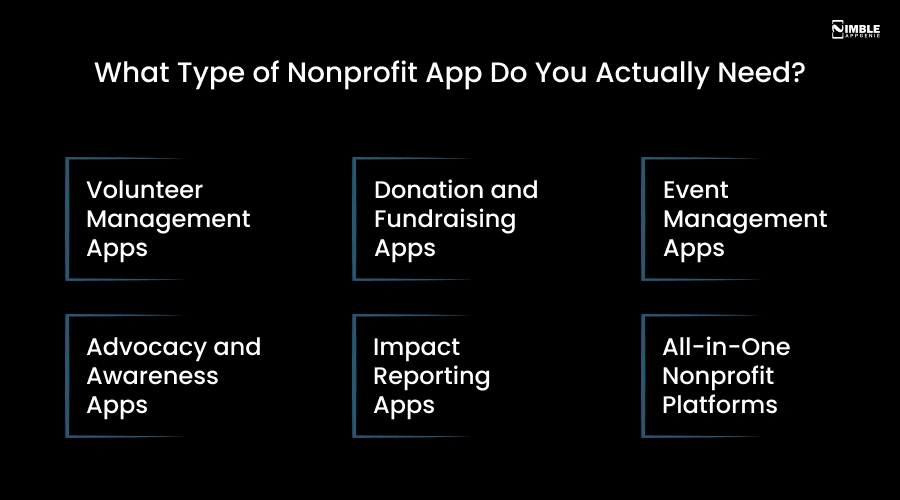
1. Volunteer Management Apps
Building volunteer management apps, you can replace spreadsheets, email chains, and WhatsApp groups that together hold your volunteer program currently.
Volunteers sign up for shifts, log hours, get reminders, and receive updates, all from their phones. Best for: Large NGOs, community organizations, and event-driven nonprofits that rely heavily on volunteer labor.
2. Donation and Fundraising Apps
Donation app development is chosen to smooth contributions as much as possible. Just one tap, and supporters can donate, set up recurring contributions, and get automated tax receipts.
Fundraising app development with real-time donation counters, fundraising campaign pages, and social sharing turns givers into advocates. Best for: Churches, Charities, disaster relief organizations, and non-profit organizations where donations are the main revenue stream.
3. Event Management Apps
These apps are developed to handle ticket sales, event updates, registrations, and live donation prompts during your fundraising events.
Replaces Eventbrite, email chains, and donation tables with one smooth experience. Best for: Nonprofits that conduct regular fundraising events, like marathons, galas, community fairs, and auctions.
4. Advocacy and Awareness Apps
Advocacy apps mobilize your supporter base. Campaign sharing, petition signing, regular cause updates, and community forums keep your community active between donation drives.
Best for: Environmental groups, human rights organizations, and social justice nonprofits that depend on community engagement and public pressure.
5. Impact Reporting Apps
Provide donors with a live view of where their money went. Project progress, GPS maps of field locations, photos, and measurable outcomes, all shown in the app.
Charity: Water, a non-profit organization, crafted their reputation largely on this sort of transparency. Best for: Development organizations, international NGOs, and healthcare nonprofits where proving impact is important for donor retention.
6. All-in-One Nonprofit Platforms
Combines volunteer management, donations, impact reporting, and events into a single app. More expensive and more complex to build, but for mid-to-large nonprofits, it diminishes the chaos of running five separate tools.
Best for: Established nonprofits with diverse donor segments and large volunteer bases.
What Features Should a Nonprofit App Have?
Talking about nonprofit app features, you should think of them in two tiers.
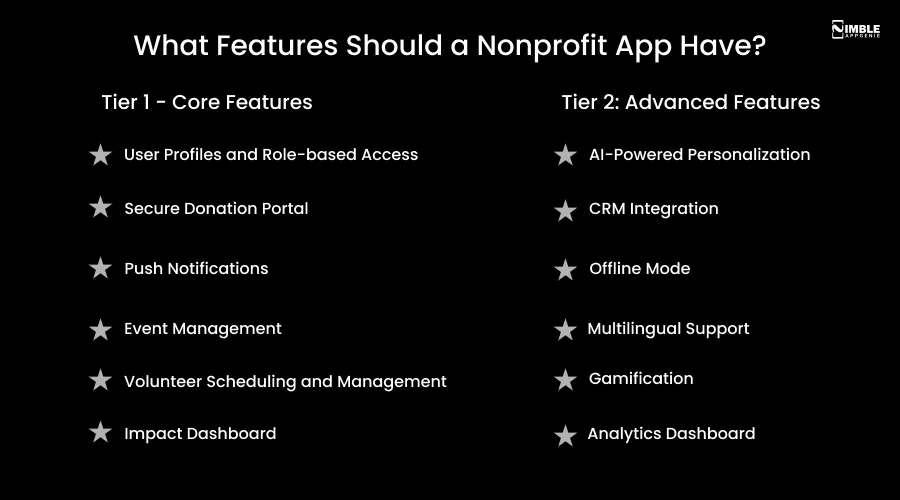
Tier 1 – Core Features
- User Profiles and Role-based Access: Volunteers, donors, administrators, and staff each see just what is relevant to them.
- Secure Donation Portal: One-tap giving with various payment options – Apple Pay, PayPal, Stripe, and Google Pay. Recurring donation setup and automatic tax receipt generation are non-negotiable.
- Push Notifications: In non-profit apps, the most undervalued feature is push notifications. Informing users at the right time with a campaign update, thank-you message, or milestone notification keeps your community connected between visits.
- Event Management: Ticketing, registration, in-event donation, and live updates, all in one place through app development for an NGO.
- Volunteer Scheduling and Management: Shift sign-ups, automatic reminders, and hour tracking. Put endless email chasing to an end for good.
- Impact Dashboard: Real-time data showing exactly how donations are being used. Project updates, photos, and measurable outcomes help donors feel their contributions actually matter.
Tier 2: Advanced Features
- AI-Powered Personalization: Recommend donations amounts based on donor history, send automated but personal thank-you messages, and suggest volunteer opportunities matching a user’s skills.
- CRM Integration: Connect with HubSpot, Salesforce, or Blackbaud so donor data flows smoothly across your systems.
- Offline Mode: For NGOs operating in low-connectivity areas, an offline-first design means volunteers can access crucial information even without a signal.
- Multilingual Support: It’s essential for global organizations serving varied communities.
- Gamification: Donation milestone badges, volunteer hour leaderboards, and community challenges provide big engagement outcomes through small incentives.
- Analytics Dashboard: Understand campaign performance, donor behavior, and volunteer activity. Make the right decisions based on data.
Nonprofit App Development – Step-By-Step Process
Now, you might be thinking – how to build a nonprofit app?
Whether you want an app or custom non-profit software development, the process involves defining clear goals, choosing between custom development or no-code platforms, and prioritizing user experience to engage supporters.
The key steps included are:
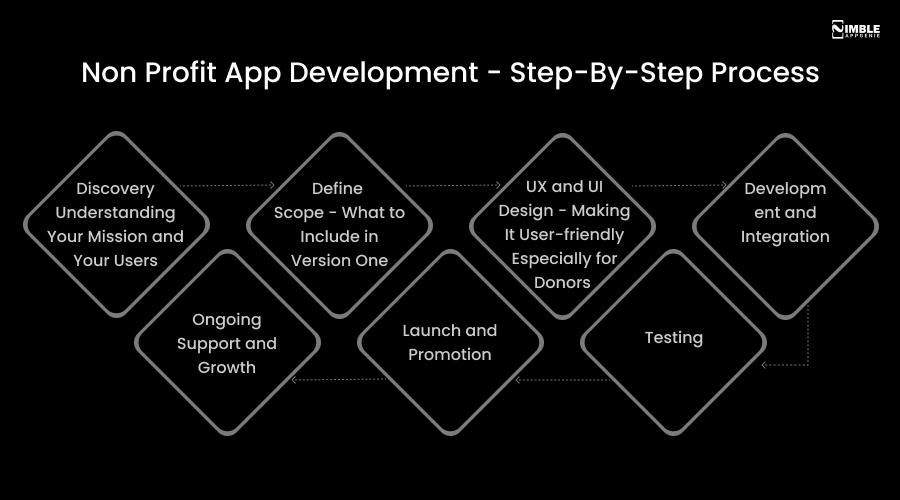
Step 1: Discovery – Understanding Your Mission and Your Users
Before your team of app developers starts coding, they need to understand three things: what your organization is aiming to achieve, who will use the app (volunteers, donors, the public, or staff), and what issue you are really trying to solve.
This step is where most nonprofit mobile app development succeeds or fails. Skipping it will end up building useless features.
Step 2: Define Scope – What to Include in Version One
List what your app wants to do. Next, honestly identify the essentials needed for launch and keep the rest for a later update. This is your MVP (Minimum Viable Product), not a compromised version of your objective.
Step 3: UX and UI Design – Making It User-Friendly Especially for Donors
The first-time donor should find your app easy to use, and the operational team should find it powerful. Great nonprofit app design prioritizes emotional resonance, simplicity, and accessibility because users are not just customers, they are people with a personal connection to your cause.
Step 4: Development and Integration
Here, the app development for nonprofits takes place. Today, most apps are developed using React Native and Flutter – cross-platform frameworks that create a single app working on Android and iOS, which keeps costs lower than building two separate native apps.
At this stage, your CRM, payment gateways, email tools, and existing systems are integrated, which simplifies interaction within them.
Step 5: Testing
Every screen, push notification, and donation flow undergoes testing across multiple devices. Security testing is not optional for apps managing real donor money; it’s crucial that your non profit app development agency does it before launch.
Step 6: Launch and Promotion
Getting your app in front of supporters is as important as creating it. Plan your app launch with social posts, email announcements, and in-person promotion at your upcoming event.
Step 7: Ongoing Support and Growth
Your job doesn’t end on launch day. Android and iOS updates, mobile app security patches, new features based on user feedback, and performance improvements are part of any responsible post-launch plan. Hire nonprofit app developers from an agency that stays with you even after the app goes live.
How Much Does Non profit App Development Cost?
On average, non-profit app development costs range between $15,000 and $250,000, depending on the scope and complexity. Every nonprofit director asks this question first and rightly so.
Here, let’s have an honest breakdown to help you make the right decision.
➤ Basic App: $15,000 to $40,000
Core donation portal, push notifications, volunteer sign-up, minimal integrations, one platform (Android or iOS).
Right For: Small non-profits testing mobile for the first time.
➤ Mid-Range App: $40,000 to $100,000
Full donation system, event tools, volunteer management, push notifications, CRM integration, both Android and iOS.
Common choice For: Growing nonprofits.
➤ Enterprise Platform: $100,000 to $250,000+
AI personalization, custom analytics, large-scale volunteer coordination, complex integrations, and multilingual support.
Ideal For: Established organizations with serious digital goals.
Factors Affecting the Cost of Non Profit App Development
- Number of features and their complexity.
- Backend infrastructure and how much data you need to process and store.
- Whether you need Android, iOS, or both (cross-platform development saves around 30–50% compared to building two native apps).
- Integrations with CRMs, payment gateways, and existing tools.
- Location of your mobile app development team – India-based agencies offer $25–$50/hour vs. $100–$200/hour in the US, with no quality compromise when you choose the right partner.
- Custom design vs utilizing a pre-built design system.
- Post-launch maintenance plan – budget 10-15% of development cost annually.
Pro Tips: The smartest approach for tight budgets is:
- Build in phases,
- Launch your MVP with the features your volunteers and donors need most,
- Gather real feedback, and
- Then create phase two based on what they really ask for – not what you guessed they would want.
Custom App vs. Off-the-Shelf: Which is Right For Your Nonprofit?
It depends on your requirement for time to launch, scalability, mission, and more.
When nonprofits explore app development for the first time, the question always comes up: Why go for custom mobile app development for nonprofits when tools like Salesforce Nonprofit, no-code platforms, and Bloomerang already exist?
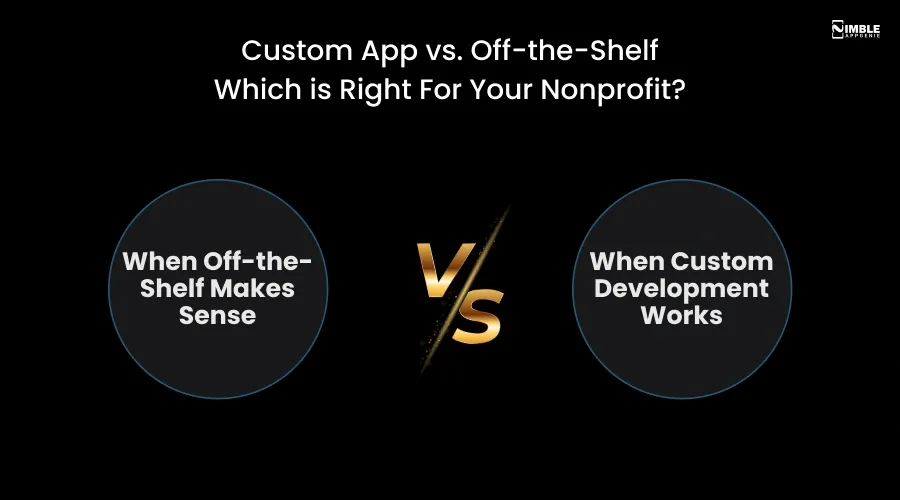
► When Off-the-Shelf Makes Sense
If your needs are standard with basic donor tracking, email communication, simple event management, and your budget is very limited, off-the-shelf tools can definitely serve you.
They are fast to set up, need no development time, and work perfectly for small organizations with simplified workflows. The limitations show up soon once you grow. You can’t customize the user experience. You find yourself locked into the vendor’s roadmap and pricing model.
Your data stays on someone else’s server. And as your workflows become more complex, you end up integrating five different tools together that don’t talk to each other, which creates even more manual work.
► When Custom Development Works
Custom is an ideal choice when your nonprofit organization has specific workflows that no generic tool supports, when you need more control over donor data and security, when you want direct access to your community, or when you are serious about donor retention and long-term growth.
Think of it this way: Off-the-shelf tools make you best fit their system; a custom non profit app development fits around your mission.
| Factor | Off-the-Shelf | Custom App |
| Upfront Cost | Low | Medium to High |
| Customization | Very Limited | Fully Tailored |
| Data Ownership | Vendor’s Servers | You Own It |
| Scalability | Capped by Platform | Unlimited |
| Time to Launch | Days to Weeks | 3 to 6 Months |
| Long-term Cost | Rising Subscriptions | Predictable Maintenance |
| Mission Alignment | Generic | Built Around Your Cause |
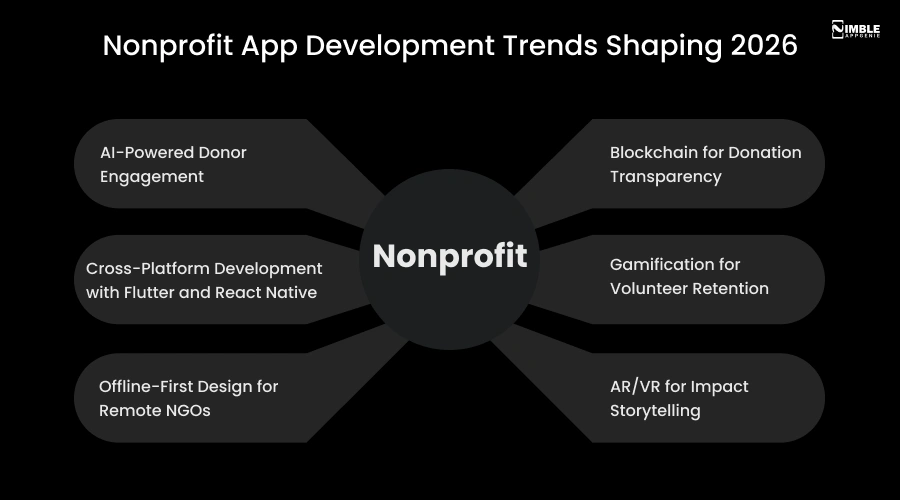
Non-Profit App Development Trends Shaping 2026
The nonprofit technology landscape is expanding fast. If you are planning to build a mobile app for nonprofits or upgrade it this year, knowing what’s changing can help you discover new ideas for nonprofit apps and decide which ones are worth exploring. Here are the trends your nonprofit app development company should already be creating for.
1. AI-Powered Donor Engagement
Smart apps now leverage the power of AI to recommend the right donation amount at the right time, send personalized messages that feel human, and identify donors at risk of lapsing without needing a human to write each one. Nonprofits using AI-driven engagement report measurable improvements in donor retention and average gift size.
2. Cross-Platform Development With Flutter and React Native
Building separate Android and iOS apps doubles your development cost. Today, cross-platform frameworks allow teams to build once and deploy to both platforms. This alone cuts development time and cost by 30-50% for most nonprofit projects.
3. Offline-First Design For Remote NGOs
For organizations operating in rural or low-connectivity areas, offline-first apps are a must-have. The app functions without internet and syncs data automatically when connectivity returns.
4. Blockchain For Donation Transparency
Blockchain builds a permanent, tamper-proof record of each donation and how it was used. For an organization that finds it challenging to build trust with skeptical donors, this is a game-changer.
5. Gamification For Volunteer Retention
Volunteer hour leaderboards, community challenges, or donation milestone badges, the principle is simple: make contributing feel rewarding, not transactional. Nonprofits using gamification constantly report increased volunteer retention rates.
6. AR/VR For Impact Storytelling
Some nonprofits are now utilizing augmented reality to allow donors to virtually visit project sites and witness the impact of their contribution.
Challenges in Nonprofit App Development – and How to Handle Them
Non-profit app development never comes without friction, and nobody talks about this.
Let’s discuss the real mobile app development challenges nonprofits face and what actually works to solve them.
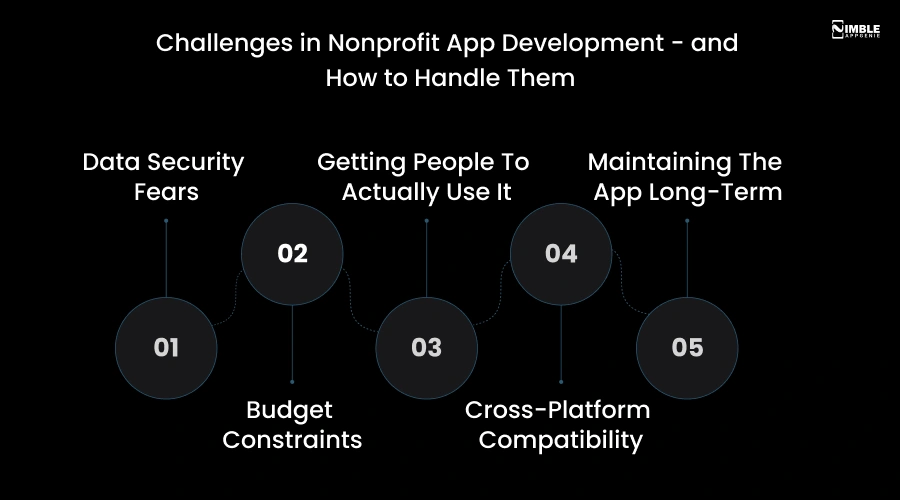
1. Data Security Fears
Non-profits manage sensitive financial data. A breach breaks the donor trust overnight. The solution is collaborating with a partner who offers nonprofit app development services, including PCI-DSS compliant payment processing, implementation of end-to-end encryption, and regular security audits from day one – not as an afterthought.
2. Budget Constraints
You can’t spend $200,000 on a first app. The best solution is phased development – MVP development, launch, feedback collection, and next phase investment based on the real needs. This is smarter and cheaper than developing everything up front.
3. Getting People To Actually Use It
Nonprofit app development is only half the job; the other half is adoption. Include your donors and volunteers in the design process. Keep the user interface simple enough that a non-technical first-time user can navigate without training. Conduct app promotion at each touchpoint before, during, and after launch.
4. Cross-Platform Compatibility
Your donors use iPhones, but your volunteers use Android, and your staff uses desktops. Cross-platform frameworks like React Native and Flutter solve this perfectly – one codebase, constant experience across all devices.
5. Maintaining The App Long-Term
Android and iOS release updates that can break your app. Security patches, feature updates, and ongoing maintenance are all part of long-term app management.
A budget of 10-15% of your development cost yearly is needed for maintenance. Also, choose an app development company for non profits who offers post-launch support as a standard part of their service.
How Nimble AppGenie Helps Nonprofits Build Apps That Actually Work?
At Nimble AppGenie, a leading mobile app development company, we have created mobile apps for nonprofits, mission-driven organizations, and NGOs, and we know that experience of working with a development agency matters as much as the app.
Here is what working with it looks like in practice:
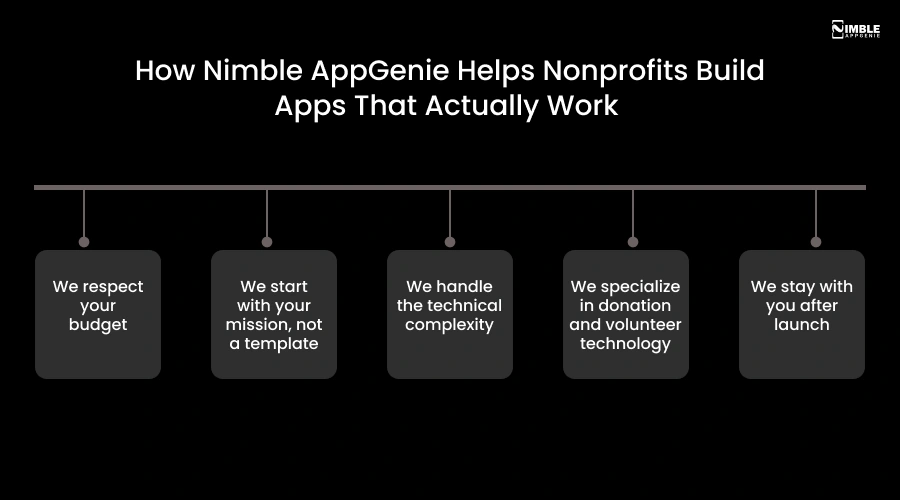
1. We Respect Your Budget
We know nonprofits can’t throw money at technology and hope it works. Nimble AppGenie provides phased development plans, honest guidance, and transparent pricing breakdowns on what you actually need versus what is simply nice to have.
2. We Start With Your Mission, Not a Template
Before we write a single line of code, we sit with your team to understand your vision, users, and the issue you are really trying to solve. Your app is created around your mission, not fitted into a generic framework.
3. We Handle the Technical Complexity
WCAG accessibility standards, PCI-DSS compliance, cross-platform compatibility, CRM integrations, and payment gateway setup, all of it. Your team stays focused on the mission, and we handle the tech.
4. We Specialize in Donation And Volunteer Technology
These are not generic features we add. We have built volunteer scheduling systems, secure donation flows, and impact reporting dashboards for organizations like yours. We know where things go wrong and how to prevent them.
5. We Stay With You After Launch
Our relationship doesn’t end when your app goes live. We offer ongoing support, feature development, and performance monitoring to ensure your app keeps expanding as your organization grows.
Conclusion
So, does your nonprofit need an app?
If your donors give once and disappear, if your volunteers are still managed through email threads and WhatsApp groups, if your team spends hours weekly on things that technology could automate, then yes.
You need nonprofit app development; the longer you wait, the more you are leaving on the table. But an app is only as good as the thinking behind it.
The nonprofits that get this right are the ones who begin with a clear mission, create only what they need first, choose the development partner who understands the sector, and treat the app as an ongoing investment, not a one-time project.
Nimble AppGenie has developed apps for organizations exactly like yours. We know the budget pressures, the very real fear of spending money on technology, and the board scrutiny that doesn’t deliver. That’s why we start every engagement with an honest conversation, not a sales pitch.
If you are ready to find out whether your nonprofits need an app right now, let us talk.
FAQs

Sunil serves as the Lead Android Engineer at Nimble AppGenie, recognized for his expertise in building robust, scalable mobile solutions across diverse industries. From seamless API integrations to optimizing OS-level performance, Sunil focuses on delivering high-speed, secure applications that stand out in a crowded market. Outside of the tech world, Sunil is a fitness enthusiast who enjoys morning runs and finds his peace playing badminton on the weekends.
Table of Contents




No Comments
Comments are closed.