


Key Takeaways:
- Mobile app maintenance ensures continuous performance improvement, bug fixes, security patches, and smooth functionality.
- App updates release new versions with added features, UI/UX changes, and system enhancements.
- In app maintenance vs app update, maintenance improves stability, while updates introduce new features.
- Apps need maintenance when facing slow speed, crashes, or compatibility issues.
- Apps require updates when redesigning, adding features, or improving user experience becomes essential.
- Partnering with Nimble AppGenie helps businesses manage both app maintenance and updates effectively.
App maintenance is a regular process that helps to identify and fix any bugs and errors occurs in the app, while an app update is all about pushing the app forward to new updates, and adding new features.
Still, if you want to know a detail about app maintenance vs app update, then it’s the right place to be.
With the growing number of app markets, the requirement for maintenance and updates is silently increasing. You might be wondering whether it’s beneficial to maintain your app now or to update it! Right?
Well, the answer depends on the situation your app is in. Hence, in this guide, we have discussed it all, scenarios, differences, and what you need to do and under what circumstances.
Let’s find it all here.
What is App Maintenance?
Mobile app maintenance is one of the critical components in an app’s success, and as a business, you should invest in it to sustain your service or product in the competitive market.
It is an ongoing process of updating the app, improving functionality, and reducing errors or bugs that might occur after maintenance.
With regular app maintenance, you can increase ROI (rate of return on investment) on your app.
There are certain other benefits to check; let’s switch over to the next section.
Benefits of App Maintenance
Mobile app maintenance is important because it enhances the security of the app, improves overall performance, offers personalized monitoring, and saves costs.
Let’s learn it all in brief, below:

- Ensures App Security: It improves security by actively patching vulnerabilities, updating outdated protocols, and fixing bugs.
- Improves Performance and Stability: Through continuous bug fixing, updating new device compatibility, and reducing loading times.
- Higher Ranking in App Stores: Mobile app maintenance is important as it helps to improve rank in app stores.
- Adaptability to New Tech: Ensures that the app remains compatible with the latest devices and the operating system.
- Increases User Satisfaction and Retention: By ensuring high performance, updating security, and introducing new features.
- Extend the Lifespan of Apps: Ongoing updates do extend the functional lifespan, maximizing the initial development investment.
Now, let’s evaluate how to perform app maintenance in the following section.
How to Perform App Maintenance?
Here is the complete series of steps defining the right process to perform the app maintenance:

Step 1: Conduct Regular Testing
You can keep a time for app testing, conducting it regularly or even 2-3 times a week, which can help you to skip any major error that might bring disaster to the app further.
Step 2: Perform Corrective Maintenance
With regular testing, you might come across bugs and errors that can be mitigated through corrective maintenance.
Step 3: Patch Security Vulnerability
When you perform corrective maintenance, it’s important to look for any security risks or breaches of information that might have caused severe damage to the brand. Check and implement prompt mobile app security measures.
Step 4: Update the App Codebase
If you are required to update the app code base, then this is the step to consider. Keep the app updated with the latest features and technology, so that it can remain competitive.
Here, the app update comes after maintenance.
Well, after you have learned a detail on app maintenance, let’s switch to app update, then to the difference between app update and app maintenance.
What is an App Update?
An app update is a process of completely or slightly changing the application to a newer version of the mobile application.
It replaces old files with an improved code, providing enhanced functionality, bug fixes, and performance optimization.
The primary purpose of an app update is to address security vulnerabilities and introduce new features. Updating the app can increase the total mobile app maintenance cost, but it will help you to fulfill the changing demands of the users.
With mobile app updates, you can ensure compatibility with the operating systems and introduce new features to keep the app up to date.
Benefits of App Update
Updating the mobile app on a daily basis can help you to enhance the security of your device, help to protect your personal information in the app, and be further useful in keeping up with the latest technologies.
Let’s learn the benefits of app updates, below:
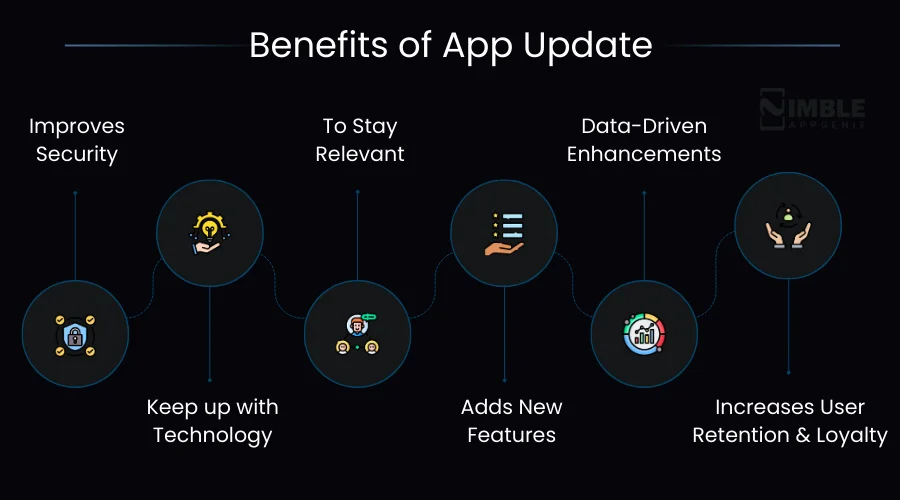
- Improves Security: When you update the app with the latest security updates, it automatically upgrades security and performance.
- Keep up with Technology: Through app updates, you can add the latest updates and technologies to your app.
- To Stay Relevant: With the app updates, your business and products will remain relevant as per the current trend.
- Adds New Features: Updates add new features to the app, which help to bring new possibilities to acquire market and retain users.
- Data-Driven Enhancements: Updates often incorporate user reviews and suggestions, which directly enhance user satisfaction.
- Increases User Retention and Loyalty: With the app updates, users trust your business. They get to know about the latest features and how the brand values them.
With these benefits, let’s learn how to update an app in the given section.
How to Perform a Mobile App Update?
You can conduct a complete mobile app update by following several steps. Let’s check them out below:

Step 1: Define Clear Goals
You need to state the complete, clear goals for updating the app, whether it’s for integrating the latest technology or due to any major changes and issues.
Step 2: State the Type of Updates Needed
Then you need to finalize the types of updates that you require for your app. Define the updates, whether they are core updates, security updates, or any other.
Step 3: Prepare the Update
After deciding on the update, you should prepare for the latest update as required. Connect with the experts and define the type of technologies required for the updates.
Step 4: Monitor and Analyze After Update
Track the performance metrics, monitor how well the updates are implemented in the app, and how well they are performing.
Now, after considering the app update in detail, let’s learn the difference between mobile app maintenance and app updates in the following section.
Difference Between Mobile App Maintenance and App Update
The major difference between mobile app maintenance and app updates is that mobile app maintenance is a process for ensuring that the app remains continuously operational, functional, and secure. However, an app update is all about specific releases of the new code and features.
Let’s discover the complete difference between mobile app maintenance and app updates in the following table:
| Comparison Parameter | App Maintenance | App Update |
| Definition | Ongoing process of keeping an app stable, secure, and performant | Releasing new versions of the app with changes or additions |
| Primary Goal | Preserve and improve existing functionality | Introduce new features or significant changes |
| Nature of Work | Continuous and behind-the-scenes | Periodic and visible to users |
| User Visibility | Mostly invisible to end users | Clearly visible through app store update notifications |
| Triggered By | Performance issues, bugs, security threats, and server health | User demand, business goals, OS changes, market trends |
| Frequency | Ongoing and regular (daily/weekly/monthly) | Periodic (monthly, quarterly, or as needed) |
| Scope of Changes | Minor fixes, patches, performance tweaks | Major or minor feature additions, UI overhauls |
| App Store Involvement | Not always required | Almost always requires app store submission |
| User Action Required | No action needed from users | Users need to download the new version |
| Impact on Codebase | Minimal to moderate changes | Moderate to significant changes |
| Cost Involved | Regular recurring cost | One-time or periodic development cost |
| Examples | Database optimization, server monitoring, bug fixing, security patches | Adding a new payment gateway, redesigning UI, and adding a new feature module |
| Risk Level | Low risk if done regularly | Moderate to high risk if not tested properly |
| Team Involved | Maintenance and DevOps team | Development, design, and QA team |
| Testing Required | Regression and performance testing | Full cycle testing, including UAT |
| Downtime Possibility | Minimal or scheduled short downtime | Possible downtime during major update deployment |
| Business Impact | Ensures smooth user experience and user retention | Drives growth, engagement, and competitive edge |
| Long Term Goal | App stability and reliability | App evolution and feature expansion |
| OS Compatibility | Monitors and patches compatibility issues | Releases dedicated updates for new OS versions |
| Security Focus | High – regularly patches vulnerabilities | Moderate – security improvements bundled with features |
Now, after evaluating the app maintenance vs app update, let’s explore what happens under different scenarios and situations in the following section.
Situation-Wise Comparison: When to Choose App Maintenance vs. App Update
Now, let’s compare the app maintenance and app updates under different parameters. Either you should consider app maintenance or app update, or both, it all depends on the situation under which it is, and its requirements.
Let’s evaluate the different scenarios to examine mobile app maintenance vs app update in this section.
When Your App Needs Maintenance and Not an Update?
The app needs maintenance, when the primary goal is to keep it running smoothly and securely, and compatible with the existing infrastructure.
Here are three conditions to consider for app maintenance:
- When the app is running slowly and needs updates. Maintenance works slowly and fixes things in the background. It helps to stabilize the app without altering features or disturbing the user experience.
- When the app faces frequent crashes or database inefficiencies, without any demand for the new features.
- If users are not complaining about missing features but rather about the performance, reliability, and security concerns.
Now, let’s consider another scenario, below:
When Your App Needs an Update and Not Maintenance?
An app requires a mobile app update rather than maintenance when it needs to adapt to the operating system. Also, when an app requires compliance with the new changing policies, introduces significant user-requested features, or needs to refresh its design.
Let’s evaluate all the conditions below:
- When users actively request new features, the app feels outdated compared to the competitors, or there is a major change required in the operating system.
- An update is required when there is a requirement to redesign the app for user experience, align the app with the latest platform guidelines, and uimprove ser experience.
- When the users demand new updates or features, and your app needs to evolve and grow, to address the growing dynamic needs of the users.
We have discussed app maintenance vs app update. Now, what if you need a combination of both? Is it possible? Let’s explore it in the following section.
Can App Maintenance and App Updates Work Together?
Yes! Mobile app maintenance and app updates can work together. It can be stated that an app needs a balance and combination of both.
Continuous app maintenance is essential for app longevity, security, and user satisfaction. While app updates provide new features and deliver improvements, helps in app security, functionality, and offering competitive advantages.
Hence, you should evaluate which model, between app update and app maintenance, is best under the particular circumstances.

Don’t Know When to Update or Maintain Your App? Nimble AppGenie Is Here to Help!
Managing a mobile app goes far beyond just launching it. Knowing when to maintain it and when to update it can be the difference between an app that thrives and one that quietly loses users.
If you find yourself confused about the right approach, you don’t have to figure it out alone. Nimble AppGenie brings years of expertise in delivering reliable and result-driven mobile app maintenance services that keep your app secure, performant, and ahead of the competition.
Whether your app needs a technical fix, a performance boost, or a full-scale update, our team evaluates your app’s specific needs and delivers the right solution at the right time.
Conclusion
Understanding the difference between app maintenance and app updates is essential for every business that wants to build a long-lasting and competitive mobile app.
Both serve distinct purposes; maintenance keeps your app stable, secure, and performant, while updates push it forward with new features and improvements.
Neither should be neglected, and neither can fully replace the other. The right approach always depends on your app’s current condition, user feedback, and business goals.
By making informed decisions about when to maintain and when to update, you set your app up for sustained success in an ever-evolving digital landscape.
FAQs

Niketan Sharma, CTO, Nimble AppGenie, is a tech enthusiast with more than a decade of experience in delivering high-value solutions that allow a brand to penetrate the market easily. With a strong hold on mobile app development, he is actively working to help businesses identify the potential of digital transformation by sharing insightful statistics, guides & blogs.
Table of Contents
No Comments
Comments are closed.