


In a Nutshell:
- Real estate apps are transforming property search and home buying with map-based, mobile-first, and personalized experiences.
- Apps like Redfin integrate MLS data, agent communication, advanced search filters, and virtual tours for better user engagement.
- The development process covers market research, UI/UX design, backend and API development, mobile app creation, testing, and deployment.
- Advanced features include AI property recommendations, predictive analytics, and AR/VR home tours.
- Business and monetization models include commissions, subscriptions, lead generation, freemium features, and advertisements.
- Development costs range from $40,000 to $250,000+, with hidden costs and cost optimization strategies.
- Future trends focus on AI-driven suggestions, embedded finance, AR/VR tours, blockchain, and conversational search.
Traditionally, finding the right property was time‑consuming and complex. Buyers often struggled with limited information, outdated listings, and the need to coordinate with multiple agents. Agents and brokers, meanwhile, faced challenges managing large volumes of listings and keeping data updated.
Today, digital property search dominates the homebuying journey; nearly 97% of homebuyers use the Internet, and about 70% rely on mobile or tablet devices to search for homes. Modern property search apps let users browse high‑quality images, explore neighborhoods, and connect with agents on smartphones.
Platforms like Redfin provide map‑based browsing, advanced search filters, and real‑time listings, reshaping how people discover homes.
In this guide, we will explain how to build a real estate app like Redfin, covering features, development steps, monetization strategies, cost, and technology stack. So, what exactly is a real estate app, and how does it work?
What is the Redfin App?
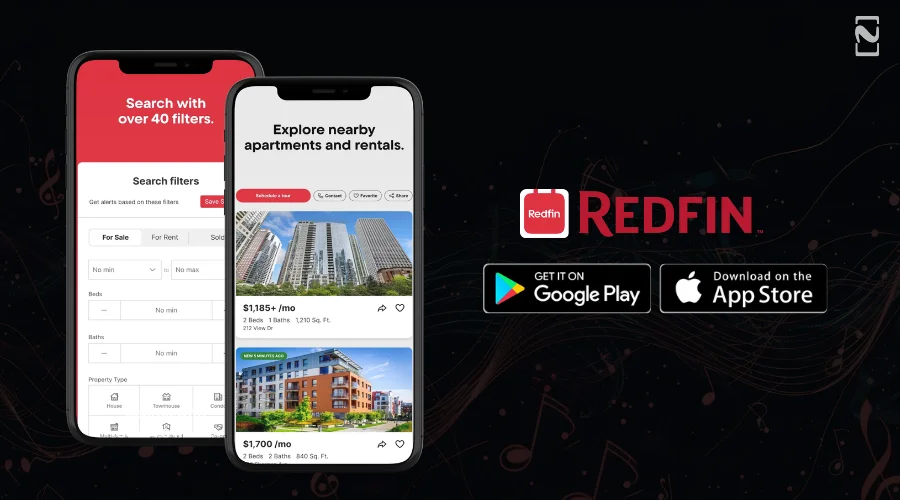
Redfin is one of the top real estate apps in the US that combines property search capabilities with brokerage services. It offers a smooth digital experience for sellers, agents, and buyers by integrating real-time data and interactive tools.
How Does the Redfin App Work?
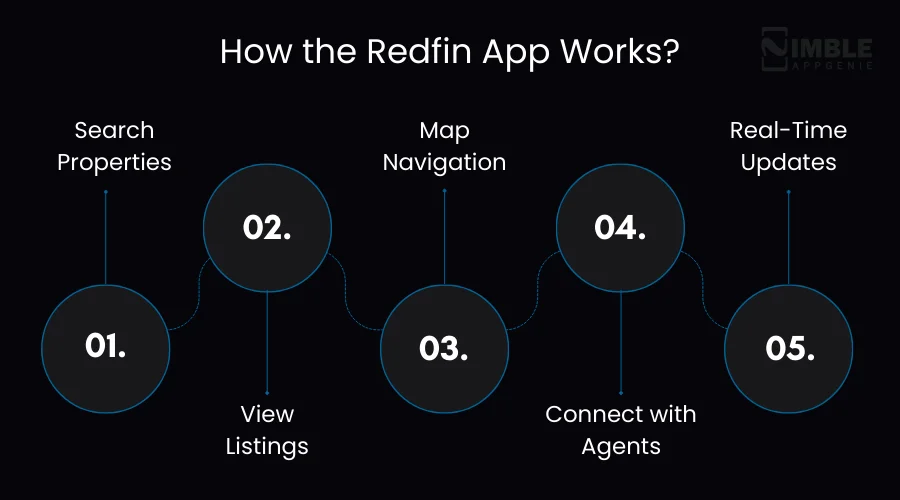
The Redfin app facilitates property discovery and the buying process through the following steps:
- Step #1: Search Properties – Users can search for homes using filters like price, size, location, and amenities.
- Step #2: View Listings – Browse photos, 3D tours, videos, and detailed property information.
- Step #3: Map Navigation – See properties on an interactive map and evaluate neighborhood features.
- Step #4: Connect with Agents – Schedule tours, chat with agents, and get expert guidance.
- Step #5: Real-Time Updates – Receive notifications for price changes, new listings, or sold properties.
By combining real-time data with user-friendly interfaces, Redfin has set a standard for modern real estate apps, providing both convenience and transparency to users.
Why Build a Real Estate App Like Redfin?
The real estate industry is undergoing a major digital shift.
- By 2034, the global PorpTech market will be valued at $104.57 billion at a CAGR of 11.9%, up from $40.19 billion in 2025.
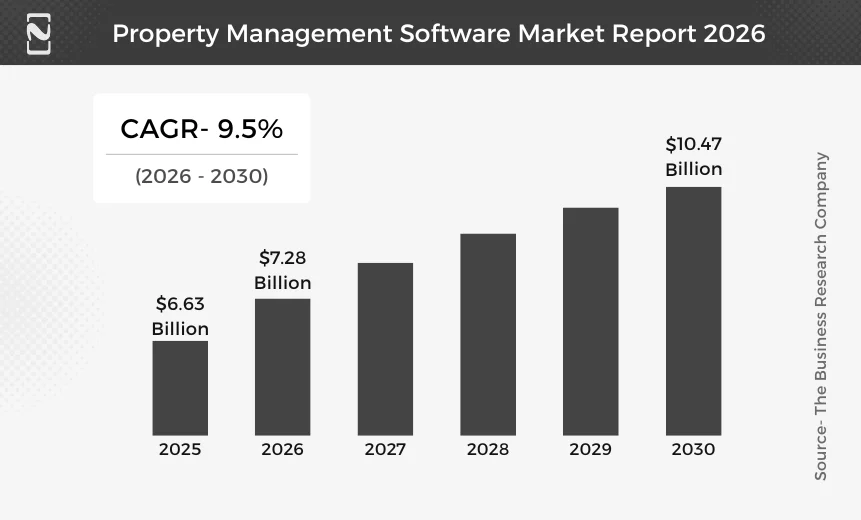
- In 2030, you can expect the property management market size to grow to $10.47 billion at a CAGR of 9.5%.
- Over 50% of buyers report using real estate apps multiple times per week during their home search.
Key benefits to build a real estate mobile application like Redfin are:
1. Enhanced User Experience
Mobile-first design, saved listings, map-based property search, and virtual tours make property discovery fast and intuitive.
2. Real-Time Property Data
Integration with MLS and other listing services ensures users have access to the latest property information, diminishing misinformation and missed opportunities.
3. AI-Powered Recommendations
AI property suggestions personalize the search experience, boosting engagement and helping users discover relevant properties rapidly.
4. Increased Lead Generation for Agents
Built-in agent communication tools, CRM integration, and appointment scheduling automate client interaction, resulting in higher conversion rates.
5. Scalability and Market Reach
Cross-platform Android and iOS apps allow businesses to reach more users, while cloud-based architecture supports growth as users and listings increase.
6. Data-Driven Insights
Analytics dashboards provide actionable insights into property trends, user behavior, and investment opportunities, enabling better decision-making.
7. Competitive Advantage
Building a real estate app like Redfin offers modern features like smart alerts, AR/VR tours, and predictive analytics that make your platform stand out from traditional real estate services.
Investing in real estate application development improves user satisfaction and increases business efficiency, revenue generation, and agent productivity.

What Features Should a Real Estate App Like Redfin Include?
Building a Redfin-like app needs features that make agent management, property search, and administration smooth. Let’s break it down:
1. User Features
To drive and retain users, a real estate app should include:
- Property Search Filters: Search by location, price, property type, size, and amenities.
- Map-Based Browsing: Explore properties visually with map-based property browsing.
- Property Alerts & Notifications: Receive updates on new listings or price changes.
- Saved Listings & Favorites: Bookmark your preferred properties for easy reference.
- Virtual Tours & 3D Walkthroughs: Experience properties remotely.
- Mortgage Calculator & Financial Tools: Estimate monthly payments and affordability.
- Neighborhood Insights: Access school ratings, crime statistics, nearby facilities, and commute times.
- Property Comparison: Compare multiple listings side-by-side.
- Reviews & Ratings: Read reviews for properties or agents.
- Social Sharing: Share favorite properties via social media or messaging apps.
2. Agent Features
For agents managing multiple clients and listings, a Redfin-like app should provide:
- Listing Management: Add, edit, or remove property listings.
- Lead Management: Capture and track potential buyer inquiries.
- Client Communication: Chat, call, or email clients directly.
- Property Analytics & Insights: Track listing performance.
- Appointment Scheduling: Manage property tours and meetings.
- CRM Integration: Sync client interactions with customer management tools.
- Automated Follow-Ups: Remind clients about appointments or new listings.
- Document Management: Store contracts and property-related documents digitally.
3. Admin Panel
Administrators need control over the platform, ensuring smooth operation and quality:
- User Management: Manage buyer, seller, and agent accounts.
- Property Moderation: Approve, reject, or edit listings.
- Commission Tracking: Monitor agent commissions.
- Analytics Dashboard: Track app usage, popular listings, and engagement.
- Role-Based Access Control: Securely manage different user roles.
- Payment & Subscription Management: Handle subscriptions and featured listings.
- Content Management: Update blogs, guides, and in-app resources.
- Security & Compliance Controls: Ensure data protection and regional compliance, including MLS integration.
Advanced Features that Differentiate Redfin-Like Apps
Real estate apps targeting modern users should go beyond basic listings and search to offer more personalized, immersive, and smarter experiences.
Advanced Redfin app features help the platform outshine its competitors, boost engagement, and increase conversions.
1. AI-Powered Features
- AI Property Recommendations: Machine learning algorithms analyze user behavior, preferences, and search history to suggest properties most likely to match their needs.
- Predictive Property Valuation: Predictive analytics estimate property prices and potential investment returns, helping users make informed buying or selling decisions.
- Smart Property Alerts: AI-driven notifications alert users about price drops, new listings, or investment opportunities in real time.
- Investment Analytics: Evaluate neighborhood trends, property appreciation rates, and rental potential to guide investment decisions.
- Personalized Search Experience: Users receive tailored recommendations based on location, budget, lifestyle, and property type preferences.
2. Immersive & Interactive Features
- AR/VR Home Tours: Augmented and virtual reality enable users to virtually walk through homes, even from remote locations.
- 3D Property Models: Interactive 3D models give buyers a realistic sense of space, floor plans, and layouts.
- Interactive Map Visualizations: Combine geolocation APIs with heatmaps, crime statistics, and neighborhood insights for better decision-making.
3. Intelligent Automation & Assistance
- Chatbots & Virtual Assistants: AI chatbots assist users with property searches, FAQs, and appointment scheduling 24/7.
- Voice Search Capabilities: Users can search for properties hands-free using natural language commands.
- Automated Lead Scoring for Agents: AI evaluates buyer engagement and scores leads to help agents prioritize high-potential clients.
- Smart Scheduling & Reminders: AI optimizes tour scheduling and sends reminders to users and agents, increasing efficiency.
4. Blockchain & Security Features
- Blockchain-Based Property Verification: Ensure authenticity of property documents, ownership history, and secure transactions.
- Secure Payment Integrations: Enable safe online deposits, booking fees, and commission payments directly through the app.
Step-By-Step Process – How to Build a Real Estate App Like Redfin
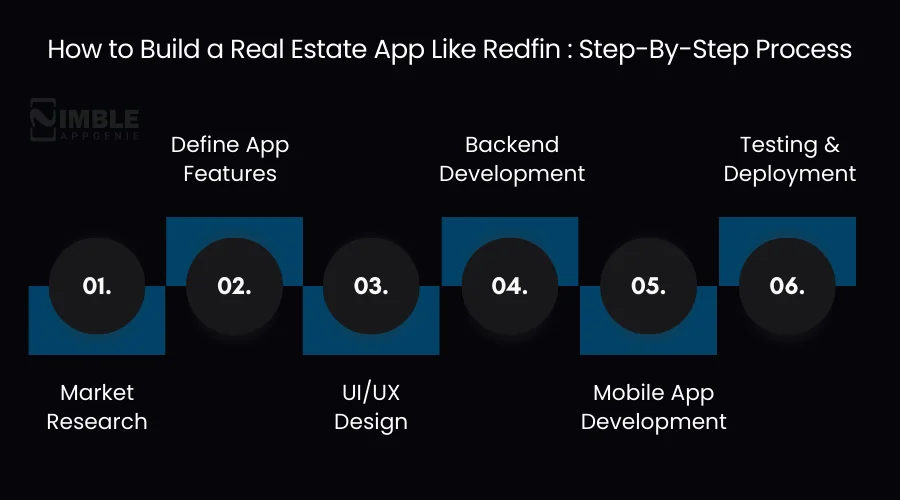
Building a Redfin-like app needs a structured approach to ensure scalability, efficiency, and an amazing user experience.
Below is a clear, step-by-step process:
Step 1: Market Research
Through market research, businesses can create a robust base for their property search app development.
- Target Audience: They should identify whether the app is for first-time buyers, real estate investors, or rental seekers.
- Region: Understand regional property trends, regulations, and local MLS requirements.
- Property Segment: They decide if the app will focus on residential, commercial, or mixed-use properties.
Perform competitor analysis of platforms like Redfin to know what features drive users and which gaps to fill.
Step 2: Define App Features
The next step includes defining the key functionalities that make a home-buying app development project competitive.
- Property Listing System: You choose how listings will be displayed, categorized, and updated.
- Search Filters: It allows users to refine searches by location, price, property type, and amenities.
- Agent Communication: Enable in-app chat, calls, or appointment scheduling.
- User Engagement Tools: Save listings, set alerts, and provide neighborhood insights.
This ensures the app effectively meets both buyer and agent needs.
Step 3: UI/UX Design
The user interface and experience determine whether your real estate marketplace app is easy and enjoyable to use.
- Map-Based Navigation: Interactive maps for quick property discovery.
- Property Cards & Listings: Concise and visually appealing presentation of property details.
- High-Quality Media: Photos, videos, and 3D walkthroughs for immersive property exploration.
- Simple Navigation & Intuitive Flow: Reduce clicks to key actions like saving a property or contacting an agent.
Step 4: Backend Development
Your property finder app development relies on a powerful backend that can manage real-time data efficiently.
- Listing Database: Organize property data with scalability in mind.
- APIs & Integrations: Connect payment gateways, geolocation services, analytics, and third-party tools.
- MLS Integration: Ensure MLS real estate app development for accurate, up-to-date listings.
- Security & Data Management: Protect user information and ensure adherence with regulations.
Step 5: Mobile App Development
Select the right platform and frameworks to reach your target audience efficiently.
- Android: Native development for Android devices.
- iOS: Native development for Apple devices.
- Cross-Platform: Use frameworks like Flutter or React Native to diminish development time while supporting multiple platforms.
Step 6: Testing & Deployment
Testing ensures your app is fast, reliable, and secure.
- Usability Testing: Businesses should validate that navigation, search, and booking features are intuitive.
- Performance Testing: Ensure speed and responsiveness, even with thousands of listings.
- Security Testing: Safeguard data, prevent unauthorized access, and ensure MLS compliance.
After testing, deploy the app on Google Play Store, Apple App Store, or a web platform for your target users.
Real Estate App Development Timeline
Knowing a structured timeline, businesses can understand the typical phases and span of mobile app development.
While the timeline may vary based on platform choice, app complexity, and feature set, a general roadmap looks like this:
| Phase | Duration | Key Activities |
| 1. Market Research & Planning | 2–3 weeks | Define target audience, region, property segment, and competitors. |
| 2. Features & Requirement Analysis | 2–4 weeks | Decide on the listing system, search filters, agent communication, and user features. |
| 3. UI/UX Design | 3–5 weeks | Create wireframes, prototypes, map-based navigation, and property card designs. |
| 4. Backend Development | 4–6 weeks | Build database, APIs, MLS integration, and security systems. |
| 5. Mobile App Development | 6–10 weeks | Develop iOS, Android, or cross-platform apps with core features. |
| 6. Testing & QA | 2–4 weeks | Conduct usability, performance, and security testing. |
| 7. Deployment & Launch | 1 week | Publish app on App Stores, web platforms, and perform launch marketing. |
| 8. Post-Launch Support & Updates | Ongoing | Bug fixes, feature upgrades, and performance optimization. |
Key Notes:
- Total Duration: Typically 3-6 months, depending on app complexity and feature set.
- MLS Integration: Real-time listing updates demand careful backend configuration during development.
- Advanced Features: AI-powered recommendations, AR/VR tours, and predictive property valuation may extend development by 2-4 additional weeks.
Tech Stack to Build a Real Estate Application Like Redfin
Developing a scalable real estate marketplace app like Redfin needs a powerful and flexible technology stack.
The right combination of frontend, backend, database, and cloud technologies helps with seamless performance, secure user interactions, and real-time property updates.
Plan your technology stack well so that it can support advanced capabilities like map-based property browsing, AI recommendations, MLS integration, and property analytics.
Below is a typical technology stack used for property search app development.
| Layer | Technologies | Purpose |
| Frontend (Web) | React.js, Next.js | Build responsive and SEO-friendly web interfaces |
| Mobile Development | Flutter, React Native, Swift, Kotlin | Develop iOS and Android apps |
| Backend | Node.js, Django, Ruby on Rails | Manage business logic, APIs, and user data |
| Database | PostgreSQL, MongoDB | Store property listings and user information |
| Search Engine | Elasticsearch | Enable fast property search and filtering |
| Cloud Infrastructure | AWS, Google Cloud, Azure | Provide scalability, hosting, and storage |
| Maps & Location | Google Maps API, Mapbox | Enable map-based property browsing |
| MLS Integration | RETS, RESO Web API | Sync real estate listings from MLS databases |
| Analytics Tools | Google Analytics, Mixpanel | Track user behavior and engagement |
| Security | OAuth, JWT, SSL encryption | Protect user data and transactions |
The exact technology stack may vary based on your property finder app development project requirements, target audience, and scalability needs.
Contact an experienced real estate app development company to get further assistance.
Essential APIs Required for Real Estate Apps
Latest property search apps depend on various APIs to secure payments, deliver real-time data, interactive maps, and communication features.
Integrate the right APIs to ensure your real estate marketplace app offers flawless navigation, accurate property listings, and seamless user interactions.
Below are some of the most important APIs used in real estate app development.
| API Type | Example APIs | Purpose |
| Maps & Geolocation APIs | Google Maps API, Mapbox | Enable map-based property browsing, location search, and nearby amenities. |
| MLS & Property Data APIs | RETS API, RESO Web API | Provides real-time property listings and updates from MLS databases. |
| Payment APIs | Stripe, PayPal | Handle secure payments for property bookings, featured listings, and subscriptions. |
| Communication APIs | Twilio, SendGrid | Enable in-app messaging, SMS alerts, and email notifications between buyers and agents. |
| Authentication APIs | OAuth, Firebase Authentication | Provide secure login using email, phone, or social media accounts. |
| Analytics APIs | Google Analytics, Mixpanel | Track user behavior, engagement, and app performance. |
| Media & Storage APIs | AWS S3, Cloudinary | Store and deliver high-resolution property images and videos. |
| AI & Recommendation APIs | OpenAI API and TensorFlow APIs | Power personalized property recommendations and predictive insights. |
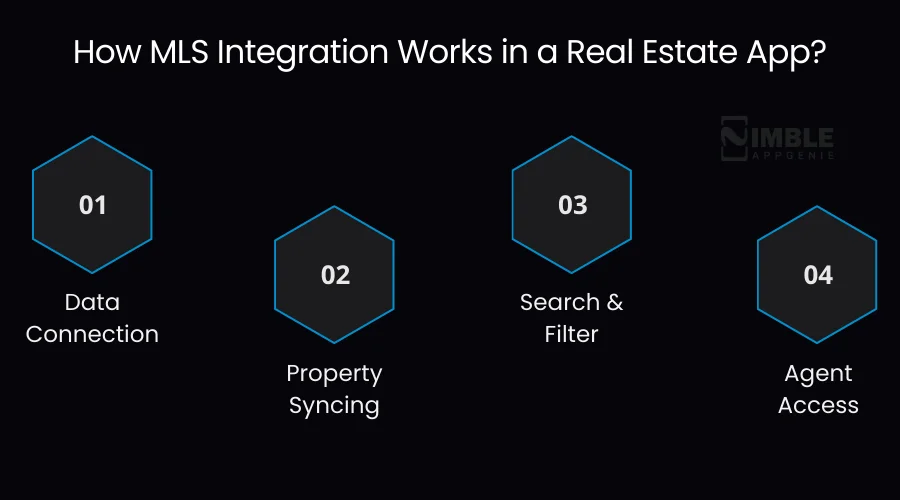
How MLS Integration Works in a Real Estate App?
- Data Connection: First, your app connects to MLS servers through data feeds or secure APIs.
- Property Syncing: Listings are synchronized automatically, so any change on MLS is reflected in your app.
- Search & Filter: Users can filter MLS-backed listings by price, location, property type, and amenities.
- Agent Access: Agents linked to MLS can manage their listings directly through the app.
Technologies Involved
- APIs & Web Services: It connects your app with MLS databases.
- Backend Database: To store, index, and retrieve listing information quickly.
- Caching & Sync Mechanisms: Ensure fast load times while reflecting real-time updates.
- Security & Compliance: Safeguard data and maintain MLS licensing agreements.
How the Architecture Works for a Real Estate App Like Redfin?
Besides the technology stack, a well-designed architecture is also significant for developing a high-performance real estate marketplace app.
Platforms similar to Redfin should have the capabilities to manage large volumes of real-time search queries, property listings, MLS data updates, and user interactions efficiently.
Thus, for property search app development, a team of developers follows a layered architecture ensuring scalability, reliability, and effortless integration with external services.
Core Layers of Real Estate App Architecture
| Architecture Layer | Components | Purpose |
| Client Layer | Mobile apps (iOS, Android), Web applications | Allows users to browse listings, search properties, and communicate with agents. |
| Application Layer | Backend services, authentication systems, and business logic | Processes user requests and manages application workflows. |
| Data Layer | Property listing databases, user profiles, and search indexes | Stores and manages large volumes of listing data and user information. |
| Integration Layer | MLS APIs, payment gateways, and map services | Connects the platform with external systems and third-party services. |
| Cloud Infrastructure | AWS, Google Cloud, CDN, and load balancers | Ensures scalability, high availability, and faster content delivery. |
How Much Does It Cost to Build a Real Estate App Like Redfin?
The cost to build a real estate app like Redfin ranges between $40,000 to $250,000, depending on app complexity, design, and integrations.
Platforms like Redfin need MLS integration, agent dashboards, map-based browsing, and advanced search filters.
Businesses should understand these factors while planning a budget and development strategy to build a real estate app like Redfin.
Estimated Development Cost
| App Type | Estimated Cost | Description |
| Basic Real Estate App | $40,000 – $70,000 | Includes essential features such as property listings, search filters, user accounts, and basic map integration. |
| Mid-Level Platform | $70,000 – $120,000 | Adds advanced functionality such as MLS integration, agent dashboards, notifications, and improved UI/UX design. |
| Advanced Marketplace | $120,000 – $250,000+ | Includes AI-powered recommendations, predictive property insights, AR/VR tours, advanced analytics, and scalable cloud infrastructure. |
These ranges provide clear budget planning for real estate app development, and the impact of every feature or integration on the total cost.
Businesses should allocate enough budget for development, testing, and post-launch maintenance.
Factors Affecting Cost in Real Estate Application Development Like Redfin
| Factors | Description | Estimated Cost Impact |
| App Complexity | Basic features vs advanced AI-powered property recommendations and AR/VR tours | $40,000 – $250,000+ |
| Third-Party Integrations | MLS APIs, maps, payments, analytics, and communication systems | $5,000 – $30,000 |
| Development Region | Rates vary depending on the location of the development team | Can increase/reduce total cost by 20–40% |
| UI/UX Design | Custom, interactive interfaces and map-based property browsing | $8,000 – $20,000 |
| Maintenance & Updates | Ongoing support, security updates, and feature enhancements | $5,000 – $15,000 per year |
What are the Hidden Costs of Real Estate App Development?
When planning the cost to build a real estate app like Redfin, you must consider hidden expenses that can make you go over budget. So, ensure you account for them in advance to avoid surprises.
Common Hidden Costs Include:
| Hidden Cost | Description | Estimated Impact |
| MLS Data Licensing Fees | Some MLS providers charge subscription or access fees for real-time property listings | $1,000–$10,000/year |
| Cloud Hosting & Storage | Storing property images, videos, and app data securely | $500–$5,000/year |
| App Store Publishing Fees | iOS and Android stores require annual or one-time publishing fees | $25–$100/year for Android, $99/year for iOS |
| Maintenance & Updates | Bug fixes, OS updates, server management, and feature upgrades | $5,000–$15,000/year |
| Security & Compliance | GDPR/CCPA compliance, SSL certificates, penetration testing | $1,000–$5,000/year |
| Third-Party APIs | Maps, payment gateways, mortgage calculators, analytics tools | $500–$5,000 depending on usage |
How to Optimize Costs When Building a Real Estate App Like Redfin
Businesses looking for high-quality real estate app development without overspending should keep an eye on AI real estate software development cost optimization.
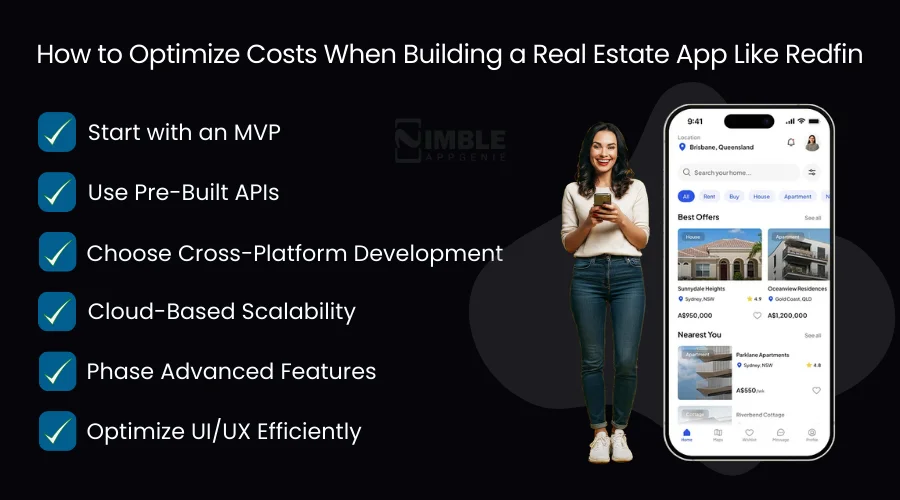
Below are some effective strategies:
- Start with an MVP: First, launch a Minimum Viable Product to validate your concept before adding advanced features.
- Use Pre-Built APIs: Leverage MLS, maps, payments, and analytics APIs instead of building from scratch.
- Choose Cross-Platform Development: Frameworks like React Native or Flutter reduce development time and cost for Android and iOS simultaneously.
- Cloud-Based Scalability: Pay only for the resources your app uses initially, and later scale as your user base expands.
- Phase Advanced Features: Integrate AI recommendations, AR/VR tours, and predictive analytics in later phases to manage initial costs.
- Optimize UI/UX Efficiently: Use reusable components and design systems to downsize repeated work.
Implementing these strategies can reduce your real estate app development cost by 20 to 40% while maintaining a competitive, feature-rich product.
How Do Real Estate Apps Make Money? Business & Monetization Models Explained
Redfin-like platforms generate revenue by connecting sellers, buyers, and agents while providing value-added services that scale with user engagement.
It’s critical to understand the business and monetization models of a real estate app for anyone planning for real estate app development.
Let’s explore business models and monetization strategies to design a profitable and sustainable app.
Real Estate App Business Models
| Business Model | How It Works | Example |
| Brokerage/Agent Fee Model | The app charges a commission or fee per property transaction facilitated through the platform | Redfin charges a percentage of the home sale |
| Listing Subscription Model | Agents and property owners pay a recurring fee to list their properties | Premium listings on Redfin |
| Freemium Model | Free basic app features with optional premium upgrades for users and agents | Access to advanced analytics, lead generation tools |
| Lead Generation Model | App sells verified buyer and seller leads to agents | Agents purchase the contact info of potential buyers |
Monetization Strategies for Real Estate Apps
| Strategy | Description | Revenue Example |
| Featured Listings | Charge extra for higher visibility of property listings | $50–$500 per listing |
| Premium Agent Accounts | Subscription for enhanced tools and analytics | $100–$500/month per agent |
| Advertisements | Display property-related or local business ads | Cost per impression/click |
| Data & Market Insights | Offer analytics and reports to agents or investors | Subscription-based, $20–$100/month |
| In-App Services | Mortgage calculators, home inspections, or virtual tour bookings | Service fee per transaction |
What are the Challenges in Building a Real Estate App like Redfin? With Solutions
When you plan to develop a real estate app like Redfin, you should be prepared for the challenges approaching you. Whether it’s technical or business, every such hurdle can affect your app’s success.
We have highlighted some common challenges of real estate app development with possible solutions to help you.
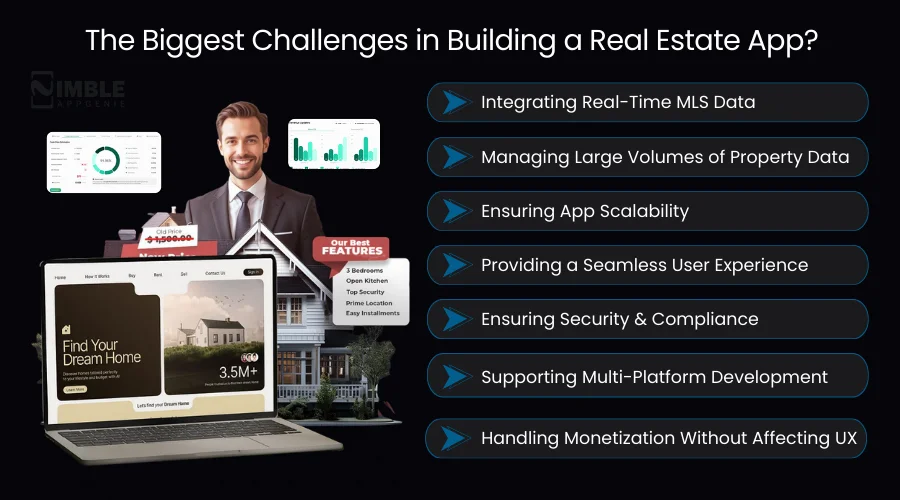
1. Integrating Real-Time MLS Data
- Challenge: MLS databases include consistently changing property listings, so it would be complex to integrate and update this data in real-time.
- Solution: Use standardized APIs like RETS or RESO Web API with automated synchronization and implement caching strategies to ensure fast response time and reduce server load.
2. Managing Large Volumes of Property Data
- Challenge: Substantial storage and rapid retrieval are required for property listings, videos, and high-resolution images.
- Solution: Implement content delivery networks (CDNs) and adopt cloud-based storage solutions (AWS S3, Google Cloud Storage) for quick media loading.
3. Ensuring App Scalability
- Challenge: With the growing numbers, the app should manage thousands of concurrent requests and searches without downtime.
- Solution: Design a scalable architecture with microservices, load balancers, and distributed databases to ensure high availability.
4. Providing a Seamless User Experience
- Challenge: Users want smooth map navigation, intuitive property search, and fast-loading property details.
- Solution: Invest in UI/UX design with map-based navigation, interactive property cards, and optimized search filters. Also, perform in-depth usability testing.
5. Ensuring Security & Compliance
- Challenge: Real estate apps handle sensitive user data, like financial details and personal information. Non-compliance can lead to legal issues.
- Solution: Implement encryption protocols, secure authentication, and follow regional data protection regulations, like CCPA and GDPR.
6. Supporting Multi-Platform Development
- Challenge: Users want both Android and iOS support. But it can be slow and costly to maintain two separate codebases.
- Solution: Use cross-platform frameworks like React Native or Flutter to cut development time and ensure consistent functionality across platforms.
7. Handling Monetization Without Affecting UX
- Challenge: Subscription fees and in-app ads can ruin the user experience if implemented properly.
- Solution: Carefully integrate monetization strategies, like optional premium upgrades, subtle featured listings, or tiered subscription models.

Redfin vs Zillow vs Traditional Real Estate Platforms
This comparison helps understand how Redfin, Zillow, and traditional real estate platforms differ in features, services, and user experience.
| Features | Redfin | Zillow | Traditional Real Estate Platforms |
| Search Features | Map-based search, advanced filters, saved listings, neighborhood insights | Map-based search, basic filters, Zestimate property estimates | Usually limited to MLS listings via agent website; fewer filters |
| Brokerage Services | Full-service brokerage, in-house agents, direct home tours | Zillow Offers (iBuying) partner agents; not full brokerage | Typically, local agents only; full-service brokerage varies |
| Commission Model | Lower commission on sales (e.g., 1–1.5% listing fee) | Standard commission via partner agents; variable | Standard 5–6% commission split among agents |
| Property Data | Real-time MLS integration, Redfin estimate, and detailed property history | MLS data, Zillow Zestimate, user-submitted info | MLS listings only; data accuracy varies by agent and region |
This comparison showcases why platforms like Redfin and Zillow are redefining property search, while traditional real estate services still rely heavily on in-person agent interactions and slower listing updates.
Why Choose Nimble AppGenie for Real Estate App Development?
Real estate app development like Redfin demands technical proficiency, a user-centric design approach, and industry knowledge.
Nimble AppGenie, a reliable mobile app development company, provides end-to-end solutions for businesses looking to enter the real estate marketplace with a feature-rich app.
Why Partner with Nimble AppGenie?
Looking to build a real estate app like Redfin? Our development experts can help you design and launch a scalable property marketplace tailored to your business needs.
With the right partner, whether through AI real estate website development or a full-fledged real estate mobile application development like Redfin, you can create a feature-rich property platform that enhances user experience, streamlines property search, connects buyers with agents, and drives revenue growth for your business.
Below is one of the top real estate success stories:
Real-Time Case Study
Client: A leading US real estate startup partnered with our team to develop a Redfin-like mobile application aimed at improving property search, agent connectivity, and user engagement.
Key Features We Implemented:
- Real-time MLS integration for up-to-date property listings and accurate pricing.
- AI-driven property recommendations increased relevant property views by 35% in three months.
- Map-based search, saved listings, and mortgage calculators to streamline the user experience.
- Cross-platform iOS and Android app development to reach a broader audience.
- Virtual tours and neighborhood insights for immersive property exploration.
Results Achieved:
- 35% boost in relevant property views due to AI-driven recommendations.
- 50% faster lead generation compared to the previous platform.
- 25% reduction in reliance on traditional agents for property inquiries.
- 100% real-time property data accuracy through MLS integration.
This case reveals how AI real estate app development and MLS integration can transform property discovery and optimize conversions in modern real estate platforms.
Conclusion
The real estate industry is digitally transforming, following the new standards for property discovery set by top real estate apps like Redfin. If you are planning to build a real estate application like Redfin will make businesses outshine their competitors with a competitive and data-driven platform.
Real estate app development involves designing a smooth user experience, integrating MLS data, and implementing advanced features like AR/VR tours, AI recommendations, and smart property alerts.
By understanding the technology stack, features, business models, development costs, monetization strategies, and future trends, real estate businesses can launch apps that engage users, streamline real estate transactions, and generate revenue.
Partnering with an experienced development company like Nimble AppGenie ensures that your app is technically robust, user-friendly, and future-proof.
FAQs
Most apps integrate with MLS databases or partner with brokers and agents to fetch real-time property listings. APIs like RETS or RESO Web API are commonly used.
You should choose a mix of:
- Partner ads from movers or lenders,
- Premium listings and subscription tiers, and
- Commission models for agent services and referrals.
Leveraging AI for real estate apps brings speed and personalization to the property market. Also, it enables fraud detection, automated customer service, and smart recommendations.

Niketan Sharma, CTO, Nimble AppGenie, is a tech enthusiast with more than a decade of experience in delivering high-value solutions that allow a brand to penetrate the market easily. With a strong hold on mobile app development, he is actively working to help businesses identify the potential of digital transformation by sharing insightful statistics, guides & blogs.
Table of Contents
No Comments
Comments are closed.